A look at Envoy as a Gateway API
Hi!
This article aims to be a hands on with Envoy as a Gateway API provider. While it was announced that Nginx as an Ingress Controller will progressively be removed from the pciture, it becomes more an more important to look for alternative. Hence, a look at Gateway API provider.
Our agenda:
- Envoy in the Gateway API providers landscape
- Playing with Envoy Gateway
Ok, let’s go!
1. Envoy in the Gateway API providers landscape
As mentionned, Envoy Gateway is part of the Kubernetes Gateway API implementations.
In the current documentation, we can find references to the Conformance levels. There are currently 3 levels:
- Conformant implementations
- Partially conformant implementations
- Stale implementations.
The last category, the stale implementations, regroups the implementations that are not following as actively as the others categories the Gateway API evolutions. The partially conformant implementations aim for full conformance. It is required that the providers in this group submitted a conformance report, that passed for one of the 3 most recent Gateway API releases. Last, the conformant category includes the providers that achieve full conformance by submitting passing reports on the core conformance test.
That being said, we’ll note that Envoy is in the conformant implementations (as is Cilium btw).
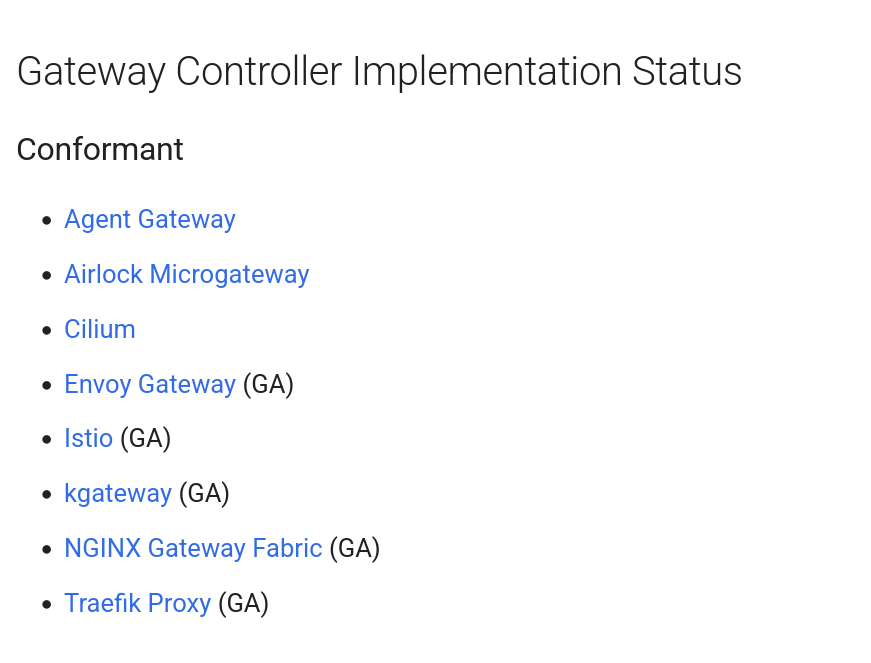
Another interesting point is that Envoy proxy is the backbone of most of the service mesh implementation that use it as a side-car proxy for the service mesh feature. That is quite representative of the footprint, and stability of the base product.
We can note also that Application Gateway for Container, for AKS users, is only in the partially conformant group.
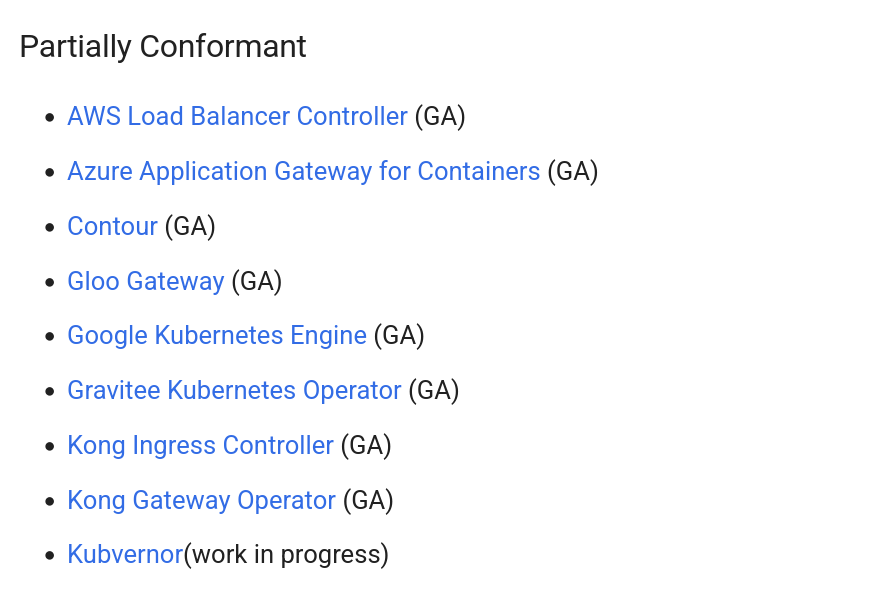
Envoy is thus an ideal candidate for AKS users looking for a fully confiormant provider.
2. Playing with Envoy Gateway
2.1. Installing Envoy Gateway
Installing Envoy is similar to any installation on Kubernetes. There is an helm chart available to help us perform this task.
However, it seems that there is additional considerations for taking care of the Gateway API prerequisites. You may know (or maybe you read that in another article on this blog 😎) that the Gateway API does requires a list of CRDs to work properly.
Those CRDs are available on a dedicated github to download.
Keep in mind that It’s quite important to be aware of the available version of those CRDs versus the version that is supported by the Gateway provider. Some providers may support more recent versions than others.
That being said, installing the CRDs can be done with kubectl as below.
#!/bin/bash
kubectl apply -f https://raw.githubusercontent.com/kubernetes-sigs/gateway-api/v1.4.1/config/crd/standard/gateway.networking.k8s.io_gatewayclasses.yaml
kubectl apply -f https://raw.githubusercontent.com/kubernetes-sigs/gateway-api/v1.4.1/config/crd/standard/gateway.networking.k8s.io_gateways.yaml
kubectl apply -f https://raw.githubusercontent.com/kubernetes-sigs/gateway-api/v1.4.1/config/crd/standard/gateway.networking.k8s.io_httproutes.yaml
kubectl apply -f https://raw.githubusercontent.com/kubernetes-sigs/gateway-api/v1.4.1/config/crd/standard/gateway.networking.k8s.io_referencegrants.yaml
kubectl apply -f https://raw.githubusercontent.com/kubernetes-sigs/gateway-api/v1.4.1/config/crd/standard/gateway.networking.k8s.io_grpcroutes.yaml
kubectl apply -f https://raw.githubusercontent.com/kubernetes-sigs/gateway-api/v1.4.1/config/crd/experimental/gateway.networking.k8s.io_tlsroutes.yaml
While that works well, taking care of this with an Helm chart would be nice, and that’s also what people at Envoy thought, because we can either install the CRDs at the time of Envoy install, or with a dedicated helm chart.
This chart installs the Kubernetes Gateway API CRDs, and optionnally the Envoy CRDs:
More on those (at least some o fthose) later.
Installing the CRDs is thus done as below.
df@df-2404lts:~$ helm template eg oci://docker.io/envoyproxy/gateway-crds-helm \
  --version v1.6.1 \
  --set crds.gatewayAPI.enabled=true \
  --set crds.gatewayAPI.channel=standard \
  --set crds.envoyGateway.enabled=true \
  | kubectl apply --server-side -f -
Pulled: docker.io/envoyproxy/gateway-crds-helm:v1.6.1
Digest: sha256:aa1733f6b8bd90ade0dd3d90f2ba4e3bc06e617f4c591f5f55cbb68de4ce6815
customresourcedefinition.apiextensions.k8s.io/backends.gateway.envoyproxy.io serverside-applied
customresourcedefinition.apiextensions.k8s.io/backendtrafficpolicies.gateway.envoyproxy.io serverside-applied
customresourcedefinition.apiextensions.k8s.io/clienttrafficpolicies.gateway.envoyproxy.io serverside-applied
customresourcedefinition.apiextensions.k8s.io/envoyextensionpolicies.gateway.envoyproxy.io serverside-applied
customresourcedefinition.apiextensions.k8s.io/envoypatchpolicies.gateway.envoyproxy.io serverside-applied
customresourcedefinition.apiextensions.k8s.io/envoyproxies.gateway.envoyproxy.io serverside-applied
customresourcedefinition.apiextensions.k8s.io/httproutefilters.gateway.envoyproxy.io serverside-applied
customresourcedefinition.apiextensions.k8s.io/securitypolicies.gateway.envoyproxy.io serverside-applied
customresourcedefinition.apiextensions.k8s.io/backendtlspolicies.gateway.networking.k8s.io serverside-applied
customresourcedefinition.apiextensions.k8s.io/gatewayclasses.gateway.networking.k8s.io serverside-applied
customresourcedefinition.apiextensions.k8s.io/gateways.gateway.networking.k8s.io serverside-applied
customresourcedefinition.apiextensions.k8s.io/grpcroutes.gateway.networking.k8s.io serverside-applied
customresourcedefinition.apiextensions.k8s.io/httproutes.gateway.networking.k8s.io serverside-applied
customresourcedefinition.apiextensions.k8s.io/referencegrants.gateway.networking.k8s.io serverside-applied
Interestingly, we don’t get a default GatewayClass after the installation.
df@df-2404lts:~$ k get gatewayclass
No resources found
Let’s follow with the Envoy Gateway installation.
df@df-2404lts:~$ helm install eg oci://docker.io/envoyproxy/gateway-helm \
  --version v1.6.1 \
  -n envoy-gateway-system \
  --create-namespace \
  --skip-crds
Pulled: docker.io/envoyproxy/gateway-helm:v1.6.1
Digest: sha256:6ede7b1df2938132758290dc8e8038d1a8c11b9fda36917c9bc15da2d06bc85a
NAME: eg
LAST DEPLOYED: Mon Jan 26 14:15:02 2026
NAMESPACE: envoy-gateway-system
STATUS: deployed
REVISION: 1
TEST SUITE: None
NOTES:
**************************************************************************
*** PLEASE BE PATIENT: Envoy Gateway may take a few minutes to install ***
**************************************************************************

Envoy Gateway is an open source project for managing Envoy Proxy as a standalone or Kubernetes-based application gateway.

Thank you for installing Envoy Gateway! 🎉

Your release is named: eg. 🎉

Your release is in namespace: envoy-gateway-system. 🎉

To learn more about the release, try:

  $ helm status eg -n envoy-gateway-system
  $ helm get all eg -n envoy-gateway-system

To have a quickstart of Envoy Gateway, please refer to https://gateway.envoyproxy.io/latest/tasks/quickstart.

To get more details, please visit https://gateway.envoyproxy.io and https://github.com/envoyproxy/gateway.
Now we have a namespace called envoy-gateway-system which contain, among other objects, a deployment. We’ll get back to this later.
df@df-2404lts:~$ k get deployments.apps -n envoy-gateway-system
NAME            READY   UP-TO-DATE   AVAILABLE   AGE
envoy-gateway   1/1     1            1           2m12s
Still no GatewayClass though. Let’s review some Gateway API basics
2.2. Basics usage of the Gateway API
Envoy Gateway is a conformant Gateway API implementation.
So it works as expected from such an implementation, with the Gateway API objects that we are becoming familiar with.
The GatewayClass:
apiVersion: gateway.networking.k8s.io/v1
kind: GatewayClass
metadata:
  name: eg
spec:
  controllerName: gateway.envoyproxy.io/gatewayclass-controller
The Gateway :
apiVersion: v1
kind: Namespace
metadata:
  name: sharedgateway
spec: {}
status: {}
---
apiVersion: gateway.networking.k8s.io/v1
kind: Gateway
metadata:
  name: envoy-gw
  namespace: sharedgateway
spec:
  gatewayClassName: eg
  listeners:
  - protocol: HTTPS
    port: 443
    name: envoy-gateway
    allowedRoutes:
      namespaces:
        from: All
    tls:
      certificateRefs:
      - kind: Secret
        group: ""
        name: app1
        namespace: certificates
      - kind: Secret
        group: ""
        name: app2
        namespace: certificates
Notice the reference to Secrets in the certificates namespace. Before creating the Gateway, we need those Secrets, and before anything the certificates that those refer to.
We can do this with the (very basic) script:
#!/bin/sh

# Generate CA Key

openssl genrsa -out akslab-ca.key 4096

# Generate CA Certificate

openssl req -x509 -new -nodes \
  -key akslab-ca.key \
  -sha256 \
  -days 3650 \
  -out akslab-ca.crt \
  -subj "/C=Fr/O=Dfitc/CN=akslab-ca"

# Create App1 Private Key

openssl genrsa -out app1.key 4096

# Create App2 Private Key

openssl genrsa -out app2.key 4096

# Generate CSR

openssl req -new \
  -key app1.key \
  -out app1.csr \
  -config app1-openssl.cnf

openssl req -new \
  -key app2.key \
  -out app2.csr \
  -config app2-openssl.cnf

# Sign Certificate with CA

openssl x509 -req \
  -in app1.csr \
  -CA akslab-ca.crt \
  -CAkey akslab-ca.key \
  -CAcreateserial \
  -out app1.crt \
  -days 825 \
  -sha256 \
  -extensions req_ext \
  -extfile app1-openssl.cnf

openssl x509 -req \
  -in app2.csr \
  -CA akslab-ca.crt \
  -CAkey akslab-ca.key \
  -CAcreateserial \
  -out app2.crt \
  -days 825 \
  -sha256 \
  -extensions req_ext \
  -extfile app2-openssl.cnf
We need to create the certificates namespace.
apiVersion: v1
kind: Namespace
metadata:
  name: certificates
spec: {}
status: {}
And then, the required secrets.
df@df-2404lts:~$ k create secret tls app1 --key <path_to_app1.key> --cert <path_to_app1.crt> -n certificates
secret/app1 created
df@df-2404lts:~$ k create secret tls app2 --key <path_to_app2.key> --cert <path_to_app12.crt> -n certificates
secret/app2 created
And last, a ReferentGrant
apiVersion: gateway.networking.k8s.io/v1beta1
kind: ReferenceGrant
metadata:
  name: allow-envoygateway-to-ref-secrets
  namespace: certificates
spec:
  from:
  - group: gateway.networking.k8s.io
    kind: Gateway
    namespace: sharedgateway
  to:
  - group: ""
    kind: Secret
To complete the basics test, we create an HTTPRoute, that points to kubernetes services
apiVersion: v1
kind: Namespace
metadata:
  name: gundam
spec: {}
status: {}
---
apiVersion: v1
kind: ConfigMap
metadata:
 name: index-html-barbatos
 namespace: gundam
data:
 index.html: |
   <html>
   <h1>Welcome to Barbatos App 2</h1>
   </br>
   <h2>This is a demo to illustrate Gateway API </h2>
   <img src="https://imgs.search.brave.com/AfLpq5XX4tK6TtxoWLDbd_665qDaxYgPAJKBCxVl5aE/rs:fit:860:0:0:0/g:ce/aHR0cHM6Ly9tLm1l/ZGlhLWFtYXpvbi5j/b20vaW1hZ2VzL0kv/NjFyYkhlLTdCbEwu/anBn" />
   </html
---
apiVersion: apps/v1
kind: Deployment
metadata:
  labels:
    app: barbatos
  name: barbatos
  namespace: gundam
spec:
  replicas: 3
  selector:
    matchLabels:
      app: barbatos
  template:
    metadata:
      labels:
        app: barbatos
    spec:
      volumes:
      - name: nginx-index-file
        configMap:
          name: index-html-barbatos
      containers:
      - image: nginx
        name: nginx
        volumeMounts:
        - name: nginx-index-file
          mountPath: /usr/share/nginx/html
        resources:
          requests:
            cpu: "50m"
            memory: "50Mi"
          limits:
            cpu: "200m"
            memory: "256Mi"
---
apiVersion: v1
kind: Service
metadata:
  namespace: gundam
  name: barbatossvc
  annotations:
    service.cilium.io/global: "true"
    service.cilium.io/shared: "true"
spec:
  type: ClusterIP
  ports:
  - port: 8090
    targetPort: 80
    protocol: TCP
  selector:
    app: barbatos
---
---
apiVersion: apps/v1
kind: Deployment
metadata:
  labels:
    app: demoapp
  name: demoapp
  namespace: gundam
spec:
  replicas: 3
  selector:
    matchLabels:
      app: demoapp
  strategy: {}
  template:
    metadata:
      labels:
        app: demoapp
    spec:
      securityContext: {}
      containers:
      - image: nginx
        name: nginx
        resources: {}
status: {}
---
apiVersion: v1
kind: Service
metadata:
  labels:
    app: demoapp
  name: demoappsvc
  namespace: gundam
spec:
  ports:
  - port: 8080
    protocol: TCP
    targetPort: 80
  selector:
    app: demoapp
status:
  loadBalancer: {}
---
apiVersion: gateway.networking.k8s.io/v1
kind: HTTPRoute
metadata:
  name: demo-httproute
  namespace: gundam
spec:
  parentRefs:
  - name: envoy-gw
    namespace: sharedgateway
  hostnames:
  - "app1.app.teknews.cloud"
  rules:
  - backendRefs:
    - name: barbatossvc
      port: 8090
      kind: Service
  - backendRefs:
    - name: demoappsvc
      port: 8080
      kind: Service
      namespace: gundam
    matches:
    - path:
        type: PathPrefix
        value: /demoapp
    filters:
    - type: URLRewrite
      urlRewrite:
        path:
          type: ReplacePrefixMatch
          replacePrefixMatch: /
On a working Kubernetes cluster (the one following is an AKS cluster), we can see the class refers to a specific controller.
df@df-2404lts:~$ k get gatewayclasses.gateway.networking.k8s.io
NAME   CONTROLLER                                      ACCEPTED   AGE
eg     gateway.envoyproxy.io/gatewayclass-controller   True       6s
We can also see that we have, in the envoy system namespace, the kubernetes services behind the gateway.
df@df-2404lts:~$ k get svc -n envoy-gateway-system
NAME                                    TYPE           CLUSTER-IP      EXTERNAL-IP    PORT(S)                                            AGE
envoy-gateway                           ClusterIP      100.65.208.39   <none>         18000/TCP,18001/TCP,18002/TCP,19001/TCP,9443/TCP   99m
envoy-sharedgateway-envoy-gw-a641ae3b   LoadBalancer   100.65.128.84   51.11.228.10   443:31334/TCP                                      42s
df@df-2404lts:~$ k describe service -n envoy-gateway-system envoy-sharedgateway-envoy-gw-a641ae3b
Name:                     envoy-sharedgateway-envoy-gw-a641ae3b
Namespace:                envoy-gateway-system
Labels:                   app.kubernetes.io/component=proxy
                          app.kubernetes.io/managed-by=envoy-gateway
                          app.kubernetes.io/name=envoy
                          gateway.envoyproxy.io/owning-gateway-name=envoy-gw
                          gateway.envoyproxy.io/owning-gateway-namespace=sharedgateway
Annotations:              <none>
Selector:                 app.kubernetes.io/component=proxy,app.kubernetes.io/managed-by=envoy-gateway,app.kubernetes.io/name=envoy,gateway.envoyproxy.io/owning-gateway-name=envoy-gw,gateway.envoyproxy.io/owning-gateway-namespace=sharedgateway
Type:                     LoadBalancer
IP Family Policy:         SingleStack
IP Families:              IPv4
IP:                       100.65.128.84
IPs:                      100.65.128.84
LoadBalancer Ingress:     51.11.228.10 (VIP)
Port:                     https-443  443/TCP
TargetPort:               10443/TCP
NodePort:                 https-443  31334/TCP
Endpoints:                100.64.0.210:10443
Session Affinity:         None
External Traffic Policy:  Local
Internal Traffic Policy:  Cluster
HealthCheck NodePort:     31898
Events:
  Type    Reason                Age   From                Message
  ----    ------                ----  ----                -------
  Normal  EnsuringLoadBalancer  72s   service-controller  Ensuring load balancer
  Normal  EnsuredLoadBalancer   60s   service-controller  Ensured load balancer
That’s interesting while it’s not the case for all Gateway provider. For example, with a Gateway relying on Cilium, the service is in the same namespace as the Gateway.
df@df-2404lts:~$ k get gatewayclasses.gateway.networking.k8s.io
NAME     CONTROLLER                     ACCEPTED   AGE
cilium   io.cilium/gateway-controller   True       140m
df@df-2404lts:~$ k get gateway -n sharedgateway
NAME       CLASS    ADDRESS       PROGRAMMED   AGE
envoy-gw   cilium   20.74.35.78   True         13s
df@df-2404lts:~$ k get service -n sharedgateway
NAME                      TYPE           CLUSTER-IP       EXTERNAL-IP   PORT(S)         AGE
cilium-gateway-envoy-gw   LoadBalancer   100.67.190.111   20.74.35.78   443:30791/TCP   26s
IMHO, the Envoy way is better in terms of access control. Let’s move on to some specificities of Envoy
2.3. Customizing the Gateway class
As long as we work in a Cloud environment, we can benefit from the Cloud Controller Manager. And that’s why we ussually can keep the default configuration for a Gateway which will relies on a LoadBalancer Service, as seen in the previous section.
But what if we want to test locally some features? Is it possible to modify the default behavior of the Gateway so that it creates a NodePort service?
For this kind of scenario, we can rely on an Envoy CRD, the EnvoyProxy.
Refering to the documentation, we can find that there is in the spec section a subsection called provider. In this area, we can specify the kind of service as shown below:
apiVersion: gateway.envoyproxy.io/v1alpha1
kind: EnvoyProxy
metadata:
  name: nodeport-proxy
  namespace: envoy-gateway-system
spec:
  provider:
    type: Kubernetes
    kubernetes:
      envoyService:
        type: NodePort
This CRD can then be referenced in the GatewayClass as follow.
apiVersion: gateway.networking.k8s.io/v1
kind: GatewayClass
metadata:
  name: envoy-nodeport
spec:
  controllerName: gateway.envoyproxy.io/gatewayclass-controller
  parametersRef:
    group: gateway.envoyproxy.io
    kind: EnvoyProxy
    name: nodeport-proxy
    namespace: envoy-gateway-system
df@df-2404lts:~$ k $hashi describe gatewayclasses.gateway.networking.k8s.io
Name:         cilium
Namespace:
Labels:       app.kubernetes.io/managed-by=Helm
Annotations:  meta.helm.sh/release-name: cilium
              meta.helm.sh/release-namespace: kube-system
API Version:  gateway.networking.k8s.io/v1
Kind:         GatewayClass
Metadata:
  Creation Timestamp:  2025-12-29T16:13:36Z
  Generation:          1
  Resource Version:    2581
  UID:                 ccfc3a0a-6369-4f7b-ba6e-2ed15139408c
Spec:
  Controller Name:  io.cilium/gateway-controller
  Description:      The default Cilium GatewayClass
Status:
  Conditions:
    Last Transition Time:  2025-12-29T16:14:03Z
    Message:               Valid GatewayClass
    Observed Generation:   1
    Reason:                Accepted
    Status:                True
    Type:                  Accepted
  Supported Features:
    Name:  GRPCRoute
    Name:  Gateway
    Name:  GatewayAddressEmpty
    Name:  GatewayHTTPListenerIsolation
    Name:  GatewayInfrastructurePropagation
    Name:  GatewayPort8080
    Name:  GatewayStaticAddresses
    Name:  HTTPRoute
    Name:  HTTPRouteBackendProtocolH2C
    Name:  HTTPRouteBackendProtocolWebSocket
    Name:  HTTPRouteBackendRequestHeaderModification
    Name:  HTTPRouteBackendTimeout
    Name:  HTTPRouteDestinationPortMatching
    Name:  HTTPRouteHostRewrite
    Name:  HTTPRouteMethodMatching
    Name:  HTTPRoutePathRedirect
    Name:  HTTPRoutePathRewrite
    Name:  HTTPRoutePortRedirect
    Name:  HTTPRouteQueryParamMatching
    Name:  HTTPRouteRequestMirror
    Name:  HTTPRouteRequestMultipleMirrors
    Name:  HTTPRouteRequestPercentageMirror
    Name:  HTTPRouteRequestTimeout
    Name:  HTTPRouteResponseHeaderModification
    Name:  HTTPRouteSchemeRedirect
    Name:  Mesh
    Name:  MeshClusterIPMatching
    Name:  MeshHTTPRouteBackendRequestHeaderModification
    Name:  MeshHTTPRouteQueryParamMatching
    Name:  MeshHTTPRouteRedirectPath
    Name:  MeshHTTPRouteRedirectPort
    Name:  MeshHTTPRouteRewritePath
    Name:  MeshHTTPRouteSchemeRedirect
    Name:  ReferenceGrant
    Name:  TLSRoute
Events:    <none>


Name:         envoy-nodeport
Namespace:
Labels:       <none>
Annotations:  <none>
API Version:  gateway.networking.k8s.io/v1
Kind:         GatewayClass
Metadata:
  Creation Timestamp:  2026-01-06T21:46:48Z
  Finalizers:
    gateway-exists-finalizer.gateway.networking.k8s.io
  Generation:        1
  Resource Version:  31219
  UID:               9f7554b6-9687-4dfe-8644-0eebede95e2c
Spec:
  Controller Name:  gateway.envoyproxy.io/gatewayclass-controller
  Parameters Ref:
    Group:      gateway.envoyproxy.io
    Kind:       EnvoyProxy
    Name:       nodeport-proxy
    Namespace:  envoy-gateway-system
Status:
  Conditions:
    Last Transition Time:  2026-01-06T21:47:08Z
    Message:               Valid GatewayClass
    Observed Generation:   1
    Reason:                Accepted
    Status:                True
    Type:                  Accepted
Events:                    <none>
Now, if we create a Gateway that use this GatewayClass, we get its associated service with the kind defined to NodePort, as expected.
apiVersion: gateway.networking.k8s.io/v1
kind: Gateway
metadata:
  name: envoy-nodeport-gw
  namespace: envoytest
spec:
  gatewayClassName: envoy-nodeport
  listeners:
  - protocol: HTTPS
    port: 443
    name: envoy-gateway
    allowedRoutes:
      namespaces:
        from: All
    tls:
      certificateRefs:
      - kind: Secret
        group: ""
        name: hashikube
        namespace: certificates
df@df-2404lts:~$ k get gateway -A $hashi
NAMESPACE   NAME                CLASS            ADDRESS         PROGRAMMED   AGE
envoytest   envoy-nodeport-gw   envoy-nodeport   192.168.56.31   True         22d
So that’ that.
If we look further to the EnvoyProxy description, we can find some other interesting parameters in the envoyServe section such as:
| parameters | Description |
|---|---|
annotations |
Annotations that should be appended to the service. </br>By default, no annotations are appended. |
name |
Name of the service. When unset, this defaults to an autogenerated name. |
Those seems promising.
The name argument allows us to manage the underlying kubernetes service name, which may be useful.
The annotations argument should allow us to pass desired annotations to the service.
It’s interesting because it moves back to the GatewayClass some specificities that we may want on all our Gateways using a specific class. In the case of multiple Gateway, the service name should be unique for each Gateway, and since it is created in the envoy-gateway-system namespace, one should be careful with it.
However, the annotations parameter is interesting and can allow us to avoid using the spec.infrastructure.annotations parameter on the Gateway.
Let’s try this.
First an EnvoyProxy CRD.
---
apiVersion: gateway.envoyproxy.io/v1alpha1
kind: EnvoyProxy
metadata:
  name: azure-internal-envoygateway
  namespace: envoy-gateway-system
spec:
  provider:
    type: Kubernetes
    kubernetes:
      envoyService:
        annotations:
          service.beta.kubernetes.io/azure-load-balancer-internal: "true"
        name: azure-internal-envoygateway
Next, a new GatewayClass referencing this CRD.
apiVersion: gateway.networking.k8s.io/v1
kind: GatewayClass
metadata:
  name: azure-internal-envoygatewayclass
spec:
  controllerName: gateway.envoyproxy.io/gatewayclass-controller
  parametersRef:
    group: gateway.envoyproxy.io
    kind: EnvoyProxy
    name: azure-internal-envoygateway
    namespace: envoy-gateway-system
And now a new Gateway referencing this GatewayClass
apiVersion: gateway.networking.k8s.io/v1
kind: Gateway
metadata:
  name: envoy-gw-internal
  namespace: sharedgateway
spec:
  gatewayClassName: azure-internal-envoygatewayclass
  listeners:
  - protocol: HTTPS
    port: 443
    name: envoy-gateway
    allowedRoutes:
      namespaces:
        from: All
    tls:
      certificateRefs:
      - kind: Secret
        group: ""
        name: app1
        namespace: certificates
      - kind: Secret
        group: ""
        name: app2
        namespace: certificates
  - protocol: HTTP
    port: 80
    name: envoy-gateway-http
    allowedRoutes:
      namespaces:
        from: All
We can check the Gateway after some time.
df@df-2404lts:~$ k get -n sharedgateway gateway envoy-gw-internal
NAME                CLASS                              ADDRESS      PROGRAMMED   AGE
envoy-gw-internal   azure-internal-envoygatewayclass   172.16.0.7   True         25m
And it’s associated service.
df@df-2404lts:~$ k get service -n envoy-gateway-system azure-internal-envoygateway -o custom-columns=Name:.metadata.name,namespace:.metadata.namespace,Type:.spec.type,IP:.status.loadBalancer.ingress[0].ip,Annotations:.metadata.annotations
Name                          namespace              Type           IP           Annotations
azure-internal-envoygateway   envoy-gateway-system   LoadBalancer   172.16.0.7   map[service.beta.kubernetes.io/azure-load-balancer-internal:true]
On Azure we can find the Internal LoadBalancer.
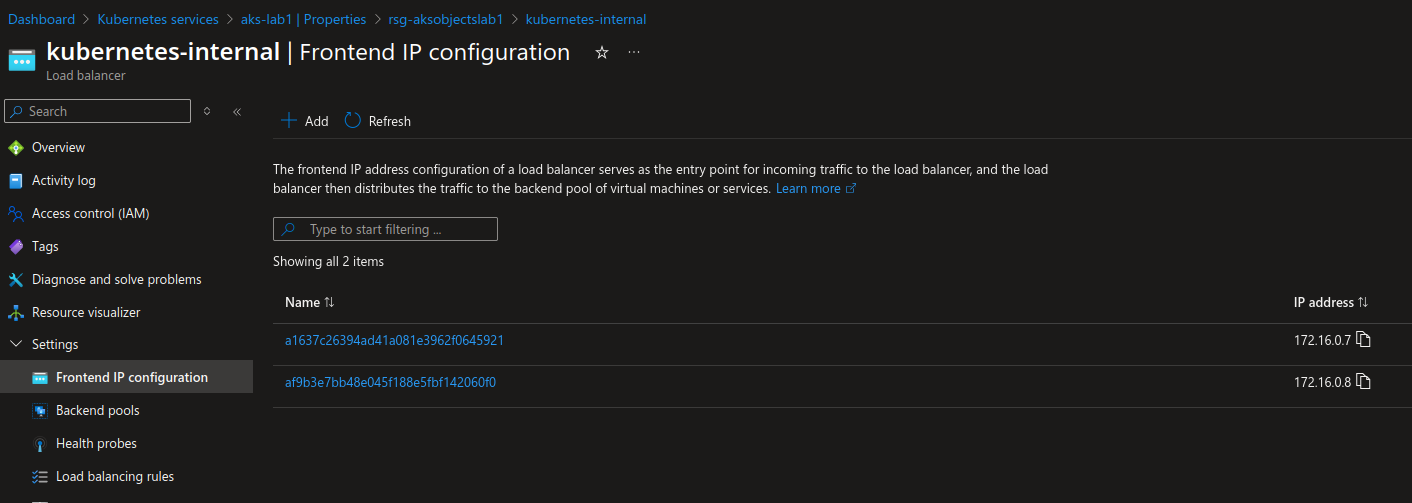
NBotice the second front end ip, that’s because, just as a reminder, I created another Internal Gateway, without using the GatewayClass taht we just defined.
apiVersion: gateway.networking.k8s.io/v1
kind: Gateway
metadata:
  name: envoy-gw-internal-auto
  namespace: sharedgateway
spec:
  gatewayClassName: eg
  infrastructure:
    annotations:
      "service.beta.kubernetes.io/azure-load-balancer-internal": "true"
  listeners:
  - allowedRoutes:
      namespaces:
        from: Same
    name: envoy-gw-internal-auto
    port: 80
    protocol: HTTP
Checking the Gateway, and the service we get the following.
df@df-2404lts:~$ k get gateway -n sharedgateway envoy-gw-internal-auto -o custom-columns=Name:.metadata.name,Namespace:.metadata.namespace,IP:.status.addresses[0].value,InfrastructureAnnotations:.spec.infrastructure.annotations

Name                     Namespace       IP           InfrastructureAnnotations
envoy-gw-internal-auto   sharedgateway   172.16.0.8   map[service.beta.kubernetes.io/azure-load-balancer-internal:true]

df@df-2404lts:~$ k get service -n envoy-gateway-system -o custom-columns=Name:.metadata.name,namespace:.metadata.namespace,Type:.spec.type,IP:.status.loadBalancer.ingress[0].ip,Annotations:.metadata.annotations

Name                                                  namespace              Type           IP              Annotations
azure-internal-envoygateway                           envoy-gateway-system   LoadBalancer   172.16.0.7      map[service.beta.kubernetes.io/azure-load-balancer-internal:true]
envoy-gateway                                         envoy-gateway-system   ClusterIP      <none>          map[meta.helm.sh/release-name:eg meta.helm.sh/release-namespace:envoy-gateway-system]
envoy-sharedgateway-envoy-gw-a641ae3b                 envoy-gateway-system   LoadBalancer   51.11.236.233   <none>
envoy-sharedgateway-envoy-gw-internal-auto-d296d3c7   envoy-gateway-system   LoadBalancer   172.16.0.8      map[service.beta.kubernetes.io/azure-load-balancer-internal:true]
Same result in the end, but not the same level of access. An interesting point to keep in mind in the Gateway API governance.
And there are still more interesting features available.
2.4. Adding authentication in front of apps
We saw that there are specific CRDs coming with EnvoyProxy. One of those is the SecurityPolicy.
From the documentation, we can find references to configure OIDC authentication.
Where it becomes interestingis that Entra Id can be used as an OIDC IDentity provider. So let’s try this.
First we need to define an HTTPRoute using a public Gateway. We’ll rely on the objects define in the 2.1 section.
Then we’ll define a SecurityPolicy. It will look like this.
---
apiVersion: gateway.envoyproxy.io/v1alpha1
kind: SecurityPolicy
metadata:
  name: oidc-envoy-app1-security-policy
  namespace: gundam
spec:
  targetRefs:
    - group: gateway.networking.k8s.io
      kind: HTTPRoute
      name: demo-httproute
  oidc:
    provider:
      issuer: "https://login.microsoftonline.com/00000000-0000-0000-0000-000000000000/v2.0"
    clientID: "00000000-0000-0000-0000-000000000000"
    clientSecret:
      name: "envoy-app-client-secret"
    redirectURL: "https://app1.app.teknews.cloud/oauth2/callback"
    logoutPath: "/logout"
Note that it refers to an Opaque Secret which is define like this.
---
apiVersion: v1
data:
  client-secret: <Secret_Value>
kind: Secret
metadata:
  creationTimestamp: null
  name: envoy-app-client-secret
  namespace: gundam
The secret value refers to the secret define on the Entra Id Application registration that we define for OIDC Auth with Entra Id.
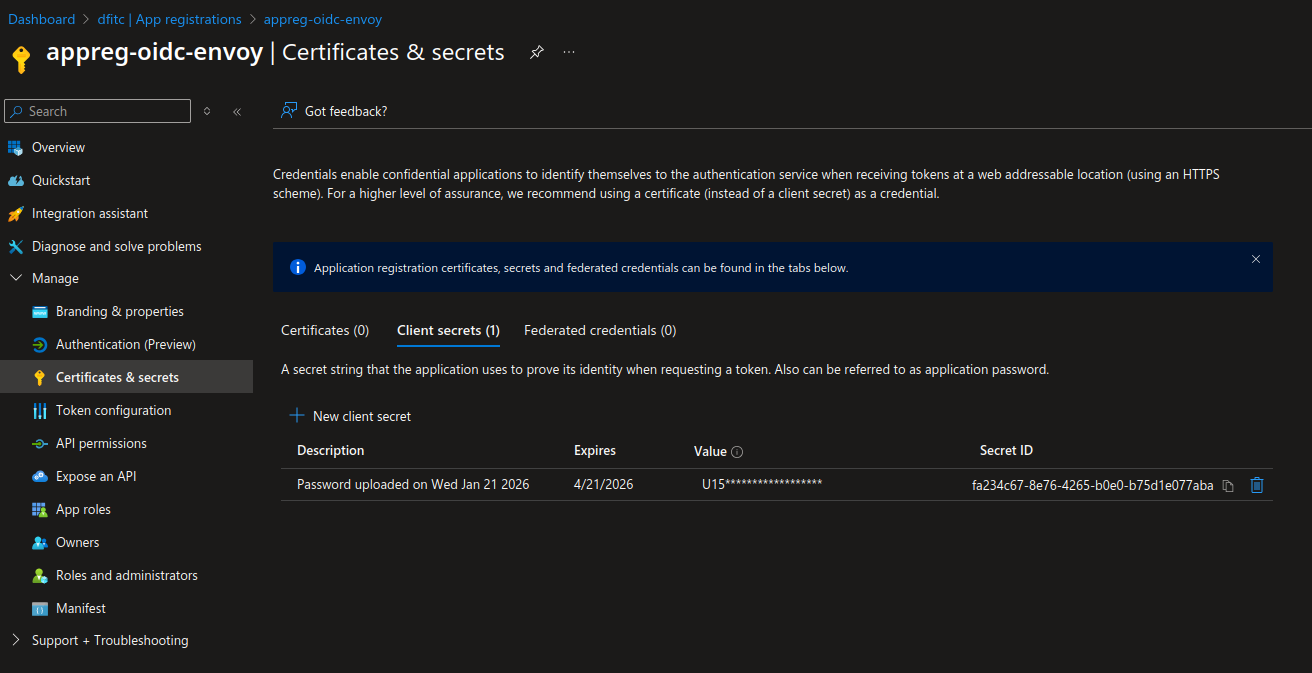
We need also to define some authorization on the Graph API, so that the app registration can read some informations on Entra Id.
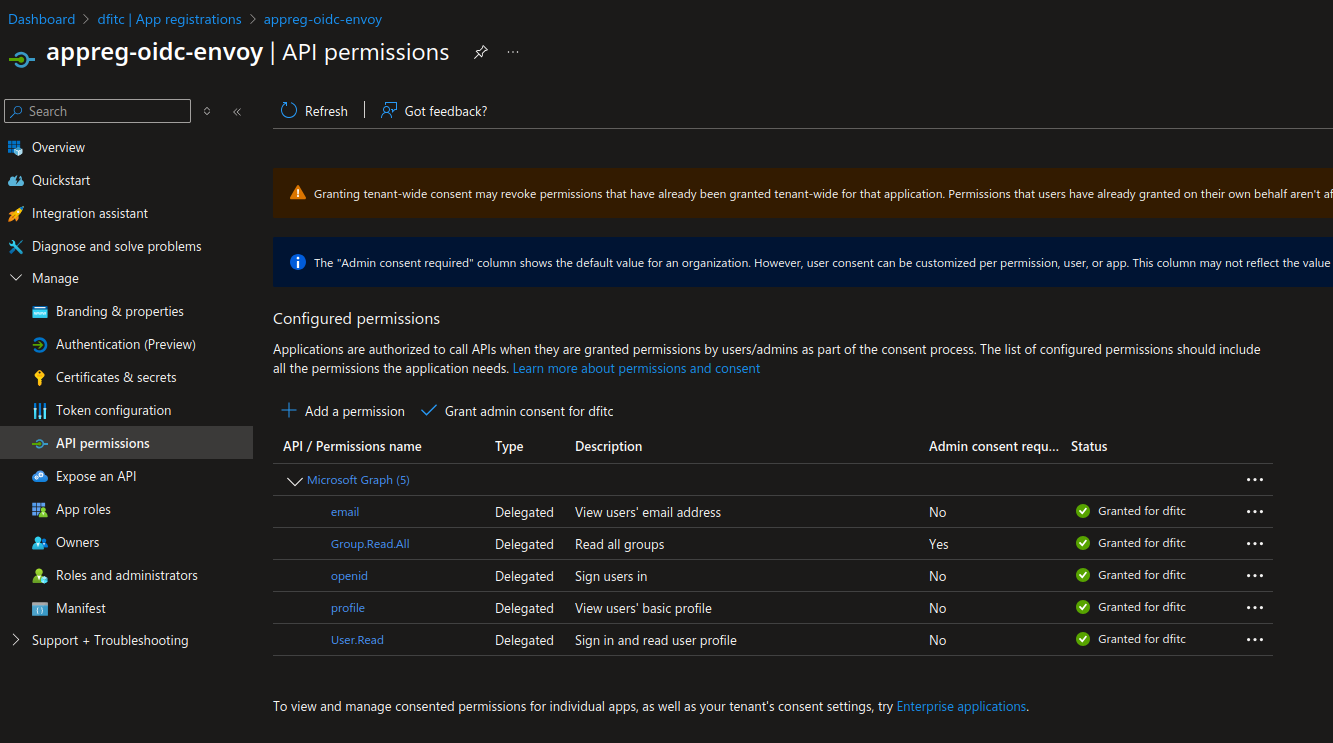
And last we need to define some urls.
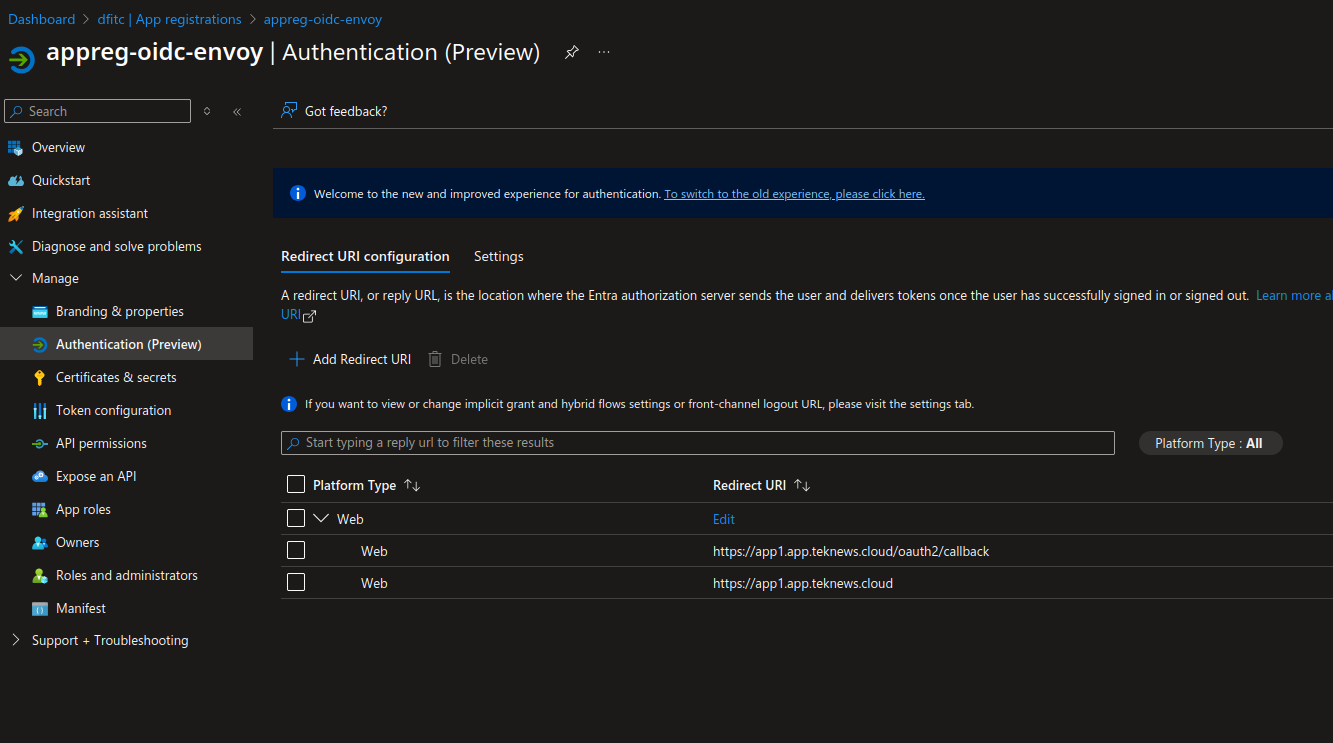
If everything works correctly, we should get an authentication mire before accessing the demo app.
df@df-2404lts:~$ curl -k -i -X GET https://app1.app.teknews.cloud
HTTP/2 302
set-cookie: OauthNonce-97a9498a=f0dec3de0a392bae.gCNoymoqJvP2NUQjWm+zqQV3TLG+UTP+rVwC/fAzyp8=;path=/;Max-Age=600;secure;HttpOnly
set-cookie: CodeVerifier=t039-RkcWijBpDobHuMsVKc1ShDGm8BAQdZEIUn5ZuLbpvVfptaFWKn75xCvNJTExQ_btF3YIkWiNSM2AKnaDA;path=/;Max-Age=600;secure;HttpOnly
location: https://login.microsoftonline.com/00000000-0000-0000-0000-000000000000/oauth2/v2.0/authorize?client_id=00000000-0000-0000-0000-000000000000&code_challenge=Xz1VjTI7vFg642-boa3szOp854pxo3L3AnUmd7OT_Fc&code_challenge_method=S256&redirect_uri=https%3A%2F%2Fapp1.app.teknews.cloud%2Foauth2%2Fcallback&response_type=code&scope=openid&state=eyJ1cmwiOiJodHRwczovL2FwcDEuYXBwLnRla25ld3MuY2xvdWQvIiwiY3NyZl90b2tlbiI6ImYwZGVjM2RlMGEzOTJiYWUuZ0NOb3ltb3FKdlAyTlVRaldtK3pxUVYzVExHK1VUUCtyVndDL2ZBenlwOD0ifQ
date: Thu, 29 Jan 2026 15:33:48 GMT
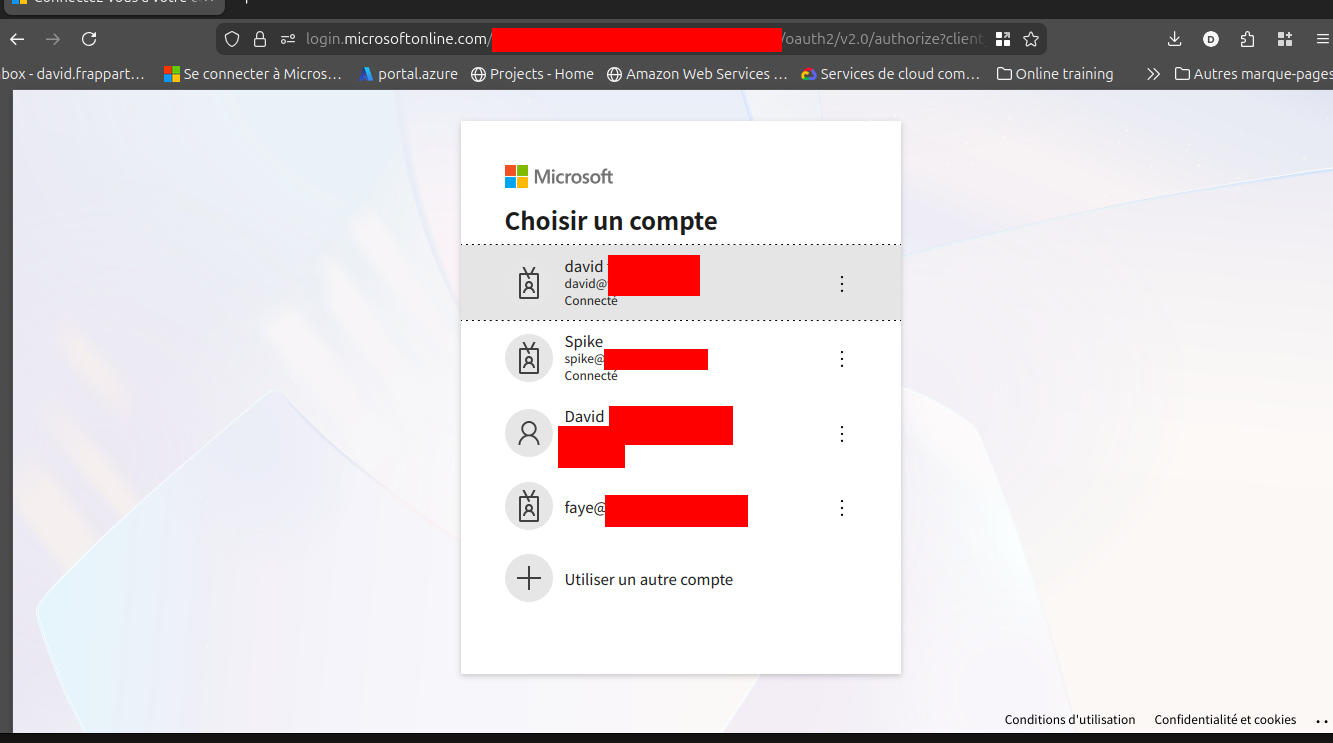
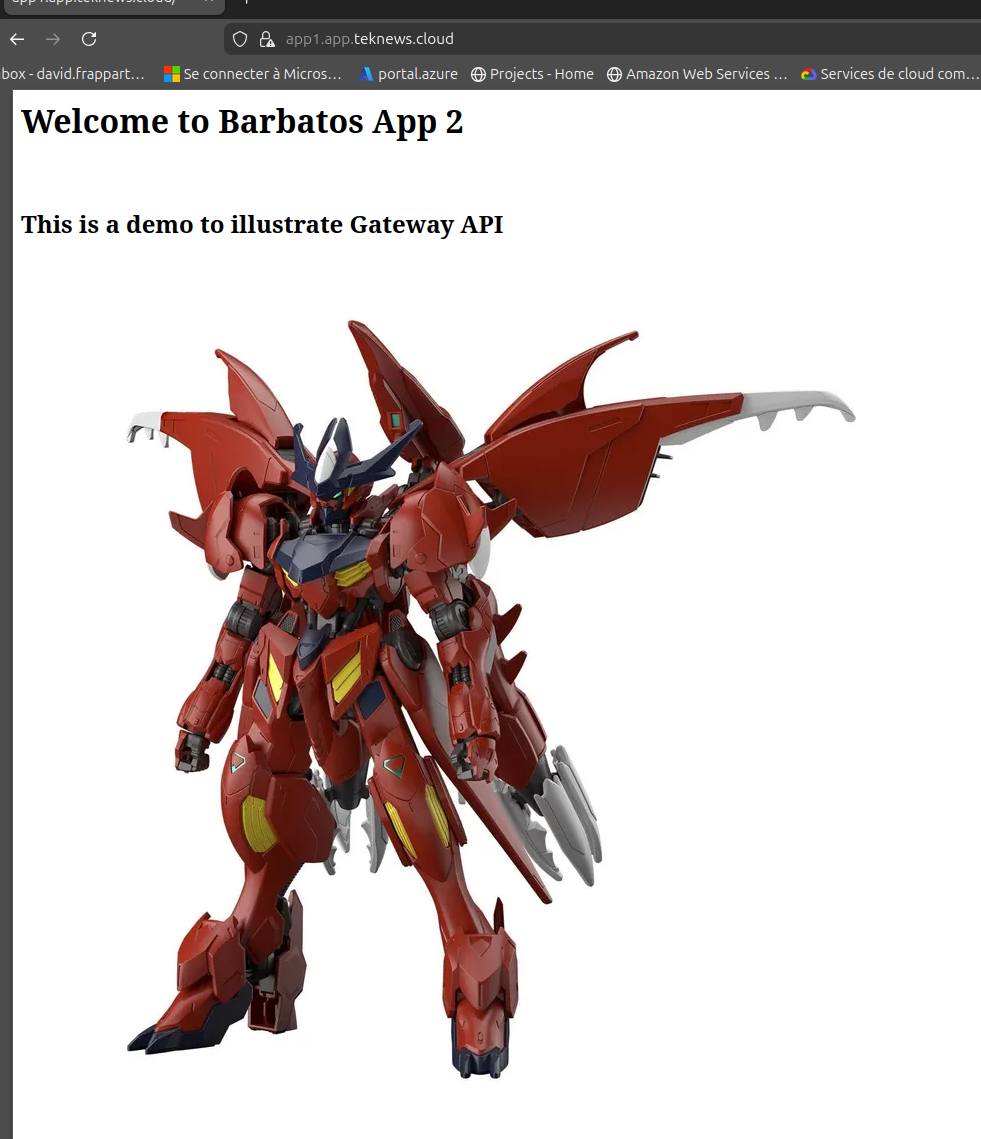
Ok, that’s fun, What else do we have?
2.5 Managing traffic with Rate limiting
Still found in the documentation, we can find different Traffic management scenarios, such as managing the rate limit.
From this, we can deduce that for an HTTPRoute define as below.
apiVersion: gateway.networking.k8s.io/v1
kind: HTTPRoute
metadata:
  name: demo-httproute
  namespace: gundam
spec:
  hostnames:
  - hashikube1
  parentRefs:
  - group: gateway.networking.k8s.io
    kind: Gateway
    name: envoy-nodeport-gw
    namespace: envoytest
  rules:
  - backendRefs:
    - group: ""
      kind: Service
      name: barbatossvc
      port: 8090
      weight: 1
    matches:
    - path:
        type: PathPrefix
        value: /
  - backendRefs:
    - group: ""
      kind: Service
      name: demoappsvc
      namespace: gundam
      port: 8080
      weight: 1
    filters:
    - type: URLRewrite
      urlRewrite:
        path:
          replacePrefixMatch: /
          type: ReplacePrefixMatch
    matches:
    - path:
        type: PathPrefix
        value: /demoapp
We can define the BackendTrafficPolicy to limit globally the traffic on the HTTPRoute.
---
apiVersion: gateway.envoyproxy.io/v1alpha1
kind: BackendTrafficPolicy
metadata:
  name: policy-httproute
  namespace: gundam
spec:
  targetRefs:
  - group: gateway.networking.k8s.io
    kind: HTTPRoute
    name: demo-httproute
  rateLimit:
    global:
      rules:
      - limit:
          requests: 3
          unit: Hour
Let’s try this.
df@df-2404lts:~$ for i in {1..6}; do curl -i -X GET https://hashikube1:32650 ; sleep 1; done
HTTP/2 500
date: Thu, 29 Jan 2026 15:49:59 GMT

HTTP/2 500
date: Thu, 29 Jan 2026 15:50:00 GMT

HTTP/2 500
date: Thu, 29 Jan 2026 15:50:01 GMT

HTTP/2 500
date: Thu, 29 Jan 2026 15:50:02 GMT

HTTP/2 500
date: Thu, 29 Jan 2026 15:50:03 GMT

HTTP/2 500
date: Thu, 29 Jan 2026 15:50:04 GMT
We specified a limit of 3 requyest per hour. After the 3rd attempt, we get HTTP/2 500, which is what we expected.
We’re nearly done for this first contact.
2.6. Envoy Admin portal
If you were paying attention (😜), you noticed the existence of an envoy deployument in the envoy-gateway-system namespace.
df@df-2404lts:~$ k get deployments.apps -n envoy-gateway-system $hashi
NAME                                         READY   UP-TO-DATE   AVAILABLE   AGE
envoy-envoytest-envoy-nodeport-gw-fff40353   1/1     1            1           22d
envoy-gateway                                1/1     1            1           30d


df@df-2404lts:~$ k $hashi get pod -n envoy-gateway-system envoy-gateway-64d8866b44-gt9b9 -o custom-columns=Name:.metadata.name,Namespace:.metadata.n
amespace,Image:.spec.containers[0].image
Name                             Namespace              Image
envoy-gateway-64d8866b44-gt9b9   envoy-gateway-system   docker.io/envoyproxy/gateway:v1.6.1
The documentation mentions an admin console available by default on theport 19000. However, checking the services, we cannot find this port.
df@df-2404lts:~$ k get service envoy-gateway -n envoy-gateway-system $hashi
NAME            TYPE        CLUSTER-IP     EXTERNAL-IP   PORT(S)                                            AGE
envoy-gateway   ClusterIP   100.65.80.43   <none>        18000/TCP,18001/TCP,18002/TCP,19001/TCP,9443/TCP   31d
But that’s ok, because this is actually the pod that has the port 19000 available. It’s just that it’s not exposed thourhg a service by default. So to access it, we need to use a port-forward command.
df@df-2404lts:~/Documents/myrepo/AKSPerso/yamlconfig/gatewayapi/envoy$ k port-forward -n envoy-gateway-system deployments/envoy-gateway 19000:19000
Forwarding from 127.0.0.1:19000 -> 19000
Forwarding from [::1]:19000 -> 19000
We can then access the portal on the corresponding port, and find some uyseful informations.
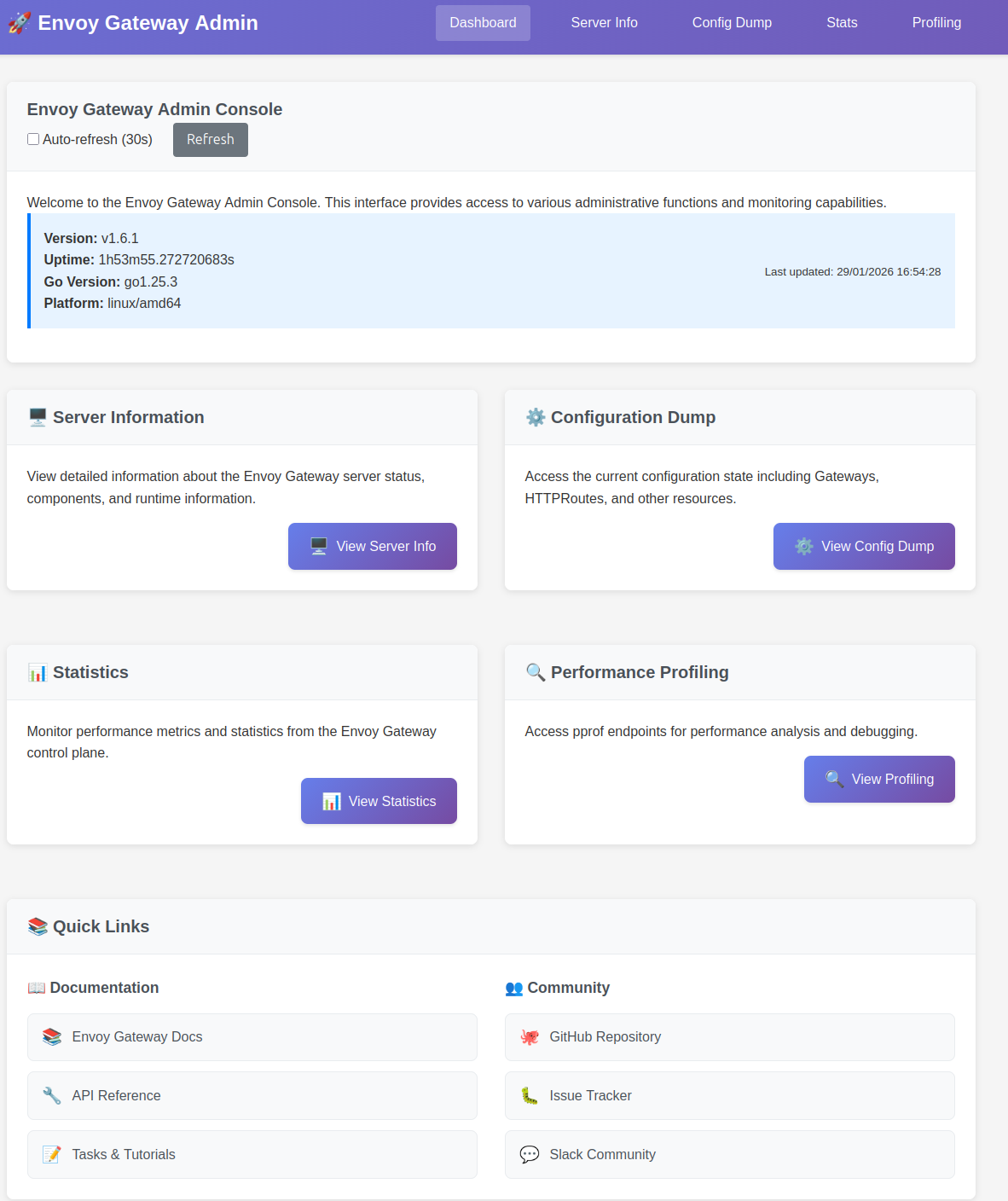
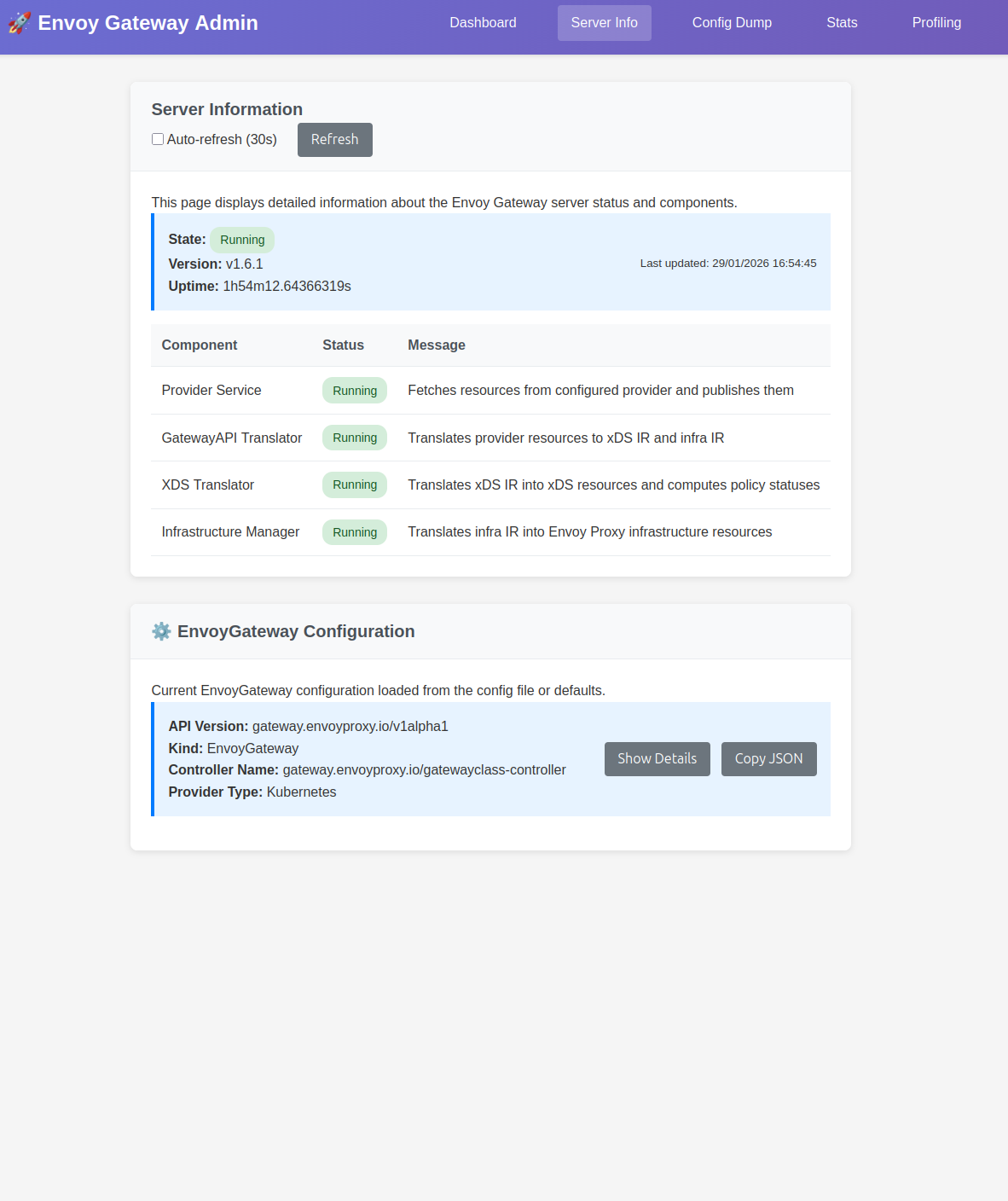
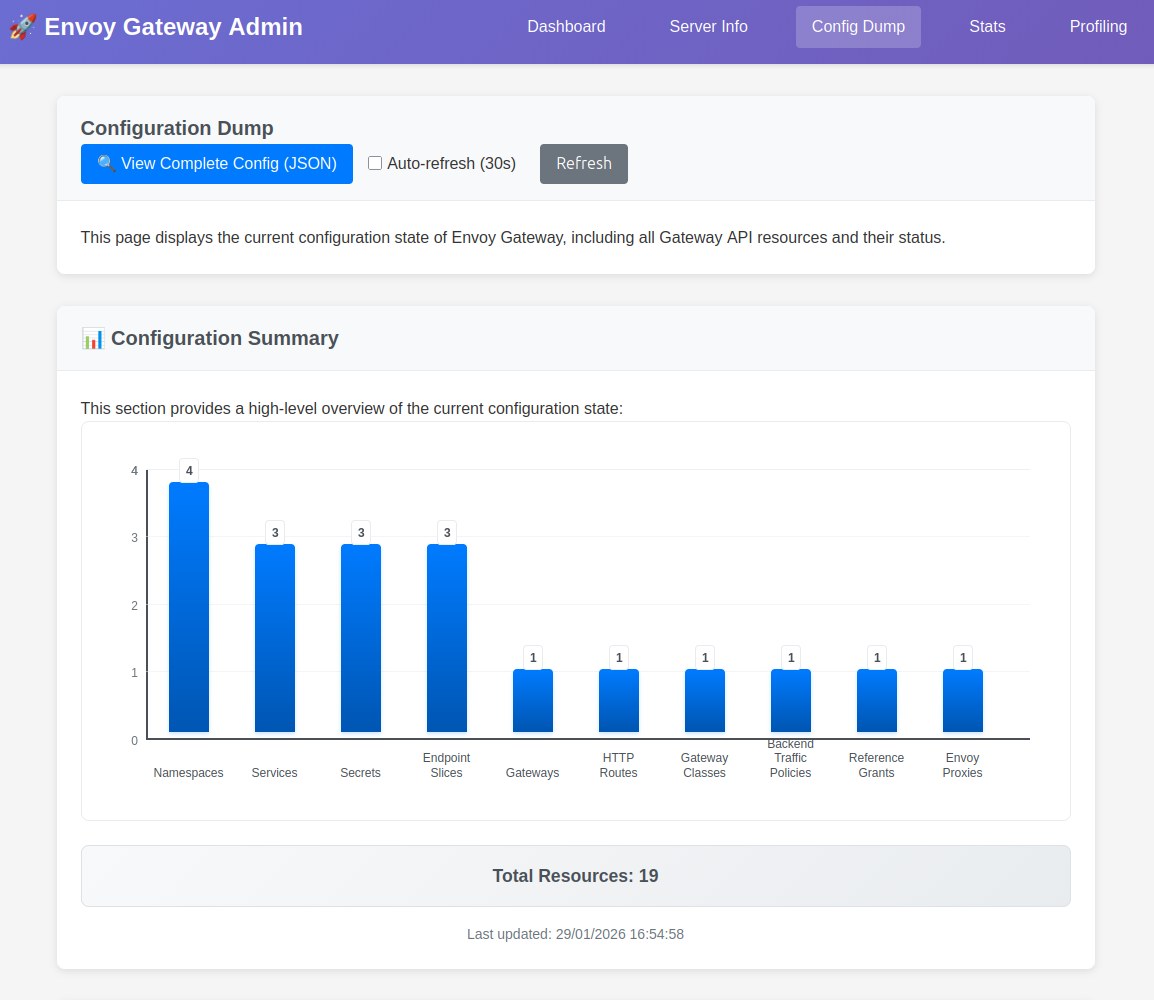
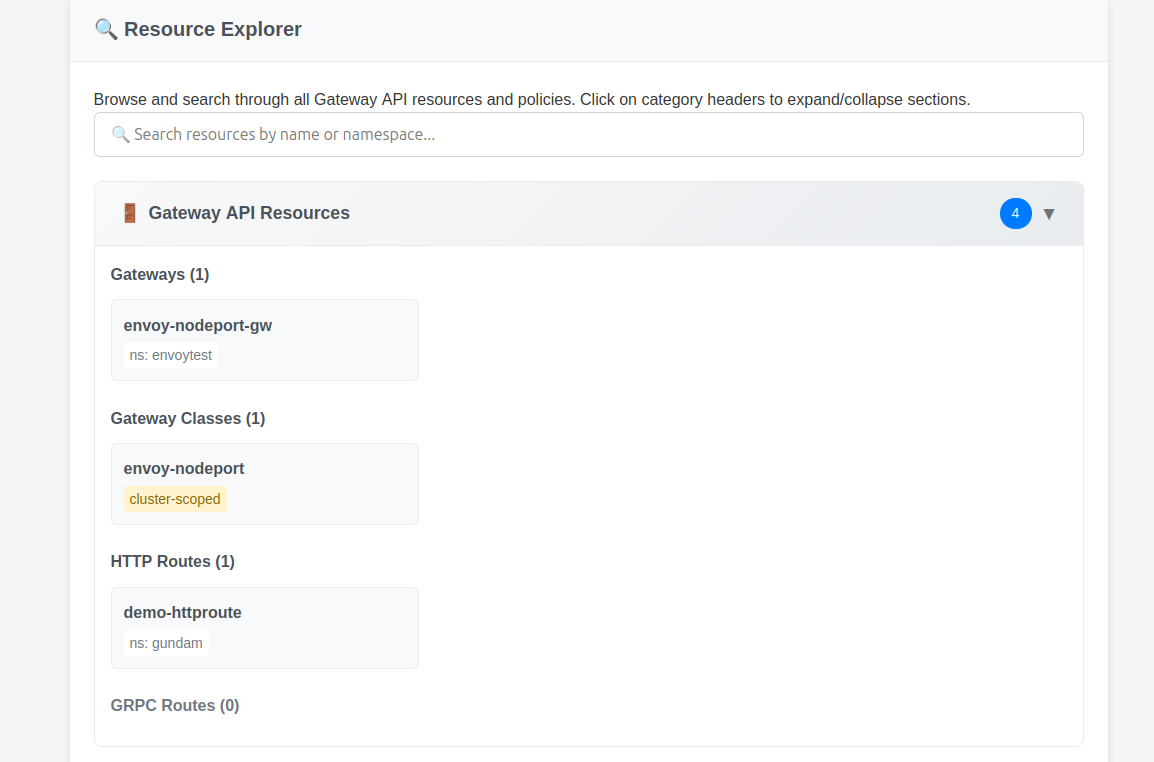
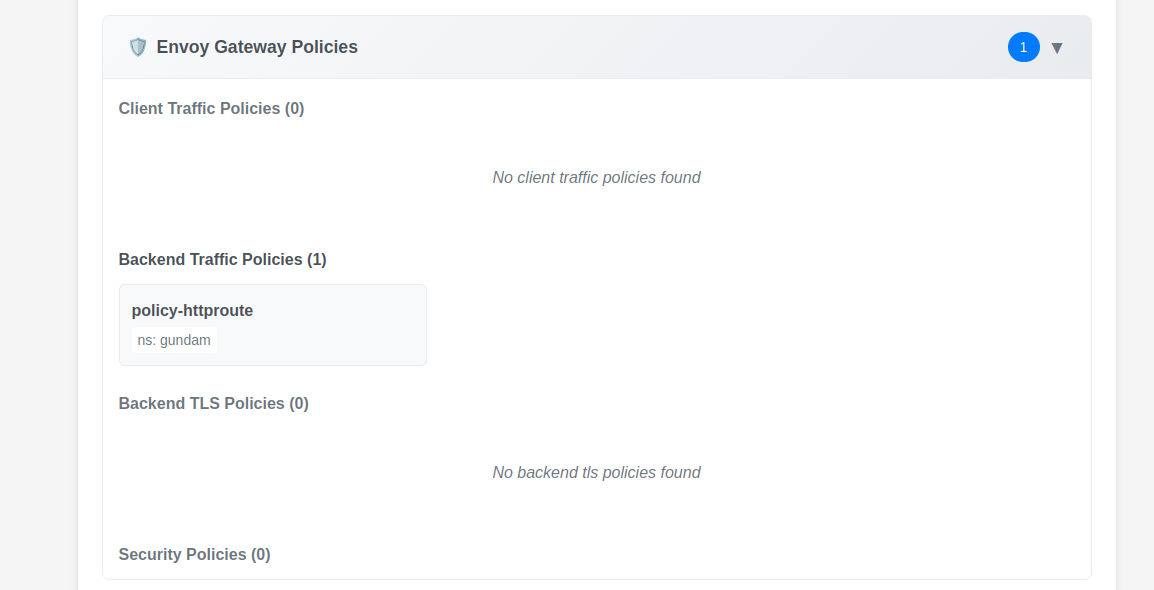
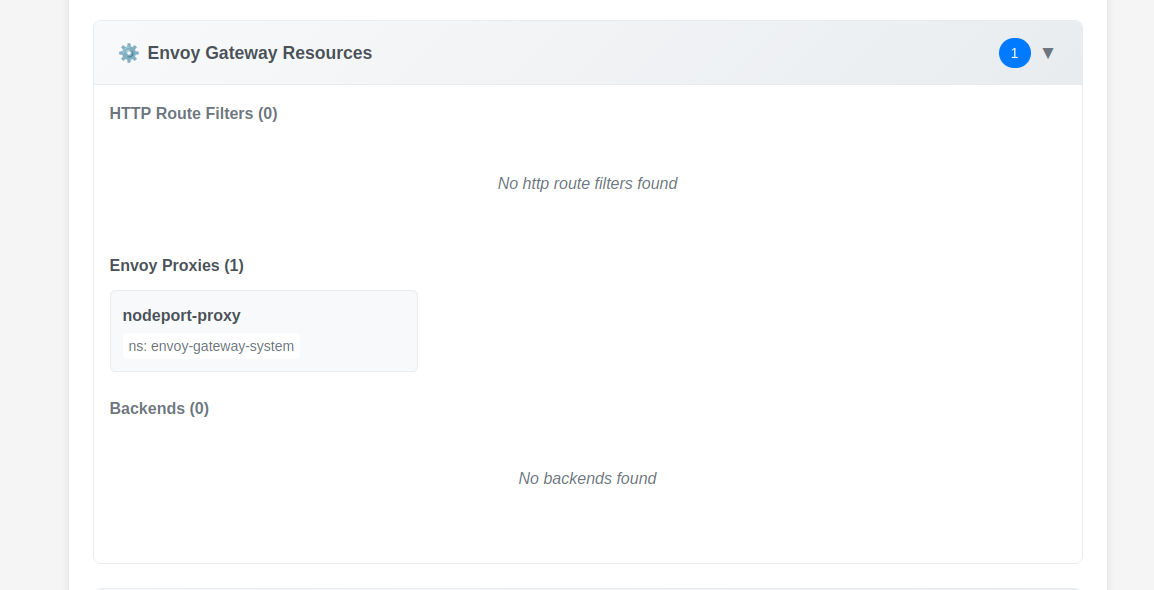
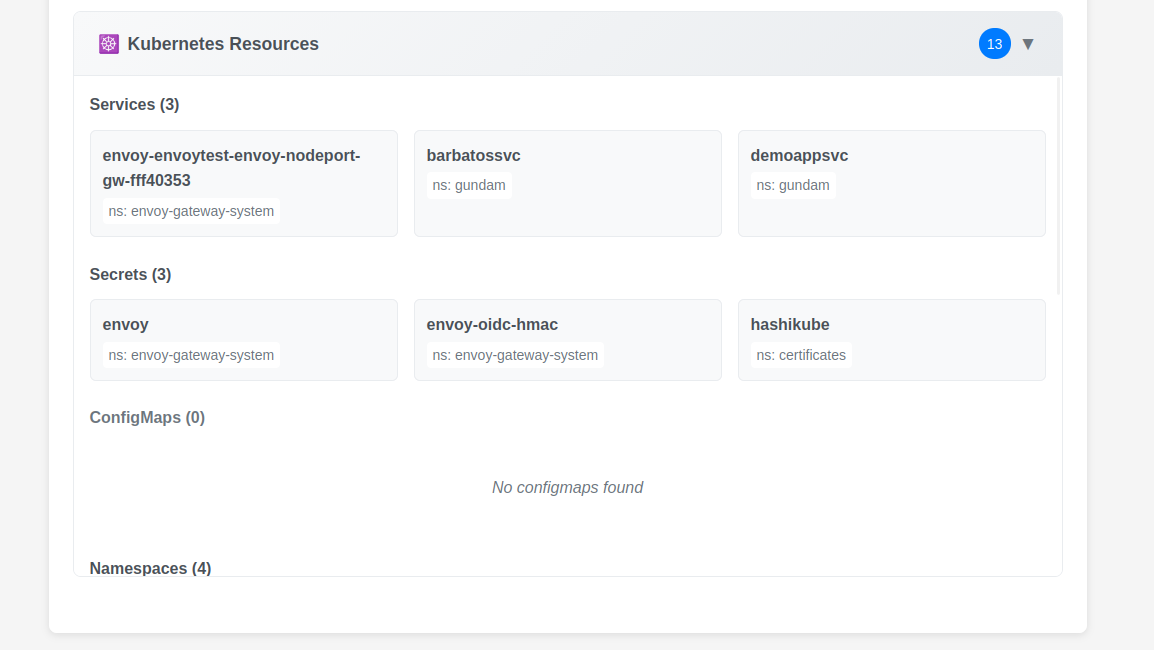
Additional samples are acvailable on this page.
Well, that will be all for now.
3. Wrapping up
Going back to Gateway API, we looked at Envoy Gateway this time.
What we note:
- A mature provider, available without CNI constraint (which is an important point for a Cloud managed Kubernetes)
- Interesting CRDs to complete the Main stream Gateway API features
- An admin portal available by default that may be used for troubelshooting purposes.
What we should do after this:
Plug everything in a monitoring system such as prometheus grafana to get a better view on the metrics.
What we can note :
Envoy CRDs provide a workaround for some lack (in my opinnion), which may question if the original purpose of the Gateway API initiative (to avoid providers CRDs and standardize configuration) is still a thing 🤔
Apart from that, a very serious candidate to migrate from Ingress Controller.
See you soon ^^