Keep control of k8s namespaces from the Azure plane
Hello!
Summer being almost done, it’s time to go back to tech stuff. In this article, we’ll have a look at a not so new feature of AKS called the managed namespace. The fact that it’s been around for some time does not diminish its value, so we’ll take some time on the topic ^^.
Our agenda:
- Overview of the managed namespace in AKS
- Creating and managing a managed namespace
- Rbac considerations for Managed namespaces
1. Overview of the managed namespace in AKS
Before diving in Azure managed namespaces, a small reminder of what a namespace is.
If we take the Kubernetes documentation, we get the following:
In Kubernetes, namespaces provide a mechanism for isolating groups of resources within a single cluster. Names of resources need to be unique within a namespace, but not across namespaces. Namespace-based scoping is applicable only for namespaced objects (e.g. Deployments, Services, etc.) and not for cluster-wide objects (e.g. StorageClass, Nodes, PersistentVolumes, etc.).
To put it simply, it’s a logical container allowing organization, but also, with the addition of configurations and other objects, some measure of security segmentation. Let’s insist on this: without additional configuration, namespace is not natively an isolation mechanism regarding security.
If I was an Azure guy, I would compare a namespace to a resource group 😏.
Also, even in a cluster intended for a single team, we’ll find some default namespaces.
➜  ~ k $cil1 get ns
NAME                   STATUS   AGE
default                Active   18d
kube-node-lease        Active   18d
kube-public            Active   18d
kube-system            Active   18d
Ok that’s fine, but why would I need a managed namespace then?
Well, first thing first, a namespace, while simple in its basic definition, is a kubernetes object.
➜ ~ k $cil1 get namespaces kube-system -o yaml
apiVersion: v1
kind: Namespace
metadata:
  creationTimestamp: "2026-08-19T21:43:07Z"
  labels:
    kubernetes.io/metadata.name: kube-system
  name: kube-system
  resourceVersion: "4"
  uid: b3374276-249e-4853-a99c-0f96d2d6f362
spec:
  finalizers:
  - kubernetes
status:
  phase: Active
So, putting ourselves in an AKS context, we may be more proficient in the Azure plane rather than the k8s one. Considering the AKS context, managing a native kubernetes object implies access to the kubernetes plane. It’s easily done witn an az aks command, but still…
➜  ~ az aks list -o table
Name      Location       ResourceGroup    KubernetesVersion    CurrentKubernetesVersion    ProvisioningState    Fqdn
--------  -------------  ---------------  -------------------  --------------------------  -------------------  --------------------------------------------
aks-lab1  francecentral  rsg-cluster-aks  1.36.0               1.36.0                      Succeeded            akslab1-48svf6dv.hcp.francecentral.azmk8s.io

➜  ~ az aks get-credentials -n aks-lab1 -g rsg-cluster-aks
A different object named aks-lab1 already exists in your kubeconfig file.
Overwrite? (y/n): y
A different object named clusterUser_rsg-cluster-aks_aks-lab1 already exists in your kubeconfig file.
Overwrite? (y/n): y
Merged "aks-lab1" as current context in /Users/df/.kube/config
Converted kubeconfig to use Azure CLI authentication.
At this point, we can create a namespace with kubectl, if we do know a bit of kubernetes cli.
➜ ~ k $cil create ns k8s-ns-demo -o yaml
apiVersion: v1
kind: Namespace
metadata:
  creationTimestamp: "2026-09-11T17:38:08Z"
  labels:
    kubernetes.io/metadata.name: k8s-ns-demo
  name: k8s-ns-demo
  resourceVersion: "65062"
  uid: 320dd9e7-5c98-4683-b40f-1f3b91197150
spec:
  finalizers:
  - kubernetes
status:
  phase: Active
Also, we mention that securing the namespace requires additional kubernetes objects, that the Azure person may not know. Typically:
- securing network inside andf outside of the namespace with
networkpolicies. - managing access with kubernetes
rolesandrolebindings. - controlling resources consuption with a
resourcequotas
It’s starting to make a lot of kubernetes resources, And that’s where the managed namespace comes in the equation.
Refering to the documentation, the Azure managed namespace provides a way to isolate teams and workloads. But that’s typically just what the kubernetes native namespace does. The important part here is the “Azure managed” part.
Think of the Azure managed namespace as an Azure plane abstraction to:
- a
namespace - a
networkpolicyto manage ingress or egress traffic - a
resourcequotas - labels and annotations that we would like added to the namespace.
Additionaly, it comes with some interesting rbac option. But that’s a little bit more complex than what it seems so we’ll check this in a dedicated section later.
Ok let’s play 😁
2. Creating and managing a managed namespace
We’ll start be creating a single managed namespace.
It’s doable with the az cli, or the portal, or bicep. So we’ll pick the 4th option a.k.a terraform.
Obviously, i would have list terraform if it was an available resource in the azurerm provider, but it’s not, so we’ll use azapi, because if something is available on bicep, it is also on azapi.
A short research on the documentation (or you could probably vibecode it, but where’s the fun in that I’ll ask you 😝)
resource "azapi_resource" "ManagedNs" {


  type = "Microsoft.ContainerService/managedClusters/managedNamespaces@2026-04-02-preview"
  name = "managedns"
  parent_id = "/subscriptions/xxxxxxxx-xxxx-xxxx-xxxx-xxxxxxxxxxxx/resourcegroups/<rg_name>/providers/Microsoft.ContainerService/managedClusters/<luster_name>"
  location = "<aks_location>"
  tags = merge(var.MandatoryTags, var.OptionalTags, var.ExtraTags)
  body = {
    properties = {
      adoptionPolicy = "Always"
      annotations = {
        "someannotation" = "somevalue"
      }
      defaultNetworkPolicy = {
        egress = "AllowAll"
        ingress = "DenyAll"
      }
      defaultResourceQuota = {
        cpuLimit = "500m"
        cpuRequest = "750m"
        memoryLimit = "256Mi"
        memoryRequest = "128Mi"
      }
      deletePolicy = "Delete"
      labels = {
        "pod-security.kubernetes.io/audit" = "restricted"
        "pod-security.kubernetes.io/audit-version" = "latest"
      }
    }
  }
}
If everyting goes well, you should have a managed namespace, that you can see through the az cli, or on the portal
➜  ~ az aks namespace list -o table

Name                ResourceGroup    Location
------------------  ---------------  -------------
aks-lab1/managedns  rsg-cluster-aks  francecentral
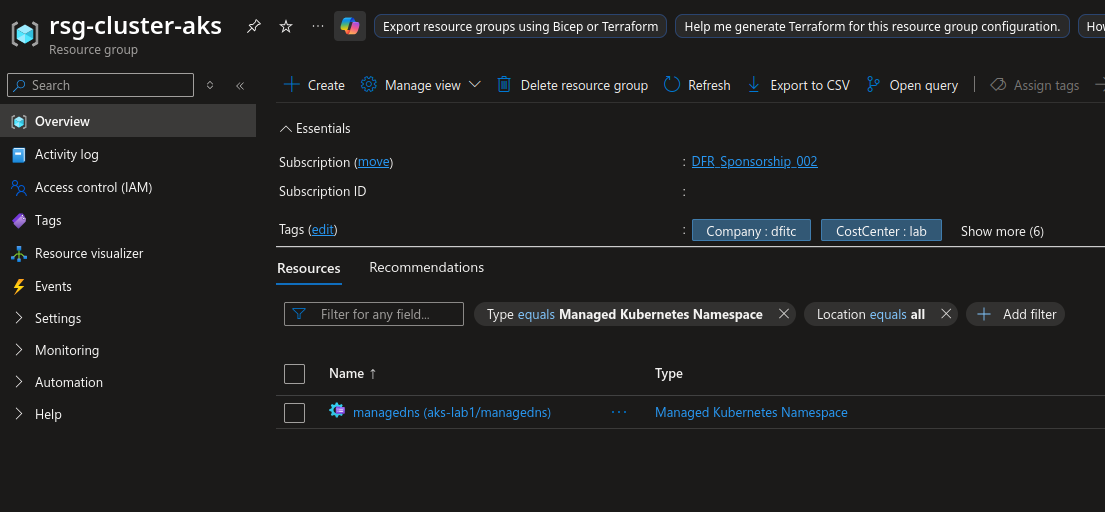
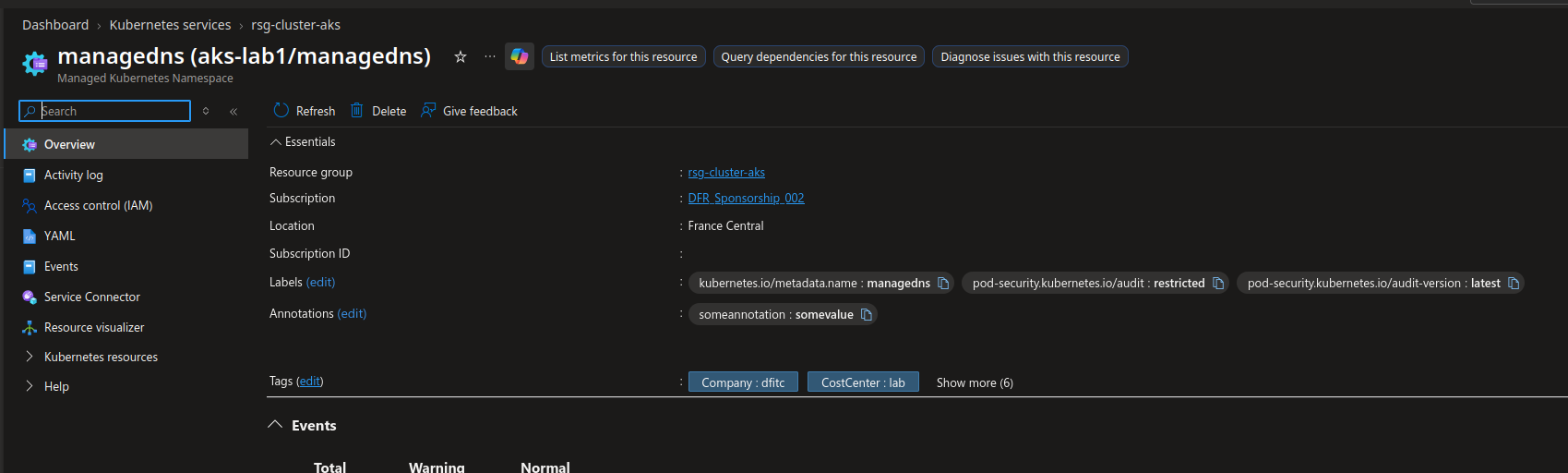
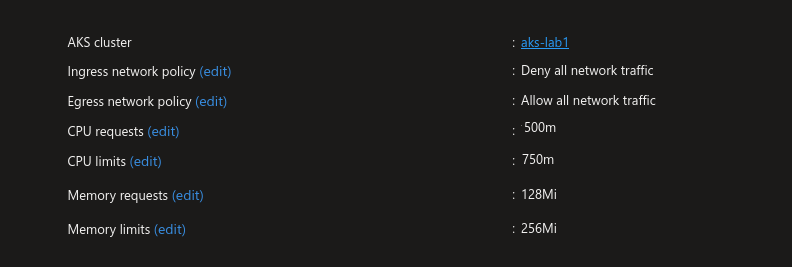
Fun fact, when we list the managed namespace from the cli or from the portal, we do have a resource group property which hint that we should be able to choose the target rg of the managed namespace. However, we can only refer to the cluster own resource group in the cli, and there is no resourceGroup or anything similar in the arm api. So we are stuck with creating the managed namespace in the cluster’s rg. But well, it does not really live anywhere else than the aks cluster so… 🤫
That being said, let’s have a look at this namespace now.
➜ ~ k get ns managedns -o yaml
apiVersion: v1
kind: Namespace
metadata:
  annotations:
    someannotation: somevalue
  creationTimestamp: "2026-09-16T06:33:01Z"
  labels:
    kubernetes.azure.com/managedByArm: "true"
    kubernetes.io/metadata.name: managedns
    pod-security.kubernetes.io/audit: restricted
    pod-security.kubernetes.io/audit-version: latest
  name: managedns
  resourceVersion: "8897"
  uid: d381d43c-c8b5-4c96-b4de-d532fc481e53
spec:
  finalizers:
  - kubernetes
status:
  phase: Active
It looks like the parameters we passed to the Azure object are visible on the namespace in kubernetes, so that’s nice.
Additionaly, there is also the kubernetes.azure.com/managedByArm: "true" label that hint that this namespace is an Azure managed one.
We should also find the resourcequotas and the networkpolicy.
➜ ~ k get resourcequotas -n managedns -o yaml
apiVersion: v1
items:
- apiVersion: v1
  kind: ResourceQuota
  metadata:
    creationTimestamp: "2026-09-16T06:33:01Z"
    labels:
      kubernetes.azure.com/managedByArm: "true"
    name: defaultresourcequota
    namespace: managedns
    resourceVersion: "24799"
    uid: 30d3aabf-f4a9-4af1-8081-7dcbbb4de4e2
  spec:
    hard:
      limits.cpu: 750m
      limits.memory: 256Mi
      requests.cpu: 500m
      requests.memory: 128Mi
  status:
    hard:
      limits.cpu: 750m
      limits.memory: 256Mi
      requests.cpu: 500m
      requests.memory: 128Mi
    used:
      limits.cpu: "0"
      limits.memory: "0"
      requests.cpu: "0"
      requests.memory: "0"
kind: List
metadata:
➜ ~ k get netpol -n managedns -o yaml
apiVersion: v1
items:
- apiVersion: networking.k8s.io/v1
  kind: NetworkPolicy
  metadata:
    creationTimestamp: "2026-09-16T06:33:01Z"
    generation: 1
    labels:
      kubernetes.azure.com/managedByArm: "true"
    name: defaultnetworkpolicy
    namespace: managedns
    resourceVersion: "8899"
    uid: dafe74b6-430b-4bf6-9b12-094c6fae8061
  spec:
    egress:
    - {}
    podSelector: {}
    policyTypes:
    - Ingress
    - Egress
kind: List
metadata:
  resourceVersion: ""
We can say that it does simplify the kubernetes management, at least from the additional kubernetes resources that are automatically added.
Before moving on, we should have a look at 2 arguments on the managed namespace.
The first one is the deletePolicy.
The second one is the adoptionPolicy
The deletePolicy defines how the lifecycle of the namespace is managed, once it’s created.
Once the object is created from the Azure plane, we do have its reflect in the kubernetes plane.
We have 2 choices then.
Either the source of truth is the Azure plane, and then the value should be set to Delete, which means that deleting the object on the Azure plane delete also its refelct in the kubernetes plane.
The other way around is to set the deletePolicy to Keep. It means that we are only bootstraping the namespace then and that we don’t care to track it in the Azure plane.
It implies some caution with automated build that could rely on the IaC defining the code. The documentation also states that the label ManagedByARM is in this case deleted.
the adoptionPolicy is also related to the resource lifecycle, but it allows us to onboard as an Azure managed namespace an existing kubernetes namespace, depending on the value set for the parameters.
Never: If the namespace already exists in the cluster, attempts to create that namespace as a managed namespace fails.IfIdentical: Take over the existing namespace to be managed, provided there are no differences between the existing namespace and the desired configuration.Always: Always take over the existing namespace to be managed, even if some fields in the namespace might be overwritten.
There are some exceptions to the onboardable namespaces:
kube-system,app-routing-system,istio-system,gatekeeper-system
And other system namespace as specified on this specific documentation page.
Once a managed namespace is created, it is manageable only from the Azure plane. Trying to modify thenamesapce will result in the following error message.
➜  ~ k label namespaces managedns aperfectcircle=passive
Error from server: admission webhook "aks-namespace-validating-webhook.azmk8s.io" denied the request: Updating/deleting namespace managedns labels is not allowed because it is managed by ARM. Please update this namespace through ARM api.
It is the same with an onboarded namespace, created first in the kubernetes plane, and then onboarded wit az cli.
➜  ~ k create ns onboardns
namespace/onboardns created
➜  ~ k get ns onboardns
NAME                   STATUS   AGE
onboardns              Active   3s

➜  ~ az aks namespace add -n onboardns --cluster-name aks-lab1 -g rsg-cluster-aks --adoption-policy always --delete-policy Delete --cpu-request 500m --cpu-limit 800m --memory-request 1Gi --memory-limit 2Gi
{
  "eTag": "ac5cc547-b696-4f75-9c85-598c9d049a92",
  "id": "/subscriptions/00000000-0000-0000-0000-000000000000/resourceGroups/rsg-cluster-aks/providers/Microsoft.ContainerService/managedClusters/aks-lab1/managedNamespaces/onboardns",
  "location": "francecentral",
  "name": "onboardns",
  "properties": {
    "adoptionPolicy": "Always",
    "annotations": null,
    "defaultNetworkPolicy": {
      "egress": "AllowAll",
      "ingress": "AllowSameNamespace"
    },
    "defaultResourceQuota": {
      "cpuLimit": "800m",
      "cpuRequest": "500m",
      "memoryLimit": "2Gi",
      "memoryRequest": "1Gi"
    },
    "deletePolicy": "Delete",
    "labels": {
      "kubernetes.io/metadata.name": "onboardns"
    },
    "portalFqdn": "akslab1-au2yamz8.portal.hcp.francecentral.azmk8s.io",
    "provisioningState": "Succeeded"
  },
  "resourceGroup": "rsg-cluster-aks",
  "systemData": {
    "createdAt": "2026-09-22T14:52:45.903523+00:00",
    "createdBy": "david@teknews.cloud",
    "createdByType": "User",
    "lastModifiedAt": "2026-09-22T14:52:45.903523+00:00",
    "lastModifiedBy": "david@teknews.cloud",
    "lastModifiedByType": "User"
  },
  "tags": null,
  "type": "Microsoft.ContainerService/managedClusters/managedNamespaces"
}

➜  ~ az aks namespace show -n onboardns --cluster-name aks-lab1 -g rsg-cluster-aks -o table
resource_group_name: rsg-cluster-aks, cluster_name: aks-lab1, managed_namespace_name: onboardns
ETag                                  Location       Name       ResourceGroup
------------------------------------  -------------  ---------  ---------------
ac5cc547-b696-4f75-9c85-598c9d049a92  francecentral  onboardns  rsg-cluster-ak

➜  ~ k annotate namespaces onboardns tool=parabol
Error from server: admission webhook "aks-namespace-validating-webhook.azmk8s.io" denied the request: Updating/deleting namespace onboardns annotations is not allowed because it is managed by ARM. Please update this namespace through ARM api.
Similarly, creating a pod inside a managed namespace, with ResourceQuotas associated will result in an error if no resource usage is specified.
➜  ~ k run -n onboardns testpod --image nginx
Error from server (Forbidden): pods "testpod" is forbidden: failed quota: defaultresourcequota: must specify limits.cpu for: testpod; limits.memory for: testpod; requests.cpu for: testpod; requests.memory for: testpod
A pod defined with resources is ok thought.
apiVersion: v1
kind: Pod
metadata:
  name: curl
  namespace: managedns
spec:
  resources:
    requests:
      memory: "64Mi"
      cpu: "128m"
    limits:
      memory: "128Mi"
      cpu: "256m"
  containers:
  - command:
    - sleep
    - "5000"
    image: alpine/curl:latest
    imagePullPolicy: Always
    name: alpine-curl
➜  ~ k apply -f ./curlpod.yaml
pod/curl created
➜  ~ k get pod -n managedns
NAME   READY   STATUS    RESTARTS   AGE
curl   1/1     Running   0          16s
We should note that in the case of onboarding existing namespace, the resource management should be taking care of carefully.
Now let’s discuss RBAC.
3. RBAC considerations for AKS and managed namespace
From the documentation, we have the following roles that can be assigned to… manage… the managed namespaces from the Azure plane.
| Role | Description |
|---|---|
| Azure Kubernetes Service Namespace Contributor | Allows access to create, update, and delete managed namespaces on a cluster. |
| Azure Kubernetes Service Namespace User | Allows read-only access to a managed namespace on a cluster. Allows access to list credentials on the namespace. |
Additionally, we have also those to access resources in the kubernetes plane.
| Role | Description | |
|---|---|---|
| Azure Kubernetes Service RBAC Reader | Allows read-only access to see most objects in a namespace. It doesn’t allow viewing roles or role bindings. This role doesn’t allow viewing Secrets, since reading the contents of Secrets enables access to ServiceAccount credentials in the namespace, which would allow API access as any ServiceAccount | in the namespace (a form of privilege escalation). |
| Azure Kubernetes Service RBAC Writer | Allows read/write access to most objects in a namespace. This role doesn’t allow viewing or modifying roles or role bindings. However, this role allows accessing Secrets and running Pods as any ServiceAccount in the namespace, so it can be used to gain the API access levels of any ServiceAccount in the | namespace. |
| Azure Kubernetes Service RBAC Admin | Allows read/write access to most resources in a namespace, including the ability to create roles and role bindings within the namespace. This role doesn’t allow write access to resource quota or to the namespace itself. |
Looking at those role, we can see that the maanged namesapce related roles do not have data actions.
{
  "assignableScopes": [
    "/"
  ],
  "description": "Allows users to create and manage Azure Kubernetes Service namespace resources.",
  "id": "/providers/Microsoft.Authorization/roleDefinitions/289d8817-ee69-43f1-a0af-43a45505b488",
  "name": "289d8817-ee69-43f1-a0af-43a45505b488",
  "permissions": [
    {
      "actions": [
        "Microsoft.Authorization/*/read",
        "Microsoft.Insights/alertRules/*",
        "Microsoft.Resources/subscriptions/resourceGroups/read",
        "Microsoft.ContainerService/managedClusters/managedNamespaces/*",
        "Microsoft.Resources/deployments/*"
      ],
      "notActions": [],
      "dataActions": [],
      "notDataActions": []
    }
  ],
  "roleName": "Azure Kubernetes Service Namespace Contributor",
  "roleType": "BuiltInRole",
  "type": "Microsoft.Authorization/roleDefinitions"
}
While the other Azure Kubernetes RBAC role do.
{
  "assignableScopes": [
    "/"
  ],
  "description": "Lets you manage all resources under cluster/namespace, except update or delete resource quotas and namespaces.",
  "id": "/providers/Microsoft.Authorization/roleDefinitions/3498e952-d568-435e-9b2c-8d77e338d7f7",
  "name": "3498e952-d568-435e-9b2c-8d77e338d7f7",
  "permissions": [
    {
      "actions": [
        "Microsoft.Authorization/*/read",
        "Microsoft.Resources/subscriptions/operationresults/read",
        "Microsoft.Resources/subscriptions/read",
        "Microsoft.Resources/subscriptions/resourceGroups/read",
        "Microsoft.ContainerService/managedClusters/listClusterUserCredential/action"
      ],
      "notActions": [],
      "dataActions": [
        "Microsoft.ContainerService/managedClusters/*"
      ],
      "notDataActions": [
        "Microsoft.ContainerService/managedClusters/resourcequotas/write",
        "Microsoft.ContainerService/managedClusters/resourcequotas/delete",
        "Microsoft.ContainerService/managedClusters/namespaces/write",
        "Microsoft.ContainerService/managedClusters/namespaces/delete"
      ]
    }
  ],
  "roleName": "Azure Kubernetes Service RBAC Admin",
  "roleType": "BuiltInRole",
  "type": "Microsoft.Authorization/roleDefinitions"
}
Before trying to illustrate what is allowed and what is not depending on the role, we should point that the cluster should be configured with Azure RBAC if we want to be able to leverage those role. Azure RBAC for Kubernetes allows the use of role definitions from the Azure plane, but those do not translte directly to kubernetes plane role or binding but work through an authorization webhook as stated in this page.
➜  ~ az aks show -n aks-lab1 -g rsg-cluster-aks |jq .aadProfile
{
  "adminGroupObjectIDs": [
    "00000000-0000-0000-0000-000000000000"
  ],
  "clientAppId": null,
  "enableAzureRbac": true,
  "managed": true,
  "serverAppId": null,
  "serverAppSecret": null,
  "tenantId": "00000000-0000-0000-0000-000000000000"
}
Now that we’ve taken care of this, let’s see a bit of RBAC.
We’ll assign the following roles to our cluster.
| Role | Scope assigned | Principal |
|---|---|---|
Azure Kubernetes Service Namespace Contributor |
Cluster Resource Group | Penny |
Azure Kubernetes Service Namespace User |
Cluster Resource Group | Faye |
Azure Kubernetes Service Namespace User |
Managed namespace | Spike |
Azure Kubernetes Service RBAC Reader |
Cluster Resource Group | Rajesh |
Azure Kubernetes Service RBAC Writer |
Cluster Resource Group | Ed |
Azure Kubernetes Service RBAC Admin |
Cluster Resource Group | Leonard |
Azure Kubernetes Service RBAC Admin |
Managed namespace | Jet |
With also:
- The
Readerrole onthe subscription level to a group called AksUsers, which all users showed earlier are member of - The
Azure Kubernetes Service Cluster User Roleto the same group as before but at the aks resource group level.
But first role assignment gives only read access to the sub level, whil the second allows the users to get credentials on the cluster, but nothing else. Which means that by default, any member of AksUser can read on the sub and get credentials on the cluster (with az aks get-crednetials). However, without any additional role, nothing can be done except get credentials on the cluster, not even read.
3.1. Reviewing access with the Azure Kubernetes Service Cluster User role
For a user who is only a member of the AksUser Group, which means that he/she/they can only view the resources in the subscription, and get credentials on the cluster (so authenticate without any authorization), we get something like this.
Requesting a Cloud Shell.Succeeded.
Connecting terminal...

Welcome to Azure Cloud Shell

Type "az" to use Azure CLI
Type "help" to learn about Cloud Shell

Your Cloud Shell session will be ephemeral so no files or system changes will persist beyond your current session.
amy [ ~ ]$ az account show
{
  "environmentName": "AzureCloud",
  "homeTenantId": "00000000-0000-0000-0000-000000000000",
  "id": "00000000-0000-0000-0000-000000000000",
  "isDefault": true,
  "managedByTenants": [],
  "name": "DFR_Sponsorship_002",
  "state": "Enabled",
  "tenantId": "00000000-0000-0000-0000-000000000000",
  "user": {
    "cloudShellID": true,
    "name": "amy@teknews.cloud",
    "type": "user"
  }
}
amy [ ~ ]$ az aks list |jq .[].name
"aks-lab1"
amy [ ~ ]$ az aks list |jq -r .[].name
aks-lab1
amy [ ~ ]$ az aks get-credentials -n aks-lab1 -g rsg-cluster-aks
Merged "aks-lab1" as current context in /home/amy/.kube/config
Converted kubeconfig to use Azure CLI authentication.
amy [ ~ ]$ kubectl get ns
Error from server (Forbidden): namespaces is forbidden: User "amy@teknews.cloud" cannot list resource "namespaces" in API group "" at the cluster scope: User does not have access to the resource in Azure. Update role assignment to allow access.
amy [ ~ ]$ kubectl get no
Error from server (Forbidden): nodes is forbidden: User "amy@teknews.cloud" cannot list resource "nodes" in API group "" at the cluster scope: User does not have access to the resource in Azure. Update role assignment to allow access.
amy [ ~ ]$ kubectl get ns managedns
Error from server (Forbidden): namespaces "managedns" is forbidden: User "amy@teknews.cloud" cannot get resource "namespaces" in API group "" in the namespace "managedns": User does not have access to the resource in Azure. Update role assignment to allow access.
amy [ ~ ]$
It’s not more possible to modify the managed namespace that we can list through the Reader role.
amy [ ~ ]$ az aks namespace update -n managedns --adoption-policy IfIdentical -g rsg-cluster-aks --cluster-name aks-lab1
(AuthorizationFailed) The client 'amy@teknews.cloud' with object id '00000000-0000-0000-0000-000000000000' does not have authorization to perform action 'Microsoft.ContainerService/managedClusters/managedNamespaces/write' over scope '/subscriptions/00000000-0000-0000-0000-000000000000/resourceGroups/rsg-cluster-aks/providers/Microsoft.ContainerService/managedClusters/aks-lab1/managedNamespaces/managedns' or the scope is invalid. If access was recently granted, please refresh your credentials.
Code: AuthorizationFailed
Message: The client 'amy@teknews.cloud' with object id '00000000-0000-0000-0000-000000000000' does not have authorization to perform action 'Microsoft.ContainerService/managedClusters/managedNamespaces/write' over scope '/subscriptions/00000000-0000-0000-0000-000000000000/resourceGroups/rsg-cluster-aks/providers/Microsoft.ContainerService/managedClusters/aks-lab1/managedNamespaces/managedns' or the scope is invalid. If access was recently granted, please refresh your credentials.
Now, switching to Penny, who is granted Azure Kubernetes Service Namespace Contributor to the resource group level.
3.2. The Azure Kubernetes Service Namespace Contributor role
Remember, we are still member of the AksUsers Group, so we have Reader access and Azure Kubernetes Service Cluster User access, meaning we can view resources and get credentials.
However, with the additional authorization of the Azure Kubernetes Service Namespace Contributor, while we cannot directly manage kuberneyes objects from the kubernetes plane, we do have the capabilities to modify the managed namespace from the Azure plane. Handy 😎.
Requesting a Cloud Shell.Succeeded.
Connecting terminal...

Welcome to Azure Cloud Shell

Type "az" to use Azure CLI
Type "help" to learn about Cloud Shell

Your Cloud Shell session will be ephemeral so no files or system changes will persist beyond your current session.
penny [ ~ ]$ az aks list -o table
Name      Location       ResourceGroup    KubernetesVersion    CurrentKubernetesVersion    ProvisioningState    Fqdn
--------  -------------  ---------------  -------------------  --------------------------  -------------------  --------------------------------------------
aks-lab1  francecentral  rsg-cluster-aks  1.36.4               1.36.4                      Succeeded            akslab1-os0kxk4r.hcp.francecentral.azmk8s.io
penny [ ~ ]$ az aks get-credentials -n aks-lab1 -g rsg-cluster-aks
Merged "aks-lab1" as current context in /home/penny/.kube/config
Converted kubeconfig to use Azure CLI authentication.
penny [ ~ ]$ kubectl get ns
Error from server (Forbidden): namespaces is forbidden: User "penny@teknews.cloud" cannot list resource "namespaces" in API group "" at the cluster scope: User does not have access to the resource in Azure. Update role assignment to allow access.
penny [ ~ ]$ kubectl get ns managedns
Error from server (Forbidden): namespaces "managedns" is forbidden: User "penny@teknews.cloud" cannot get resource "namespaces" in API group "" in the namespace "managedns": User does not have access to the resource in Azure. Update role assignment to allow access.
penny [ ~ ]$ az aks namespace list -o table
Name                 ResourceGroup    Location
-------------------  ---------------  -------------
aks-lab1/managedns   rsg-cluster-aks  francecentral
aks-lab1/managedns2  rsg-cluster-aks  francecentral
penny [ ~ ]$ az aks namespace show -n managedns --cluster-name aks-lab1 -g rsg rsg-cluster-aks |jq .
ERROR: unrecognized arguments: rsg-cluster-aks

https://aka.ms/cli_ref
Read more about the command in reference docs

penny [ ~ ]$ az aks namespace show -n managedns --cluster-name aks-lab1 -g rsg-cluster-aks |jq '.name,.deletePolicy'
WARNING: resource_group_name: rsg-cluster-aks, cluster_name: aks-lab1, managed_namespace_name: managedns
"managedns"
null
penny [ ~ ]$ az aks namespace show -n managedns --cluster-name aks-lab1 -g rsg-cluster-aks |jq '.name,.properties.deletePolicy'
WARNING: resource_group_name: rsg-cluster-aks, cluster_name: aks-lab1, managed_namespace_name: managedns
"managedns"
"Delete"
penny [ ~ ]$ az aks namespace update -n managedns --cluster-name aks-lab1 -g rsg-cluster-aks --delete-policy keep
{
  "eTag": "00000000-0000-0000-0000-000000000000",
  "id": "/subscriptions/00000000-0000-0000-0000-000000000000/resourceGroups/rsg-cluster-aks/providers/Microsoft.ContainerService/managedClusters/aks-lab1/managedNamespaces/managedns",
  "location": "francecentral",
  "name": "managedns",
  "properties": {
    "adoptionPolicy": "Always",
    "annotations": null,
    "defaultNetworkPolicy": {
      "egress": "AllowAll",
      "ingress": "DenyAll"
    },
    "defaultResourceQuota": {
      "cpuLimit": "750m",
      "cpuRequest": "500m",
      "memoryLimit": "256Mi",
      "memoryRequest": "128Mi"
    },
    "deletePolicy": "Keep",
    "labels": {
      "kubernetes.io/metadata.name": "managedns"
    },
    "portalFqdn": "akslab1-os0kxk4r.portal.hcp.francecentral.azmk8s.io",
    "provisioningState": "Succeeded"
  },
  "resourceGroup": "rsg-cluster-aks",
  "systemData": {
    "createdAt": "2026-09-23T07:00:55.022436+00:00",
    "createdBy": "00000000-0000-0000-0000-000000000000",
    "createdByType": "Application",
    "lastModifiedAt": "2026-09-23T09:25:20.377358+00:00",
    "lastModifiedBy": "penny@teknews.cloud",
    "lastModifiedByType": "User"
  },
  "tags": null,
  "type": "Microsoft.ContainerService/managedClusters/managedNamespaces"
}
penny [ ~ ]$ az aks namespace show -n managedns --cluster-name aks-lab1 -g rsg-cluster-aks |jq '.name,.properties.deletePolicy'
WARNING: resource_group_name: rsg-cluster-aks, cluster_name: aks-lab1, managed_namespace_name: managedns
"managedns"
"Keep"
So still no access to the kubernetes object inside the kubernetes plane, but the capability to modify the namespace as an Azure resource.
Ok, switching to Spike, who is only an Azure Kubernetes Service Namespace User
3.3. The Azure Kubernetes Service Namespace User role
For this one, because it would not be very visible otherwise, we removed Spike from the crew of the Bebop, so that he only gets the Azure Kubernetes Service Namespace User.

It reflects on what he can do, which is only view the managed namespace on which he is assigned this role.
Requesting a Cloud Shell.Succeeded.
Connecting terminal...

Your Cloud Shell session will be ephemeral so no files or system changes will persist beyond your current session.
spike [ ~ ]$ az account show
{
  "environmentName": "AzureCloud",
  "homeTenantId": "00000000-0000-0000-0000-000000000000",
  "id": "00000000-0000-0000-0000-000000000000",
  "isDefault": true,
  "managedByTenants": [],
  "name": "DFR_Sponsorship_002",
  "state": "Enabled",
  "tenantId": "00000000-0000-0000-0000-000000000000",
  "user": {
    "cloudShellID": true,
    "name": "spike@teknews.cloud",
    "type": "user"
  }
}
spike [ ~ ]$ az aks namespace list -o table
Name                 ResourceGroup    Location
-------------------  ---------------  -------------
aks-lab1/managedns2  rsg-cluster-aks  francecentral
spike [ ~ ]$ az aks list -o table

spike [ ~ ]$
That’s it for the Azure plane only roles. Now we can have a look to the Kubernetes plane roles.
3.4. Playing a bit with the Azure for kubernetes roles
First thing first, let’s remind here that those roles have been here for some time and are absolutely not something that came at the same time as the managed namespace.
For a user with the Azure Kubernetes Service RBAC Reader we can see, depending on the scope of assignment, namespaces inside the cluster.
However, that’s about all, as the kubectl auth can-i command shows.
Requesting a Cloud Shell.Succeeded.
Connecting terminal...

Welcome to Azure Cloud Shell

Type "az" to use Azure CLI
Type "help" to learn about Cloud Shell

Your Cloud Shell session will be ephemeral so no files or system changes will persist beyond your current session.
rajesh [ ~ ]$ az account show
{
  "environmentName": "AzureCloud",
  "homeTenantId": "00000000-0000-0000-0000-000000000000",
  "id": "00000000-0000-0000-0000-000000000000",
  "isDefault": true,
  "managedByTenants": [],
  "name": "DFR_Sponsorship_002",
  "state": "Enabled",
  "tenantId": "00000000-0000-0000-0000-000000000000",
  "user": {
    "cloudShellID": true,
    "name": "rajesh@teknews.cloud",
    "type": "user"
  }
}

rajesh [ ~ ]$ az aks get-credentials -n aks-lab1 -g rsg-cluster-aks
Merged "aks-lab1" as current context in /home/rajesh/.kube/config
Converted kubeconfig to use Azure CLI authentication.

rajesh [ ~ ]$ kubectl get ns
NAME                   STATUS   AGE
cert-manager           Active   10h
cilium-secrets         Active   10h
default                Active   11h
envoy-gateway-system   Active   10h
gatekeeper-system      Active   11h
kube-node-lease        Active   11h
kube-public            Active   11h
kube-system            Active   11h
managedns              Active   11h
managedns2             Active   11h
rajesh [ ~ ]$ kubectl auth can-i get pod
yes
rajesh [ ~ ]$ kubectl auth can-i get pod -n managedns
yes
rajesh [ ~ ]$ kubectl auth can-i get create -n managedns
Warning: the server doesn't have a resource type 'create'
no - User does not have access to the resource in Azure. Update role assignment to allow access.
rajesh [ ~ ]$ kubectl auth can-i get delete -n managedns
Warning: the server doesn't have a resource type 'delete'

no - User does not have access to the resource in Azure. Update role assignment to allow access.
Let’s try the Azure Kubernetes Service RBAC Admin role now.
AS described, the role allows to perform nearly anything in the namespaces allowed. And when the scope of assignment is the resource group of the cluster, then it means that it’s scoped on all the cluster, by the inheritance in Azure. Useful, but not very granular.
Requesting a Cloud Shell.Succeeded.
Connecting terminal...

Your Cloud Shell session will be ephemeral so no files or system changes will persist beyond your current session.
leonard [ ~ ]$ az account show
{
  "environmentName": "AzureCloud",
  "homeTenantId": "00000000-0000-0000-0000-000000000000",
  "id": "00000000-0000-0000-0000-000000000000",
  "isDefault": true,
  "managedByTenants": [],
  "name": "DFR_Sponsorship_002",
  "state": "Enabled",
  "tenantId": "00000000-0000-0000-0000-000000000000",
  "user": {
    "cloudShellID": true,
    "name": "leonard@teknews.cloud",
    "type": "user"
  }
}
leonard [ ~ ]$ az aks get-credentials -n aks-lab1 -g rsg-cluster-aks
A different object named clusterUser_rsg-cluster-aks_aks-lab1 already exists in your kubeconfig file.
Overwrite? (y/n): y
Merged "aks-lab1" as current context in /home/leonard/.kube/config
Converted kubeconfig to use Azure CLI authentication.
leonard [ ~ ]$ kubectl get ns
NAME                   STATUS   AGE
cert-manager           Active   12h
cilium-secrets         Active   12h
default                Active   12h
envoy-gateway-system   Active   12h
gatekeeper-system      Active   12h
kube-node-lease        Active   12h
kube-public            Active   12h
kube-system            Active   12h
managedns              Active   12h
managedns2             Active   12h
leonard [ ~ ]$ kubectl get ns managedns
NAME        STATUS   AGE
managedns   Active   12h
leonard [ ~ ]$ kubectl get all -n  managedns
NAME                               READY   STATUS    RESTARTS   AGE
pod/deployment1-66b6d65db4-zjczr   1/1     Running   0          25m

NAME                      TYPE        CLUSTER-IP      EXTERNAL-IP   PORT(S)    AGE
service/deployment1-svc   ClusterIP   100.65.15.245   <none>        8080/TCP   88m

NAME                          READY   UP-TO-DATE   AVAILABLE   AGE
deployment.apps/deployment1   1/1     1            1           25m

NAME                                     DESIRED   CURRENT   READY   AGE
replicaset.apps/deployment1-66b6d65db4   1         1         1       25m
leonard [ ~ ]$ kubectl get sa -n  managedns
NAME             AGE
default          12h
deployment1-sa   88m
leonard [ ~ ]$ kubectl auth can-i create resourcequotas
no - User does not have access to the resource in Azure. Update role assignment to allow access.
leonard [ ~ ]$ kubectl auth can-i get resourcequotas
yes
leonard [ ~ ]$ kubectl auth can-i update resourcequotas
no - User does not have access to the resource in Azure. Update role assignment to allow access.
leonard [ ~ ]$ kubectl auth can-i update resourcequotas -n managedns
no - User does not have access to the resource in Azure. Update role assignment to allow access.
leonard [ ~ ]$
What about with a scope on the managed namespace in the Azure plane?
The scope at the managed namespace level translate to the kubernetes plane, and we are way more granular.
Requesting a Cloud Shell.Succeeded.
Connecting terminal...

Your Cloud Shell session will be ephemeral so no files or system changes will persist beyond your current session.
jet [ ~ ]$ az account show
{
  "environmentName": "AzureCloud",
  "homeTenantId": "00000000-0000-0000-0000-000000000000",
  "id": "00000000-0000-0000-0000-000000000000",
  "isDefault": true,
  "managedByTenants": [],
  "name": "DFR_Sponsorship_002",
  "state": "Enabled",
  "tenantId": "00000000-0000-0000-0000-000000000000",
  "user": {
    "cloudShellID": true,
    "name": "jet@teknews.cloud",
    "type": "user"
  }
}

jet [ ~ ]$ az aks get-credentials -n aks-lab1 -g rsg-cluster-aks
Merged "aks-lab1" as current context in /home/jet/.kube/config
Converted kubeconfig to use Azure CLI authentication.
jet [ ~ ]$ kubectl get ns
Error from server (Forbidden): namespaces is forbidden: User "jet@teknews.cloud" cannot list resource "namespaces" in API group "" at the cluster scope: User does not have access to the resource in Azure. Update role assignment to allow access.
jet [ ~ ]$ kubectl get ns managedns
NAME        STATUS   AGE
managedns   Active   12h

jet [ ~ ]$ kubectl get ns managedns2
Error from server (Forbidden): namespaces "managedns2" is forbidden: User "jet@teknews.cloud" cannot get resource "namespaces" in API group "" in the namespace "managedns2": User does not have access to the resource in Azure. Update role assignment to allow access.
jet [ ~ ]$ kubectl get all -n managedns
NAME                               READY   STATUS    RESTARTS   AGE
pod/deployment1-66b6d65db4-zjczr   1/1     Running   0          5m30s

NAME                      TYPE        CLUSTER-IP      EXTERNAL-IP   PORT(S)    AGE
service/deployment1-svc   ClusterIP   100.65.15.245   <none>        8080/TCP   68m

NAME                          READY   UP-TO-DATE   AVAILABLE   AGE
deployment.apps/deployment1   1/1     1            1           5m34s

NAME                                     DESIRED   CURRENT   READY   AGE
replicaset.apps/deployment1-66b6d65db4   1         1         1       5m34s
jet [ ~ ]$ kubectl auth can-i create sa -n managedns
yes
jet [ ~ ]$ kubectl auth can-i create resourcequotas -n managedns
no - User does not have access to the resource in Azure. Update role assignment to allow access.
jet [ ~ ]$ kubectl auth can-i create resourcequotas -n managedns2
no - User does not have access to the resource in Azure. Update role assignment to allow access.
jet [ ~ ]$ kubectl auth can-i create sa -n managedns2
no - User does not have access to the resource in Azure. Update role assignment to allow access.
Ok that’s it, let’s wrap
4. Summary
To conclude, we could say that we gain at least 2 things with the managed namespace.
The first is an Azure plane manageable object, which does not require to the Azure Admin to know that much on Kubernetes. Even more than that, it’s a wrapper of kubernetes resources that bring additional features and potential security.
I would still recommand getting to know more k8s though.
The second is that, coupled to the Azure roles for Kubernetes, we gain more grnaularity in the authorization management, still without even touching a kubectl command. Still not necessarily a good idea to not know anything about that, but well, it’s a huge gain of time, and an interesting option on the governance of access at least.
Last, I would say that it’s probably an interesting first step, but one should keep in mind that a managed namespace is just an Azure wrapper to abastract some Kubernetes resources. Following this train of though, we could consider to create our own bootstrap with for example a namespace, a default network policy, as for the managed namespace. And maybe a service account, configured to not automatically mount the token, a limiterange rather than a resourceQuota, and why not some crds, such as an argo project, or a csi secret or whatever.
The idea is that we can pretty much do whatever we want, and the managed namespace is after all only a first step.
And that will be all so see you another time ^^.