Falco on AKS
Hi!
Last time we started to look at Falco, and installed the binaries directly on the single cluster node available in our lab. However, chances are that we don’t have access to the nodes, because we are using a cloud-managed kubernetes service, such as AKS, EKS, GKE… You get my point 😏.
In this article, we’ll kind of rewind the previous article and take the path of the Azure managed kubernetes, instead of the local kubeadm one.
Note that it is probably working for other managed kubernetes. Probably because I did not check so I cannot be sure
We’ll follow the below agenda:
- Installing Falco on an AKS Cluster
- Using Falco on AKS
Ok, let’s get started!
1. Installing Falco on an AKS cluster
As long as we have access to the nodes of a cluster, we can easily do whatever we want on the said nodes. This is both useful and an issue in itself. Good because, well, it means that the cluster is highly customizable, and bad because we need to keep some control on what is done on the cluster. This is somehow a classic issue in managing kubernetes on-premise or in the cloud. I don’t want to discuss this topic however so we’ll go directly to the lab configuration and the installation steps 😎.
1.1. Lab configuration
To evaluate Falco on AKS, we will use an AKS cluster with just one node pool. There is plenty of documentation on how to create an AKS cluster so I won’t detail how to do this in this article 😝.
Note that at the time this article is writen, AKS can use up to the 1.33.5 kubernetes version.
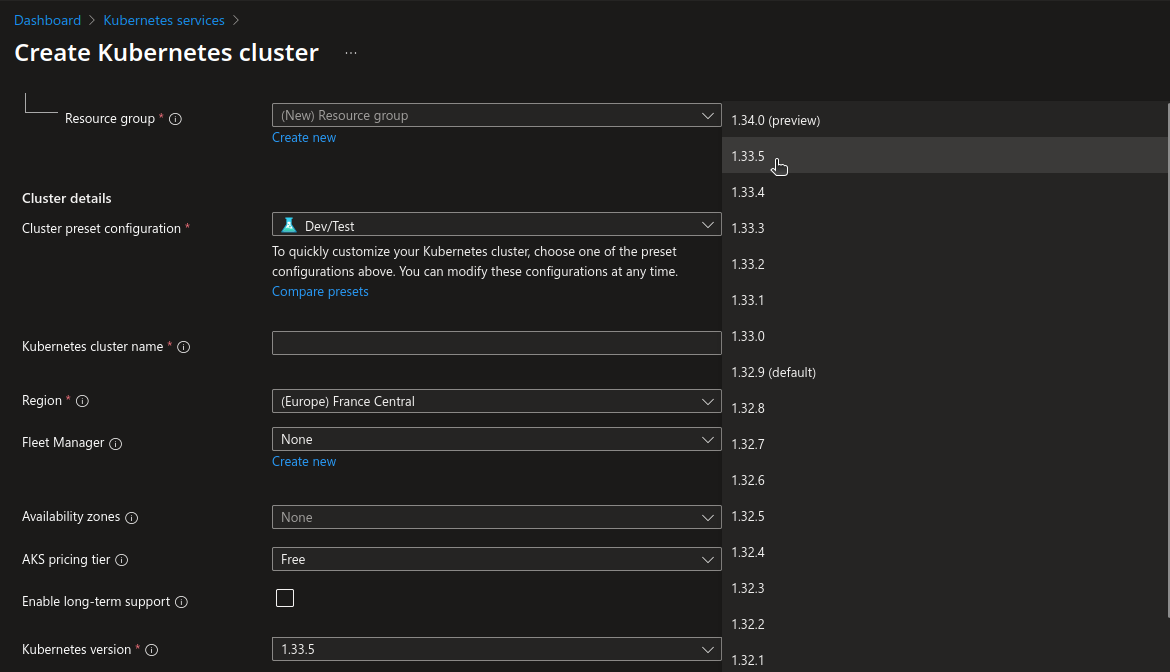
Also, because I like Cilium, the cluster will be configured with BYOCNI, and Cilium installed. However, for this article, there is no requirement to use a CNI or another. It may be useful depending on how we want to interact with Falco, but we’ll come to that later.
df@df-2404lts:~$ k get no
NAME                                STATUS   ROLES    AGE    VERSION
aks-aksnp0lab-30954262-vmss000000   Ready    <none>   168m   v1.33.5
aks-aksnp0lab-30954262-vmss000001   Ready    <none>   168m   v1.33.5
aks-aksnp0lab-30954262-vmss000002   Ready    <none>   168m   v1.33.5
aks-aksnp0lab-30954262-vmss000003   Ready    <none>   151m   v1.33.5
df@df-2404lts:~$ cilium status
    /¯¯\
 /¯¯\__/¯¯\    Cilium:             OK
 \__/¯¯\__/    Operator:           OK
 /¯¯\__/¯¯\    Envoy DaemonSet:    OK
 \__/¯¯\__/    Hubble Relay:       OK
    \__/       ClusterMesh:        disabled

DaemonSet              cilium             Desired: 4, Ready: 4/4, Available: 4/4
DaemonSet              cilium-envoy       Desired: 4, Ready: 4/4, Available: 4/4
Deployment             cilium-operator    Desired: 2, Ready: 2/2, Available: 2/2
Deployment             hubble-relay       Desired: 1, Ready: 1/1, Available: 1/1
Deployment             hubble-ui          Desired: 1, Ready: 1/1, Available: 1/1
Containers:            cilium             Running: 4
                       cilium-envoy       Running: 4
                       cilium-operator    Running: 2
                       hubble-relay       Running: 1
                       hubble-ui          Running: 1
Cluster Pods:          20/20 managed by Cilium
Helm chart version:    1.17.2
Image versions         cilium             quay.io/cilium/cilium:v1.17.2@sha256:3c4c9932b5d8368619cb922a497ff2ebc8def5f41c18e410bcc84025fcd385b1: 4
                       cilium-envoy       quay.io/cilium/cilium-envoy:v1.31.5-1741765102-efed3defcc70ab5b263a0fc44c93d316b846a211@sha256:377c78c13d2731f3720f931721ee309159e782d882251709cb0fac3b42c03f4b: 4
                       cilium-operator    quay.io/cilium/operator-generic:v1.17.2@sha256:81f2d7198366e8dec2903a3a8361e4c68d47d19c68a0d42f0b7b6e3f0523f249: 2
                       hubble-relay       quay.io/cilium/hubble-relay:v1.17.2@sha256:42a8db5c256c516cacb5b8937c321b2373ad7a6b0a1e5a5120d5028433d586cc: 1
                       hubble-ui          quay.io/cilium/hubble-ui-backend:v0.13.2@sha256:a034b7e98e6ea796ed26df8f4e71f83fc16465a19d166eff67a03b822c0bfa15: 1
                       hubble-ui          quay.io/cilium/hubble-ui:v0.13.2@sha256:9e37c1296b802830834cc87342a9182ccbb71ffebb711971e849221bd9d59392: 1
Once we have a cluster running, we’re good to go
1.2. Installation
To install on AKS, this time, we’ll rely on the Helm chart available on falcosecurity repo.
df@df-2404lts:~$ helm search repo falcosecurity
NAME                            CHART VERSION   APP VERSION     DESCRIPTION
falcosecurity/event-generator   0.3.4           0.10.0          A Helm chart used to deploy the event-generator...
falcosecurity/falco             7.0.1           0.42.1          Falco
falcosecurity/falco-exporter    0.12.2          0.8.7           DEPRECATED Prometheus Metrics Exporter for Falc...
falcosecurity/falco-talon       0.3.0           0.3.0           React to the events from Falco
falcosecurity/falcosidekick     0.11.1          2.31.1          Connect Falco to your ecosystem
falcosecurity/k8s-metacollector 0.1.10          0.1.1           Install k8s-metacollector to fetch and distribu...
The installation is pretty simple and can be done as below.
df@df-2404lts:~$ helm upgrade falco --set falcosidekick.enabled=true falcosecurity/falco --namespace falco --create-namespace --install
Release "falco" does not exist. Installing it now.
NAME: falco
LAST DEPLOYED: Mon Nov 24 11:53:30 2025
NAMESPACE: falco
STATUS: deployed
REVISION: 1
NOTES:
Falco agents are spinning up on each node in your cluster. After a few
seconds, they are going to start monitoring your containers looking for
security issues.
The attentive reader will have noticed that we added a parameter for something call falco sidekick. We’ll do a specific post on that very soon, but for now we will focus on install, config and susage of Falco on AKS 😇.
If everything went well, we should have Falco resources in the falco namespace.
df@df-2404lts:~$ k get all -n falco
NAME                                       READY   STATUS    RESTARTS   AGE
pod/falco-4x52l                            2/2     Running   0          95m
pod/falco-falcosidekick-74468d7bb8-4nms8   1/1     Running   0          95m
pod/falco-falcosidekick-74468d7bb8-hx7l4   1/1     Running   0          95m
pod/falco-rl6dd                            2/2     Running   0          95m
pod/falco-srkdh                            2/2     Running   0          95m

NAME                          TYPE        CLUSTER-IP       EXTERNAL-IP   PORT(S)             AGE
service/falco-falcosidekick   ClusterIP   100.65.237.201   <none>        2801/TCP,2810/TCP   95m

NAME                   DESIRED   CURRENT   READY   UP-TO-DATE   AVAILABLE   NODE SELECTOR   AGE
daemonset.apps/falco   3         3         3       3            3           <none>          95m

NAME                                  READY   UP-TO-DATE   AVAILABLE   AGE
deployment.apps/falco-falcosidekick   2/2     2            2           95m

NAME                                             DESIRED   CURRENT   READY   AGE
replicaset.apps/falco-falcosidekick-74468d7bb8   2         2         2       95m
df@df-2404lts:~$ k get configmaps -n falco
NAME               DATA   AGE
falco              1      95m
falco-falcoctl     1      95m
kube-root-ca.crt   1      95m
df@df-2404lts:~$ k get secrets -n falco
NAME                          TYPE                 DATA   AGE
falco-falcosidekick           Opaque               384    95m
sh.helm.release.v1.falco.v1   helm.sh/release.v1   1      95m
We can note that we have a daemonset, which effectively allow us to have a falco pod on all nodes (except if we add taints without the corresponding tolerations obviously 😎)
df@df-2404lts:~$ k get daemonsets.apps -n falco
NAME    DESIRED   CURRENT   READY   UP-TO-DATE   AVAILABLE   NODE SELECTOR   AGE
falco   3         3         3       3            3           <none>          96m
Checking one of the daemonset pods, we can find the falco.yaml config file.
df@df-2404lts:~$ k exec -n falco falco-4x52l -it -- sh
Defaulted container "falco" out of: falco, falcoctl-artifact-follow, falco-driver-loader (init), falcoctl-artifact-install (init)
/ # ls /etc/falco
config.d          falco.yaml        falco_rules.yaml
We’ll note also the falco_rules.yaml which is the default rules file.
In the configuration though we will find that the accepted rule files by default do not change in comparison to the install through binary.
df@df-2404lts:~$ k exec -n falco falco-4x52l -- cat /etc/falco/falco.yaml > ./yamlfiles/falco.yaml
Defaulted container "falco" out of: falco, falcoctl-artifact-follow, falco-driver-loader (init), falcoctl-artifact-install (init)
df@df-2404lts:~$ cat ./yamlfiles/falco.yaml |grep -i rules_files -A4
rules_files:
- /etc/falco/falco_rules.yaml
- /etc/falco/falco_rules.local.yaml
- /etc/falco/rules.d
stdout_output:
We can have a look at the rule file and find out that it is similar to the one we previously used on the kubeadm lab. For example, the rule Terminal shell in container is present with the same definition as before, which is what we expected.
df@df-2404lts:~$ k exec -n falco falco-4x52l -- cat /etc/falco/falco_rules.yaml > ./yamlfiles/falco_rules.yaml
Defaulted container "falco" out of: falco, falcoctl-artifact-follow, falco-driver-loader (init), falcoctl-artifact-install (init)
df@df-2404lts:~$ cat ./yamlfiles/falco_rules.yaml |grep -i "rule: Terminal shell in container" -A6
- rule: Terminal shell in container
  desc: >
    A shell was used as the entrypoint/exec point into a container with an attached terminal. Parent process may have
    legitimately already exited and be null (read container_entrypoint macro). Common when using "kubectl exec" in Kubernetes.
    Correlate with k8saudit exec logs if possible to find user or serviceaccount token used (fuzzy correlation by namespace and pod name).
    Rather than considering it a standalone rule, it may be best used as generic auditing rule while examining other triggered
    rules in this container/tty.
Ok, so we know how to install Falco, and thanks to the daemonset, we know its automatically propageted to all nodes. There may be some questions to answered for rules customization, but we’ll come to that in the next part.
2. Using Falco on AKS
2.1 Triggering an alert
To trigger alert, we’ll rely on a sample pod called hellofalco and check the standard output of the daemonset pod running on the corresponding node.
df@df-2404lts:~$ k run hellofalco --image nginx
pod/hellofalco created

df@df-2404lts:~$ k get pod -o wide
NAME         READY   STATUS    RESTARTS   AGE   IP             NODE                                NOMINATED NODE   READINESS GATES
hellofalco   1/1     Running   0          9s    100.66.1.202   aks-aksnp0lab-30954262-vmss000002   <none>           <none>
df@df-2404lts:~$ k get pod -n falco -o wide
NAME                                   READY   STATUS    RESTARTS   AGE    IP            NODE                                NOMINATED NODE   READINESS GATES
falco-4x52l                            2/2     Running   0          120m   100.66.1.21   aks-aksnp0lab-30954262-vmss000002   <none>           <none>
falco-falcosidekick-74468d7bb8-4nms8   1/1     Running   0          120m   100.66.1.79   aks-aksnp0lab-30954262-vmss000002   <none>           <none>
falco-falcosidekick-74468d7bb8-hx7l4   1/1     Running   0          120m   100.66.1.29   aks-aksnp0lab-30954262-vmss000002   <none>           <none>
falco-rl6dd                            2/2     Running   0          120m   100.66.2.7    aks-aksnp0lab-30954262-vmss000003   <none>           <none>
falco-srkdh                            2/2     Running   0          120m   100.66.0.44   aks-aksnp0lab-30954262-vmss000001   <none>           <none>
We can see that the falco pod on the same node as our test pod is falco-4x52.
Let’s trigger a bunch of rules.
df@df-2404lts:~$ k exec hellofalco -it -- sh
# ls /etc/shadow
/etc/shadow
# cat /etc/shadow
root:*:20409:0:99999:7:::
daemon:*:20409:0:99999:7:::
bin:*:20409:0:99999:7:::
sys:*:20409:0:99999:7:::
sync:*:20409:0:99999:7:::
games:*:20409:0:99999:7:::
man:*:20409:0:99999:7:::
lp:*:20409:0:99999:7:::
mail:*:20409:0:99999:7:::
news:*:20409:0:99999:7:::
uucp:*:20409:0:99999:7:::
proxy:*:20409:0:99999:7:::
www-data:*:20409:0:99999:7:::
backup:*:20409:0:99999:7:::
list:*:20409:0:99999:7:::
irc:*:20409:0:99999:7:::
_apt:*:20409:0:99999:7:::
nobody:*:20409:0:99999:7:::
nginx:!:20410::::::
The Falco logs are directly avaialble in the Falco pods output, so we can get those with the kubectl logs command
df@df-2404lts:~$ k logs -n falco falco-4x52l | grep "container_name=hellofalco" > falcooutput.json
With a bit of formating, we can get the desired informations and find that we did triggered rules with our hellofalco pod.
df@df-2404lts:~$ cat falcooutput.json |jq .
[
  {
    "hostname": "aks-aksnp0lab-30954262-vmss000002",
    "output": "13:22:11.153390386: Warning Sensitive file opened for reading by non-trusted program | file=/etc/shadow gparent=systemd ggparent=<NA> gggparent=<NA> evt_type=openat user=root user_uid=0 user_loginuid=-1 process=cat proc_exepath=/usr/bin/cat parent=containerd-shim command=cat /etc/shadow terminal=0 container_id=1376fe875695 container_name=hellofalco container_image_repository=docker.io/library/nginx container_image_tag=latest k8s_pod_name=hellofalco k8s_ns_name=default",
    "output_fields": {
      "container.id": "1376fe875695",
      "container.image.repository": "docker.io/library/nginx",
      "container.image.tag": "latest",
      "container.name": "hellofalco",
      "evt.time": 1763990531153390386,
      "evt.type": "openat",
      "fd.name": "/etc/shadow",
      "k8s.ns.name": "default",
      "k8s.pod.name": "hellofalco",
      "proc.aname[2]": "systemd",
      "proc.aname[3]": null,
      "proc.aname[4]": null,
      "proc.cmdline": "cat /etc/shadow",
      "proc.exepath": "/usr/bin/cat",
      "proc.name": "cat",
      "proc.pname": "containerd-shim",
      "proc.tty": 0,
      "user.loginuid": -1,
      "user.name": "root",
      "user.uid": 0
    },
    "priority": "Warning",
    "rule": "Read sensitive file untrusted",
    "source": "syscall",
    "tags": [
      "T1555",
      "container",
      "filesystem",
      "host",
      "maturity_stable",
      "mitre_credential_access"
    ],
    "time": "2025-11-24T13:22:11.153390386Z"
  },
  {
    "hostname": "aks-aksnp0lab-30954262-vmss000002",
    "output": "13:23:47.646127337: Warning Sensitive file opened for reading by non-trusted program | file=/etc/shadow gparent=systemd ggparent=<NA> gggparent=<NA> evt_type=openat user=root user_uid=0 user_loginuid=-1 process=cat proc_exepath=/usr/bin/cat parent=containerd-shim command=cat /etc/shadow terminal=0 container_id=1376fe875695 container_name=hellofalco container_image_repository=docker.io/library/nginx container_image_tag=latest k8s_pod_name=hellofalco k8s_ns_name=default",
    "output_fields": {
      "container.id": "1376fe875695",
      "container.image.repository": "docker.io/library/nginx",
      "container.image.tag": "latest",
      "container.name": "hellofalco",
      "evt.time": 1763990627646127337,
      "evt.type": "openat",
      "fd.name": "/etc/shadow",
      "k8s.ns.name": "default",
      "k8s.pod.name": "hellofalco",
      "proc.aname[2]": "systemd",
      "proc.aname[3]": null,
      "proc.aname[4]": null,
      "proc.cmdline": "cat /etc/shadow",
      "proc.exepath": "/usr/bin/cat",
      "proc.name": "cat",
      "proc.pname": "containerd-shim",
      "proc.tty": 0,
      "user.loginuid": -1,
      "user.name": "root",
      "user.uid": 0
    },
    "priority": "Warning",
    "rule": "Read sensitive file untrusted",
    "source": "syscall",
    "tags": [
      "T1555",
      "container",
      "filesystem",
      "host",
      "maturity_stable",
      "mitre_credential_access"
    ],
    "time": "2025-11-24T13:23:47.646127337Z"
  },
  {
    "hostname": "aks-aksnp0lab-30954262-vmss000002",
    "output": "13:24:56.428114287: Notice A shell was spawned in a container with an attached terminal | evt_type=execve user=root user_uid=0 user_loginuid=-1 process=sh proc_exepath=/usr/bin/dash parent=containerd-shim command=sh terminal=34816 exe_flags=EXE_WRITABLE|EXE_LOWER_LAYER container_id=1376fe875695 container_name=hellofalco container_image_repository=docker.io/library/nginx container_image_tag=latest k8s_pod_name=hellofalco k8s_ns_name=default",
    "output_fields": {
      "container.id": "1376fe875695",
      "container.image.repository": "docker.io/library/nginx",
      "container.image.tag": "latest",
      "container.name": "hellofalco",
      "evt.arg.flags": "EXE_WRITABLE|EXE_LOWER_LAYER",
      "evt.time": 1763990696428114287,
      "evt.type": "execve",
      "k8s.ns.name": "default",
      "k8s.pod.name": "hellofalco",
      "proc.cmdline": "sh",
      "proc.exepath": "/usr/bin/dash",
      "proc.name": "sh",
      "proc.pname": "containerd-shim",
      "proc.tty": 34816,
      "user.loginuid": -1,
      "user.name": "root",
      "user.uid": 0
    },
    "priority": "Notice",
    "rule": "Terminal shell in container",
    "source": "syscall",
    "tags": [
      "T1059",
      "container",
      "maturity_stable",
      "mitre_execution",
      "shell"
    ],
    "time": "2025-11-24T13:24:56.428114287Z"
  }
]
2.2. Customizing rules
To customize rules with an Helm-managed Falco, we relies on additional yaml files, that we may pass through the Helm cli as below
df@df-2404lts:~$ helm upgrade falco --set falcosidekick.enabled=true falcosecurity/falco --namespace falco --create-namespace --install -f ./rules.yaml
Release "falco" has been upgraded. Happy Helming!
NAME: falco
LAST DEPLOYED: Mon Nov 24 15:19:23 2025
NAMESPACE: falco
STATUS: deployed
REVISION: 3
NOTES:
Falco agents are spinning up on each node in your cluster. After a few
seconds, they are going to start monitoring your containers looking for
security issues.
The yaml file should look like this:
customRules:
  customrules.yaml: |-
    - rule: Container Spawned
      desc: >
        Detects whenever a new container is created or started.
      condition: >
        evt.type = container
      output: >
        🚀 Container spawned!
        container=%container.name
        image=%container.image.repository:%container.image.tag
        user=%user.name
      priority: INFO
      tags: [container, monitoring, lifecycle]

    - rule: Terminal shell in container
      desc: >
        A shell was used as the entrypoint/exec point into a container with an attached terminal. Parent process may have
        legitimately already exited and be null (read container_entrypoint macro). Common when using "kubectl exec" in Kubernetes.
        Correlate with k8saudit exec logs if possible to find user or serviceaccount token used (fuzzy correlation by namespace and pod name).
        Rather than considering it a standalone rule, it may be best used as generic auditing rule while examining other triggered
        rules in this container/tty.
      condition: >
        spawned_process
        and container
        and shell_procs
        and proc.tty != 0
        and container_entrypoint
        and not user_expected_terminal_shell_in_container_conditions
      output: A shell was spawned in a container with an attached terminal | evt_type=%evt.type user=%user.name user_uid=%user.uid user_loginuid=%user.loginuid process=%proc.name proc_exepath=%proc.exepath parent=%proc.pname command=%proc.cmdline terminal=%proc.tty exe_flags=%evt.arg.flags
      priority: ALERT
      tags: [maturity_stable, container, shell, mitre_execution, T1059]
If everything goes well (which may take a bit of time, I had to restart the daemonset pods), we should see in the daemonset pods the new rule file and its content.
df@df-2404lts:~/Documents/dfrappart.github.io$ k exec -n falco daemonsets/falco -- ls /etc/falco
Defaulted container "falco" out of: falco, falcoctl-artifact-follow, falco-driver-loader (init), falcoctl-artifact-install (init)
config.d
falco.yaml
falco_rules.yaml
rules.d
df@df-2404lts:~/Documents/dfrappart.github.io$ k exec -n falco daemonsets/falco -- ls /etc/falco/rules.d
Defaulted container "falco" out of: falco, falcoctl-artifact-follow, falco-driver-loader (init), falcoctl-artifact-install (init)
customrules.yaml
df@df-2404lts:~/Documents/dfrappart.github.io$ k exec -n falco daemonsets/falco -- cat /etc/falco/rules.d/customrules.yaml
Defaulted container "falco" out of: falco, falcoctl-artifact-follow, falco-driver-loader (init), falcoctl-artifact-install (init)
- rule: Container Spawned
  desc: >
    Detects whenever a new container is created or started.
  condition: >
    evt.type = container
  output: >
    🚀 Container spawned!
    container=%container.name
    image=%container.image.repository:%container.image.tag
    user=%user.name
  priority: INFO
  tags: [container, monitoring, lifecycle]

- rule: Terminal shell in container
  desc: >
    A shell was used as the entrypoint/exec point into a container with an attached terminal. Parent process may have
    legitimately already exited and be null (read container_entrypoint macro). Common when using "kubectl exec" in Kubernetes.
    Correlate with k8saudit exec logs if possible to find user or serviceaccount token used (fuzzy correlation by namespace and pod name).
    Rather than considering it a standalone rule, it may be best used as generic auditing rule while examining other triggered
    rules in this container/tty.
  condition: >
    spawned_process
    and container
    and shell_procs
    and proc.tty != 0
    and container_entrypoint
    and not user_expected_terminal_shell_in_container_conditions
  output: A shell was spawned in a container with an attached terminal | evt_type=%evt.type user=%user.name user_uid=%user.uid user_loginuid=%user.loginuid process=%proc.name proc_exepath=%proc.exepath parent=%proc.pname command=%proc.cmdline terminal=%proc.tty exe_flags=%evt.arg.flags
  priority: ALERT
  tags: [maturity_stable, container, shell, mitre_execution, T1059]
Now if we check the logs on the Falco pods, we should see the notification for our custom rule that is triggerd for container creation. But also the rule for Shell execution modified to ALERT.
df@df-2404lts:~$ k logs -n falco falco-p9m9k |grep "container_name=hellofalco" > falcooutputcustom.json
Defaulted container "falco" out of: falco, falcoctl-artifact-follow, falco-driver-loader (init), falcoctl-artifact-install (init)
df@df-2404lts:~$ cat falcooutputcustom.json |jq .
[
  {
    "hostname": "aks-aksnp0lab-30954262-vmss000002",
    "output": "14:22:42.070202000: Informational 🚀 Container spawned! container=hellofalco image=docker.io/library/nginx:latest user=<NA> container_id=1376fe875695 container_name=hellofalco container_image_repository=docker.io/library/nginx container_image_tag=latest k8s_pod_name=hellofalco k8s_ns_name=default",
    "output_fields": {
      "container.id": "1376fe875695",
      "container.image.repository": "docker.io/library/nginx",
      "container.image.tag": "latest",
      "container.name": "hellofalco",
      "evt.time": 1763994162070202000,
      "k8s.ns.name": "default",
      "k8s.pod.name": "hellofalco",
      "user.name": null
    },
    "priority": "Informational",
    "rule": "Container Spawned",
    "source": "syscall",
    "tags": [
      "container",
      "lifecycle",
      "monitoring"
    ],
    "time": "2025-11-24T14:22:42.070202000Z"
  },
  {
    "hostname": "aks-aksnp0lab-30954262-vmss000002",
    "output": "14:24:39.222599448: Alert A shell was spawned in a container with an attached terminal | evt_type=execve user=root user_uid=0 user_loginuid=-1 process=sh proc_exepath=/usr/bin/dash parent=containerd-shim command=sh terminal=34816 exe_flags=EXE_WRITABLE|EXE_LOWER_LAYER container_id=1376fe875695 container_name=hellofalco container_image_repository=docker.io/library/nginx container_image_tag=latest k8s_pod_name=hellofalco k8s_ns_name=default",
    "output_fields": {
      "container.id": "1376fe875695",
      "container.image.repository": "docker.io/library/nginx",
      "container.image.tag": "latest",
      "container.name": "hellofalco",
      "evt.arg.flags": "EXE_WRITABLE|EXE_LOWER_LAYER",
      "evt.time": 1763994279222599448,
      "evt.type": "execve",
      "k8s.ns.name": "default",
      "k8s.pod.name": "hellofalco",
      "proc.cmdline": "sh",
      "proc.exepath": "/usr/bin/dash",
      "proc.name": "sh",
      "proc.pname": "containerd-shim",
      "proc.tty": 34816,
      "user.loginuid": -1,
      "user.name": "root",
      "user.uid": 0
    },
    "priority": "Alert",
    "rule": "Terminal shell in container",
    "source": "syscall",
    "tags": [
      "T1059",
      "container",
      "maturity_stable",
      "mitre_execution",
      "shell"
    ],
    "time": "2025-11-24T14:24:39.222599448Z"
  }
]
Ok let’s conclude for today.
3. Conclusion
This time we had a look at Falco on an AKS cluster. Instead of installing binaries on the cluster nodes, we relied on Helm anda daemonset to have Falco available on each nodes. Apart from that, the way Falco works is unchanged and we can propagate easily additional rules if needed through additional files passed through the Helm command. Also, instead of checking the syslog on the nodes, we can use kubectl logs command to see Falco outputs and rules triggered. At this point the exploitability is not yet ideal, but we’ll see how we can further extend Falco in a coming post.
Until then ^^