Deployment Safeguards in AKS
Hello again,
Today a short article about Deployment Safeguards in AKS. It’s something I really came across by happenstance, while looking for something on the Terraform doc (Yes I still parse documentation manually, I’ve always been fond of reading 🤷🏻♂️)
I found it interesting so I’ll talk about it today ^^.
The agenda:
- Deployment Safeguards overview
- Using deployment safeguards
- AKS Deployment safeguards vs Native PSA management
1. Deployment Safeguards overview
Deployment safeguards is a feature available in AKS to enforce best practices. As the documentation states it, it works with Azure policy controls. This is important to consider and we’ll see a bit more of this along this article.
In terms of those best practices, it allows to enforce controls (or warns) equivalent to the Pod Security Standards/Pod Security Admission, but not only, as we can see in the below table.
| Deployment safeguard policy | Mutation outcome if available |
|---|---|
| Cannot Edit Individual Nodes | N/A |
| Kubernetes cluster containers CPU and memory resource requests must be defined | Sets default CPU and memory requests and enforces minimums. For more information, see Resource requests mutator. |
| Must Have Anti Affinity Rules or topologySpreadConstraintsSet | Adds pod anti-affinity rules and topology spread constraints to improve workload distribution. For more information, see Anti-affinity and topology spread mutator. |
| No AKS Specific Labels | N/A |
| Kubernetes cluster containers should only use allowed images | N/A |
| Reserved System Pool Taints | Removes the CriticalAddonsOnly taint from a user node pool if not set. AKS uses the CriticalAddonsOnly taint to keep customer pods away from the system pool. This configuration ensures a clear separation between AKS components and customer pods and prevents eviction of customer pods that don’t tolerate the CriticalAddonsOnly taint. |
| Ensure cluster containers have readiness or liveness probes configured | N/A |
| Kubernetes clusters should use Container Storage Interface (CSI) driver StorageClass | N/A |
| Kubernetes cluster services should use unique selectors | N/A |
| Kubernetes cluster container images should not include latest image tag | N/A |
As one could expect, the Warn mode displays warning messages when an admin is managing the cluster through kubectl, while the Enforce mode denies actions/configurations that violate the Safeguards.
Also, when the Enforce mode is set, we get a resource request mutator that will… mutate… the resources impacted, as the name implies 😆.
For example, a pod with missing CPU or Memory requests and limits definition would be mutated to get the following:
| Scenario | Action |
|---|---|
| Both CPU request and limit are missing | Set both to 500m (default) |
| CPU request exists but is less than 100m | Set limit to 100m (minimum) |
| CPU limit exists but is less than 100m | Set limit to 100m (minimum) |
| Only CPU request exists | Set request equal to limit |
| Only CPU limit exists | Set request equal to limit |
| Both memory request and limit are missing | Set both to 2048Mi (default) |
| Memory request exists but is less than 100Mi | Set request to 100Mi (minimum) |
| Memory limit exists but is less than 100Mi | Set limit to 100Mi (minimum) |
| Only memory request exists | Leave as-is (no limit added) |
| Only memory limit exists | Leave as-is (no request added) |
As described in the first table, there are different actions managed by the resource request mutator. We’ll eventually see some of those in the next section.
2. Deep dive in deployment safeguards
2.1. Use deployment safeguards
The idea with Deployment safeguards is to provide a means to the Azure admin to deploy the safeguards that we discussed before.
To do this, the said administrator can interact with the Azure API, through the cli or terraform for example.
As a matter of fact, I came across this feature while reading the Azurerm provider documentation.
And thus, from a terraform standpoint, deploying the safeguards looks like this.
resource "azurerm_kubernetes_cluster_deployment_safeguard" "AKSDeploymentSafeguard" {

  kubernetes_cluster_id        = <AksClusterId>
  level                        = "Warn"
  excluded_namespaces          = ["kube-system", "kube-public", "kube-node-lease", "default"]
  pod_security_standards_level = "Restricted"
}
It’s possible to create this safeguard through the cli, as the help displays.
➜  ~ az aks safeguards create -h |grep Examples -A7
Examples
    Create a DeploymentSafeguards resource at Warn level with a managed cluster resource id
        az aks safeguards create --resource /subscriptions/subid1/resourceGroups/rg1/providers/Micro
        soft.ContainerService/managedClusters/cluster1 --level Warn

    Create a DeploymentSafeguards resource at Warn level using subscription, resourcegroup, and name
    tags
        az aks safeguards create --subscription subid1 -g rg1 -n cluster1 --level Warn
➜  ~
However, we should take note that only one safeguard per cluster.
➜  ~ az aks safeguards create --cluster aks-lab1 -g rsg-cluster-aks
Deployment Safeguards instance already exists for this cluster. Please use 'az aks safeguards update' to modify the configuration, or 'az aks safeguards delete' to remove it before creating a new one.
It makes sense, it does not look like we can set the name of the deployment safeguard, either in cli or through the terraform object.
Still, we have our safeguards deployed.
➜  ~ az aks safeguards list --managed-cluster aks-lab1 -g rsg-cluster-aks |jq .
[
  {
    "eTag": "00000000-0000-0000-0000-000000000000",
    "id": "/subscriptions/00000000-0000-0000-0000-000000000000/resourceGroups/rsg-cluster-aks/providers/Microsoft.ContainerService/managedClusters/aks-lab1/providers/Microsoft.ContainerService/deploymentSafeguards/default",
    "name": "default",
    "properties": {
      "excludedNamespaces": [
        "kube-system",
        "kube-public",
        "kube-node-lease",
        "default",
        "cert-manager"
      ],
      "level": "Warn",
      "podSecurityStandardsLevel": "Restricted",
      "provisioningState": "Succeeded",
      "systemExcludedNamespaces": [
        "aks-command",
        "kube-system",
        "calico-system",
        "tigera-system",
        "gatekeeper-system",
        "app-routing-system",
        "aks-periscope",
        "aks-istio-system",
        "aks-istio-ingress",
        "aks-istio-egress",
        "azuresecuritylinuxagent",
        "aks-static-egress-gateway",
        "fleet-system",
        "azappconfig-system",
        "azurelustre-system",
        "azureml",
        "dapr-system",
        "dataprotection-microsoft",
        "flux-system",
        "acstor",
        "sc-system",
        "azure-extensions-usage-system",
        "gadget"
      ]
    },
    "resourceGroup": "rsg-cluster-aks",
    "type": "Microsoft.ContainerService/deploymentSafeguards"
  }
]
Ok, what about trying some stuff. There is one safeguard that should tell us to avoid the labeling of individual node, through kubectl
➜  ~ k get no
NAME                                 STATUS   ROLES    AGE     VERSION
aks-aksnp0lab1-47883628-vmss000001   Ready    <none>   6h3m    v1.36.4
aks-aksnp0lab1-47883628-vmss000002   Ready    <none>   6h3m    v1.36.4
aks-aksnp0lab1-47883628-vmss000003   Ready    <none>   5h47m   v1.36.4
➜  ~ k label nodes aks-aksnp0lab1-47883628-vmss000001 label=test
Warning: [azurepolicy-k8sazurev1restrictednodeedits-b6d031d2c47bf02fdfe1] Tainting or labelling individual nodes is not recommended. Please use AZ CLI to taint/label nodepools instead. For more information, visit https://aka.ms/aks/deployment-safeguards
node/aks-aksnp0lab1-47883628-vmss000001 labeled
We do get a warning, but because it’s only warning, the label is applied.
➜  ~ k get node -o json |jq '.items[0].metadata.labels' |grep -i "label" -A2 -B2
  "kubernetes.io/hostname": "aks-aksnp0lab1-47883628-vmss000001",
  "kubernetes.io/os": "linux",
  "label": "test",
  "node.kubernetes.io/instance-type": "standard_d2s_v4",
  "storageprofile": "managed",
Ok, let’s try something else.
➜  ~ k create ns demo
namespace/demo created
➜  ~ k run demo -n demo --image=nginx
Warning: Validation failed for ValidatingAdmissionPolicy 'aks-managed-restricted-seccomp' with binding 'aks-managed-restricted-seccomp-binding': Seccomp profile must be explicitly set to "RuntimeDefault" or "Localhost" under restricted policy (Linux only)
Warning: Validation failed for ValidatingAdmissionPolicy 'aks-managed-restricted-privilege-escalation' with binding 'aks-managed-restricted-privilege-escalation-binding': Privilege escalation must be explicitly set to false for all containers under restricted policy (Linux only)
Warning: Validation failed for ValidatingAdmissionPolicy 'aks-managed-restricted-capabilities' with binding 'aks-managed-restricted-capabilities-binding': All containers must drop ALL capabilities under restricted policy (Linux only)
Warning: Validation failed for ValidatingAdmissionPolicy 'aks-managed-restricted-run-as-non-root' with binding 'aks-managed-restricted-run-as-non-root-binding': Containers must not run as root user: spec.containers[*].securityContext.runAsNonRoot not set to true
Warning: [azurepolicy-k8sazurev2containerenforceprob-a349bfc0c5860e58e1e3] Container <demo> in your Pod <demo> has no <livenessProbe>. Required probes: ["readinessProbe", "livenessProbe"]. For more information, visit https://aka.ms/aks/deployment-safeguards
Warning: [azurepolicy-k8sazurev2containerenforceprob-a349bfc0c5860e58e1e3] Container <demo> in your Pod <demo> has no <readinessProbe>. Required probes: ["readinessProbe", "livenessProbe"]. For more information, visit https://aka.ms/aks/deployment-safeguards
Warning: [azurepolicy-k8sazurev4noprivilegeescalatio-c31629da2b1380febaa2] Container demo is required to explicitly set securityContext.allowPrivilegeEscalation to false. For more information, visit https://aka.ms/aks/deployment-safeguards
Warning: [azurepolicy-k8sazurev2containernolatestima-bd040c42044f6d5ad684] Please specify an explicit version such as '1.0'. Using the latest tag for container demo in Kubernetes is a best practice to ensure reproducibility, prevent unintended updates, and facilitate easier debugging and rollbacks by using explicit and versioned container images. For more information, visit https://aka.ms/aks/deployment-safeguards
Warning: [azurepolicy-k8sazurev3allowedseccomp-a199645234fa143881eb] Seccomp profile 'not configured' is not allowed for container 'demo'. Found at: no explicit profile found. Allowed profiles: {"Localhost", "RuntimeDefault", "localhost/*", "runtime/default"}. For more information, visit https://aka.ms/aks/deployment-safeguards
Warning: [azurepolicy-k8sazurev1containerrequests-b9818431be5a70a1e21a] container <demo> has no resource requests. For more information, visit https://aka.ms/aks/deployment-safeguards
Warning: [azurepolicy-k8sazurev3allowedcapabilities-26737cbbf6db8ced3c55] container <demo> is not dropping all required capabilities. Container must drop all of ["ALL"] or "ALL". For more information, visit https://aka.ms/aks/deployment-safeguards
pod/demo created
➜  ~ k get pod -n demo
NAME   READY   STATUS    RESTARTS   AGE
demo   1/1     Running   0          8s
➜  ~
Again, a lot of warnings, related to the controls of the Pod Security Standard, but still only warnings.
If we try something similar on the default namespace, which is excluded from the safeguards, no warning, as expected.
➜  ~ k run demo-default --image=nginx
pod/demo-default created
Ok let’s switch to Enforce
➜  ~ az aks safeguards update --managed-cluster aks-lab1 -g rsg-cluster-aks --set properties.level=Enforce
{
  "eTag": "00000000-0000-0000-0000-000000000000",
  "id": "/subscriptions/00000000-0000-0000-0000-000000000000/resourceGroups/rsg-cluster-aks/providers/Microsoft.ContainerService/managedClusters/aks-lab1/providers/Microsoft.ContainerService/deploymentSafeguards/default",
  "name": "default",
  "properties": {
    "excludedNamespaces": [
      "kube-system",
      "kube-public",
      "kube-node-lease",
      "default",
      "cert-manager"
    ],
    "level": "Enforce",
    "podSecurityStandardsLevel": "Restricted",
    "provisioningState": "Succeeded",
    "systemExcludedNamespaces": [
      "aks-command",
      "kube-system",
      "calico-system",
      "tigera-system",
      "gatekeeper-system",
      "app-routing-system",
      "aks-periscope",
      "aks-istio-system",
      "aks-istio-ingress",
      "aks-istio-egress",
      "azuresecuritylinuxagent",
      "aks-static-egress-gateway",
      "fleet-system",
      "azappconfig-system",
      "azurelustre-system",
      "azureml",
      "dapr-system",
      "dataprotection-microsoft",
      "flux-system",
      "acstor",
      "sc-system",
      "azure-extensions-usage-system",
      "gadget"
    ]
  },
  "resourceGroup": "rsg-cluster-aks",
  "type": "Microsoft.ContainerService/deploymentSafeguards"
}
Now, labeling a single node is not possible.
➜  ~ k get no
NAME                                 STATUS   ROLES    AGE     VERSION
aks-aksnp0lab1-47883628-vmss000001   Ready    <none>   6h19m   v1.36.4
aks-aksnp0lab1-47883628-vmss000002   Ready    <none>   6h19m   v1.36.4
aks-aksnp0lab1-47883628-vmss000003   Ready    <none>   6h3m    v1.36.4
➜  ~ k label nodes aks-aksnp0lab1-47883628-vmss000002 label=testwithonforce
Error from server (Forbidden): admission webhook "validation.gatekeeper.sh" denied the request: [azurepolicy-k8sazurev1restrictednodeedits-b6d031d2c47bf02fdfe1] Tainting or labelling individual nodes is not recommended. Please use AZ CLI to taint/label nodepools instead. For more information, visit https://aka.ms/aks/deployment-safeguards
As is creating pods without some restrictions.
➜  ~ k run demo2 -n demo --image nginx
Error from server (Forbidden): pods "demo2" is forbidden: ValidatingAdmissionPolicy 'aks-managed-restricted-privilege-escalation' with binding 'aks-managed-restricted-privilege-escalation-binding' denied request: Privilege escalation must be explicitly set to false for all containers under restricted policy (Linux only)
What if we try a more secure configuration as below:
apiVersion: apps/v1
kind: Deployment
metadata:
  labels:
    app: nginx-unprivileged
  name: nginx-unprivileged
  namespace: demo
spec:
  replicas: 3
  selector:
    matchLabels:
      app: nginx-unprivileged
  strategy: {}
  template:
    metadata:
      labels:
        app: nginx-unprivileged
    spec:
      securityContext:
        runAsNonRoot: true
        runAsUser: 1000
        seccompProfile:
          type: RuntimeDefault
      containers:
      - image: nginxinc/nginx-unprivileged:stable-trixie-perl
        name: nginx-unprivileged
        securityContext:
          allowPrivilegeEscalation: false
          capabilities:
            drop: ["ALL"]
        resources: {}
status: {}
➜  ~ k apply -f deploymentsafeguardsnginx.yaml
Warning: nginx-unprivileged had anti-affinity and topology spread constraints added to improve availability by distributing pods across nodes. Learn more at aka.ms/aks/deployment-safeguards
Warning: nginx-unprivileged had resource requests and limits added or adjusted to improve quality of service and prevent resource starvation. Learn more at aka.ms/aks/deployment-safeguards
Warning: [azurepolicy-k8sazurev2containerenforceprob-a349bfc0c5860e58e1e3] [Implied by gatekeeper-expand-workloads] Container <nginx-unprivileged> in your Pod <nginx-unprivileged-pod> has no <livenessProbe>. Required probes: ["readinessProbe", "livenessProbe"]. For more information, visit https://aka.ms/aks/deployment-safeguards
Warning: [azurepolicy-k8sazurev2containerenforceprob-a349bfc0c5860e58e1e3] [Implied by gatekeeper-expand-workloads] Container <nginx-unprivileged> in your Pod <nginx-unprivileged-pod> has no <readinessProbe>. Required probes: ["readinessProbe", "livenessProbe"]. For moreinformation, visit https://aka.ms/aks/deployment-safeguards
deployment.apps/nginx-unprivileged created
We do get some warning but the deployment seems to be created. If we check one of the pod we can see that the container had resources added, as per the table we saw earlier, cpu requests and limit to 500m and memory requests and limits to 2Gi. It does seem big though 😅.
➜ ~ k get pod -n demo nginx-unprivileged-5bf9c5fd67-5m5vb -o json |jq .spec.containers
[
  {
    "image": "nginxinc/nginx-unprivileged:stable-trixie-perl",
    "imagePullPolicy": "IfNotPresent",
    "name": "nginx-unprivileged",
    "resources": {
      "limits": {
        "cpu": "500m",
        "memory": "2Gi"
      },
      "requests": {
        "cpu": "500m",
        "memory": "2Gi"
      }
    },
    "securityContext": {
      "allowPrivilegeEscalation": false,
      "capabilities": {
        "drop": [
          "ALL"
        ]
      }
    },
    "terminationMessagePath": "/dev/termination-log",
    "terminationMessagePolicy": "File",
    "volumeMounts": [
      {
        "mountPath": "/var/run/secrets/kubernetes.io/serviceaccount",
        "name": "kube-api-access-v8mt2",
        "readOnly": true
      }
    ]
  }
]
There are also pod antiaffinity added
➜ ~ k get pod -n demo nginx-unprivileged-5bf9c5fd67-5m5vb -o json |jq .spec.affinity
{
  "podAntiAffinity": {
    "preferredDuringSchedulingIgnoredDuringExecution": [
      {
        "podAffinityTerm": {
          "labelSelector": {
            "matchLabels": {
              "app": "nginx-unprivileged"
            }
          },
          "topologyKey": "kubernetes.io/hostname"
        },
        "weight": 100
      }
    ]
  }
}
We’ll note that this anti-affinity rule is a soft one. It says “try to schedule the pods on different nodes, but if we cannot do anything else, that’s still ok”. It avoids pods in pending mode when there are more replicas than nodes.
Another topologyKey could be topology.kubernetes.io/zone which would ensure a distribution across zones rather than nodes. It does imply the existence of availability zones though.
Ok, now let’s look a bit at what is under this deployment safeguards.
2.2. Under deployment safeguards
The first thing that we should check is how the PSS are configured on this cluster. It’s supposed to be labels on namespaces. However, we cannot see any of those on the demo namespace that was created earlier
➜  ~ k get ns demo --show-labels
NAME   STATUS   AGE     LABELS
demo   Active   2m10s   kubernetes.io/metadata.name=demo
Which means it’s another system that is responsible for this. And the culprit is the Azure policy extension for kubernetes 😏
➜ ~ k get deployments.apps -n kube-system |grep -i poli
azure-policy                          1/1     1            1           5h40m
azure-policy-webhook                  1/1     1            1           5h40m
As written in the docs, it works with constraint templates and constraints, the crds from Gatekeeper which Azure policy for kubernetes relies on.
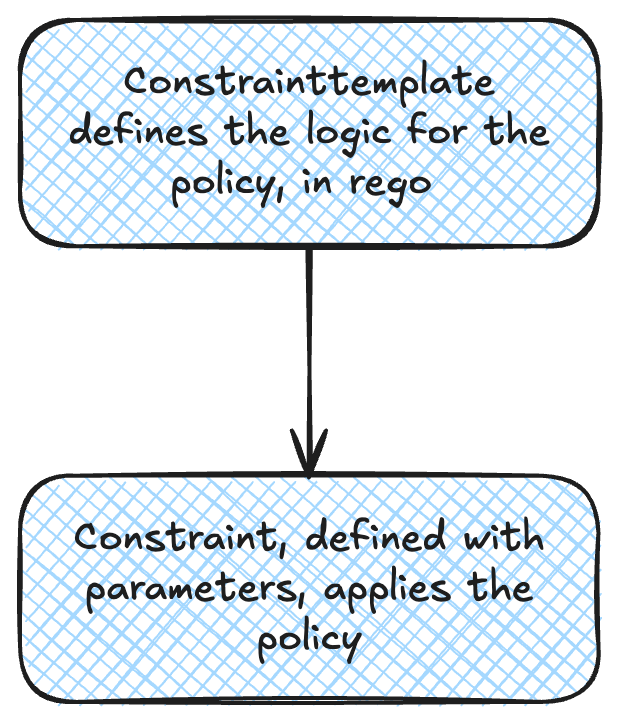
Knowing that, let’s look which constrainttemplates are present on the cluster.
➜  ~ k get constrainttemplate
NAME                                  AGE
k8sazurev1allowedsysctls              6h15m
k8sazurev1antiaffinityrules           6h15m
k8sazurev1blockdefault                6h15m
k8sazurev1containerrequests           6h15m
k8sazurev1enforcecsidriver            6h15m
k8sazurev1externalips                 6h15m
k8sazurev1ingresshttpsonly            6h15m
k8sazurev1printmutationsannotations   6h15m
k8sazurev1reservedtaints              6h15m
k8sazurev1restrictedlabels            6h15m
k8sazurev1restrictednodeedits         6h15m
k8sazurev1serviceallowedports         6h15m
k8sazurev1uniqueserviceselector       6h15m
k8sazurev1windowsblockhostprocess     6h15m
k8sazurev2blockautomounttoken         6h15m
k8sazurev2blockhostnamespace          6h15m
k8sazurev2containerallowedimages      6h15m
k8sazurev2containerenforceprobes      6h15m
k8sazurev2containernolatestimage      6h15m
k8sazurev2noprivilege                 6h15m
k8sazurev2volumetypes                 6h15m
k8sazurev3allowedcapabilities         6h15m
k8sazurev3allowedseccomp              6h15m
k8sazurev3allowedusersgroups          6h15m
k8sazurev3blockhostnamespace          6h15m
k8sazurev3containerlimits             6h15m
k8sazurev3disallowedcapabilities      6h15m
k8sazurev3enforceapparmor             6h15m
k8sazurev3hostnetworkingports         6h15m
k8sazurev3noprivilegeescalation       6h15m
k8sazurev3readonlyrootfilesystem      6h15m
k8sazurev3selinux                     6h15m
k8sazurev4noprivilegeescalation       6h15m
k8sazurev4procmount                   6h15m
k8sazurev5hostfilesystem              6h15m
And the constraints.
➜ ~ k get constraint -o custom-columns=Name:.metadata.name
Name
azurepolicy-k8sazurev1allowedsysctls-5bee03cd05d959aa9c99
azurepolicy-k8sazurev1antiaffinityrules-de74d072ee9ef8a37fac
azurepolicy-k8sazurev1blockdefault-08628ed62873dcb9aacb
azurepolicy-k8sazurev1blockdefault-bb6294bb543cc61d3564
azurepolicy-k8sazurev1containerrequests-b9818431be5a70a1e21a
azurepolicy-k8sazurev1enforcecsidriver-c8c16c21e28cffb53865
azurepolicy-k8sazurev1externalips-7d5611e1b1d91f00815c
azurepolicy-k8sazurev1ingresshttpsonly-9a5e6c62e2ce30eee775
azurepolicy-k8sazurev1printmutationsannota-25ffa82468abcbfddc9d
azurepolicy-k8sazurev1reservedtaints-27029f9936b451a2e6ce
azurepolicy-k8sazurev1restrictedlabels-0a9e1c9c1d1792c57590
azurepolicy-k8sazurev1restrictednodeedits-b6d031d2c47bf02fdfe1
azurepolicy-k8sazurev1serviceallowedports-fdfb9ed06d3c8058c269
azurepolicy-k8sazurev1uniqueserviceselecto-a46ac989bcda9af05af7
azurepolicy-k8sazurev1windowsblockhostproc-73411bbc2d7529c65145
azurepolicy-k8sazurev2blockautomounttoken-744220ae750834721768
azurepolicy-k8sazurev2blockautomounttoken-912da9626602ff90acb1
azurepolicy-k8sazurev2blockhostnamespace-5443d47c58408f0d9ff7
azurepolicy-k8sazurev2blockhostnamespace-fc0200e857d8d3f64854
azurepolicy-k8sazurev2containerallowedimag-fb7957742f6a76a9ccbc
azurepolicy-k8sazurev2containerenforceprob-a349bfc0c5860e58e1e3
azurepolicy-k8sazurev2containernolatestima-bd040c42044f6d5ad684
azurepolicy-k8sazurev2noprivilege-661189fe8402b91a9404
azurepolicy-k8sazurev2noprivilege-7e60420b44e55ad40797
azurepolicy-k8sazurev2noprivilege-cd6080f6e20cb0cc1cb8
azurepolicy-k8sazurev2volumetypes-8314f9bc3644a89796b6
azurepolicy-k8sazurev3allowedcapabilities-1ac215ce18ca516b72d9
azurepolicy-k8sazurev3allowedcapabilities-26737cbbf6db8ced3c55
azurepolicy-k8sazurev3allowedcapabilities-5d7519b28033e55fba57
azurepolicy-k8sazurev3allowedseccomp-a199645234fa143881eb
azurepolicy-k8sazurev3allowedusersgroups-ec712d737cf463789301
azurepolicy-k8sazurev3blockhostnamespace-2e8ba4a146cdfe6fcb80
azurepolicy-k8sazurev3containerlimits-7c945d5709b19eda5718
azurepolicy-k8sazurev3disallowedcapabiliti-6469e920e27d9696be66
azurepolicy-k8sazurev3disallowedcapabiliti-991e7fd30c4a88de4098
azurepolicy-k8sazurev3enforceapparmor-5bedeff765f31d8c5af1
azurepolicy-k8sazurev3enforceapparmor-bbfd5aaac29ebdf5ea2e
azurepolicy-k8sazurev3hostnetworkingports-978ebed6e05469be4681
azurepolicy-k8sazurev3noprivilegeescalatio-db172bf7c5660b3c6975
azurepolicy-k8sazurev3noprivilegeescalatio-f791990bbfe0a0534a99
azurepolicy-k8sazurev3readonlyrootfilesyst-d4e7365148b8f4efe63b
azurepolicy-k8sazurev3selinux-1080fe9b11b1eff6f82b
azurepolicy-k8sazurev4noprivilegeescalatio-c31629da2b1380febaa2
azurepolicy-k8sazurev4procmount-73416a3ad2342b478f82
azurepolicy-k8sazurev5hostfilesystem-626f257e52abaced2a2b
azurepolicy-k8sazurev5hostfilesystem-8ffe721852810ddc1454
Having a look at the k8sazurev1restrictednodeedits constraint template, we can get a glimpse at how that works under the hood.
k get constrainttemplate k8sazurev1restrictednodeedits -o yaml
apiVersion: templates.gatekeeper.sh/v1
kind: ConstraintTemplate
metadata:
  annotations:
    azure-policy-definition-id-1: /providers/Microsoft.Authorization/policyDefinitions/53a4a537-990c-495a-92e0-7c21a465442c
    constraint-template: https://store.policy.core.windows.net/kubernetes/restricted-node-edits/v1/template.yaml
    constraint-template-installed-by: azure-policy-addon
  creationTimestamp: "2026-10-16T08:25:24Z"
  generation: 1
  labels:
    managed-by: azure-policy-addon
  name: k8sazurev1restrictednodeedits
  resourceVersion: "12744"
  uid: 34c54a97-2bc9-41dc-ae0a-e686ed024062
spec:
  crd:
    spec:
      names:
        kind: K8sAzureV1RestrictedNodeEdits
      validation:
        legacySchema: true
        openAPIV3Schema:
          properties:
            allowedGroups:
              items:
                type: string
              type: array
            allowedUsers:
              items:
                type: string
              type: array
          type: object
  targets:
  - operations:
    - CREATE
    - UPDATE
    - CONNECT
    rego: |
      package k8sazurev1restrictednodeedits

      is_system_account(userinfo) {
        AKS_GROUPS := {"system:node", "system:serviceaccounts:kube-system"}
        specifiedGroups := {x | x = input.parameters.allowedGroups[_]}
        allGroups := AKS_GROUPS | specifiedGroups
        userGroups := {x | x = userinfo.groups[_]}
        diffList := userGroups - allGroups
        count(diffList) < count(userGroups)
      }

      is_system_account(userinfo) {
        AKS_USERS := {"nodeclient", "system:serviceaccount:kube-system:aci-connector-linux", "system:serviceaccount:kube-system:node-controller", "acsService", "aksService", "system:serviceaccount:kube-system:cloud-node-manager","system:serviceaccount:kube-system:cilium-operator"}
        userSpecifiedUsers := {x | x = input.parameters.allowedUsers[_]}
        allUsers := AKS_USERS | userSpecifiedUsers
        allowedUsers := {x | x = allUsers[_]}
        user := allowedUsers[_]
        userinfo.username == user
      }

      flatten_map(obj) = labels {
        keyVals := [s | s = concat(":",[key,val]); val = obj[key]]
          str := concat(",", keyVals)
          labels := split(str,",")
      }

      unchanged_taints_or_labels(node, oldNode) {
          taints := {x | x = flatten_map(taint); taint = node.spec.taints[_]}
          oldTaints := {x | x = flatten_map(taint); taint = oldNode.spec.taints[_]}
          addedTaints := taints - oldTaints
          deletedTaints := oldTaints - taints
          count(addedTaints) == count(deletedTaints)
          count(addedTaints) == 0
          labels := {x | x = flatten_map(node.metadata.labels)[_]}
          oldLabels := {x | x = flatten_map(oldNode.metadata.labels)[_]}
          addedLabels := labels - oldLabels
          deletedLabels := oldLabels - labels
          count(addedLabels) == count(deletedLabels)
          count(addedLabels) == 0
      }


      violation[{"msg":msg}]{
          input.review.oldObject != null
          input.review.userInfo != null
          not unchanged_taints_or_labels(input.review.object, input.review.oldObject)
          not is_system_account(input.review.userInfo)
          msg := "Tainting or labelling individual nodes is not recommended. Please use AZ CLI to taint/label nodepools instead. For more information, visit https://aka.ms/aks/deployment-safeguards"
      }
    target: admission.k8s.gatekeeper.sh
status:
  byPod:
  - id: gatekeeper-audit-6c474cbb89-zb42g
    observedGeneration: 1
    operations:
    - audit
    - generate
    - mutation-status
    - status
    templateUID: 34c54a97-2bc9-41dc-ae0a-e686ed024062
  - id: gatekeeper-controller-b78c56cf-d9c9w
    observedGeneration: 1
    operations:
    - mutation-webhook
    - webhook
    templateUID: 34c54a97-2bc9-41dc-ae0a-e686ed024062
  - id: gatekeeper-controller-b78c56cf-k42x8
    observedGeneration: 1
    operations:
    - mutation-webhook
    - webhook
    templateUID: 34c54a97-2bc9-41dc-ae0a-e686ed024062
  created: true
Without going too deep into the rego syntax, we can see 2 sections with is_system_account(userinfo). Those define who’s exempt of the constraint.
Next, there is a section starting with unchanged_taints_or_labels in which a check is done on a constructed list of label and taint.
Last there is the violation where a message is defined.
To get the full picture, we should get the associated constraint. To have a look at it, we need its full name, not the one we get with a custom columns format.
➜ ~ k get constraint -o custom-columns=Name:.metadata.name |grep node
azurepolicy-k8sazurev1restrictednodeedits-b6d031d2c47bf02fdfe1
➜  ~ k get constraint |grep node
k8sazurev1restrictednodeedits.constraints.gatekeeper.sh/azurepolicy-k8sazurev1restrictednodeedits-b6d031d2c47bf02fdfe1   deny                 0
➜ ~ k get k8sazurev1restrictednodeedits.constraints.gatekeeper.sh/azurepolicy-k8sazurev1restrictednodeedits-b6d031d2c47bf02fdfe1 -o json |jq .metadata.labels
{
  "managed-by": "azure-policy-addon"
}
➜ ~ k get k8sazurev1restrictednodeedits.constraints.gatekeeper.sh/azurepolicy-k8sazurev1restrictednodeedits-b6d031d2c47bf02fdfe1 -o json |jq .spec
{
  "enforcementAction": "deny",
  "match": {
    "excludedNamespaces": [
      "kube-system",
      "kube-public",
      "kube-node-lease",
      "default",
      "cert-manager",
      "aks-command",
      "kube-system",
      "calico-system",
      "tigera-system",
      "gatekeeper-system",
      "app-routing-system",
      "aks-periscope",
      "aks-istio-system",
      "aks-istio-ingress",
      "aks-istio-egress",
      "azuresecuritylinuxagent",
      "aks-static-egress-gateway",
      "fleet-system",
      "azappconfig-system",
      "azurelustre-system",
      "azureml",
      "dapr-system",
      "dataprotection-microsoft",
      "flux-system",
      "acstor",
      "sc-system",
      "azure-extensions-usage-system",
      "gadget"
    ],
    "kinds": [
      {
        "apiGroups": [
          ""
        ],
        "kinds": [
          "Node"
        ]
      }
    ],
    "source": "All"
  },
  "parameters": {
    "allowedGroups": [
      "system:node",
      "system:serviceaccounts:kube-system"
    ],
    "allowedUsers": [
      "nodeclient",
      "system:serviceaccount:kube-system:aci-connector-linux",
      "system:serviceaccount:kube-system:node-controller",
      "acsService",
      "aksService",
      "system:serviceaccount:kube-system:cloud-node-manager",
      "system:serviceaccount:kube-system:cilium-operator",
      "system:serviceaccount:aks-static-egress-gateway:kube-egress-gateway-cni-manager"
    ]
  }
}
We can see the label "managed-by": "azure-policy-addon" that shows where the constraint comes from.
The parameters section define effectively which users can perform the update on the cluster nodes. I’m not really clear on how the filtering occurs so that as an admin, the az aks nodepool update works without warning for the labeling of node. I would guess that it’s the aksService but neither I, nor any LLM helpers that I used could find clear reference in the documentation 🤷🏻♂️.
We can validate however that it’s scope on node with the spec.kind section that list Nodes only.
Ok, that’s enough, let’s move to the next part.
3. AKS Deployment safeguards vs Native PSA management
We saw that deployment safeguards are not limited to an equivalent of PSS/PSA. However, it’s a good starting point for comparison.
First, we should take into account that it relies on Gatekeeper. Referring to community maintained library, we can see that there are many different constraint templates & constraints related to PSS. Below is a table listing all the relevant elements.
| PSS profile | Control | Gatekeeper policy |
|---|---|---|
| Baseline | Privileged containers | privileged-containers |
| Baseline | Host namespaces | host-namespaces |
| Baseline | Host networking and ports | host-network-ports |
| Baseline | Host filesystem | host-filesystem |
| Baseline | Linux capabilities | capabilities |
| Baseline | SELinux context | selinux |
| Baseline | Proc mount types | proc-mount |
| Baseline | AppArmor profile | apparmor |
| Baseline | Seccomp profile | seccompv2 |
| Baseline | Sysctls | forbidden-sysctls |
| Restricted | Privilege escalation | allow-privilege-escalation |
| Restricted | FlexVolume drivers | flexvolume-drivers |
| Restricted | FSGroup | fsgroup |
| Restricted | Read-only root filesystem | read-only-root-filesystem |
| Restricted | User and group IDs | users |
| Restricted | Volume types | volumes |
In front of this, we can consider the Gatekeeper as more flexible. Indeed, rather than applying a full profile on a per namespace basis, as with the labels for the PSA, we could theoretically choose the constraint that we want to apply.
However, we do not use Gatekeeper directly but its Azure implementation through Azure Policy for Kubernetes. Even more, in this case, we are not touching Azure Policies (yet) but a specific object which is the deployment safeguard.
We already saw that this object is a “one-per-cluster” kind, so it kind of breaks the added flexibility of the Gatekeeper approach. We could probably be more flexible by using the combination of Azure policy and its Gatekeeper extension in an AKS cluster but the article is already long enough, so we’ll discuss that another time.
Ok let’s wrap ^^.
4. Summary
In this article, we discovered (or reviewed) the deployment safeguards for AKS.
Based on Gatekeeper and Azure policies, it offers many controls to bring better security on AKS cluster. The control plane remains in Azure, so the AKS admin doesn’t have to be a kubernetes expert. But, because there’s always a but 😏, abstracting the kubernetes control plane with the Azure control plane results in this specific case (and It’s often the case to be honest) to the loss of the granular view on kubernetes objects. As we mentioned, because deployment safeguards is a one per cluster resource type, it is not possible to have different level of control depending on different apps or environments.
Taking that into account, we could consider that it’s more a tool for dedicated clusters than for mutualized clusters.
That being said, all the guardrails enforced with the deployment safeguards are a good way to attain better security so there’s a balance to find.
Not ideal for mature teams managing multiple apps on shared cluster, automated for teams not so mature on Kubernetes. This last point is confirmed with the deployment safeguards parameters enforced on AKS Automatic clusters.
For more granularity then, no excuse, we need to keep learning kubernetes 😎