Hands on Falco
Hello!
Back to more k8s stuff again 🤓
this time we’ll have a look at Falco, a real time security monitoring solution. We’ll follow the below agenda:
- Falco concepts
- Falco on self-managed kubernetes
- Writing custom rules
Ok, let’s get started!
1. Falco concepts
In the Kubernetes landscape, it’s kind of a big issue to ensure the environments are secured. While we have many different ways/tools avaialble to harden this security, it’s noty a trivial problem to manage all those aspects.
When considering security monitoring, or should I say security posture 🤔, there are a few tools that come to mind. Falco is one of those.
Historically, Falco was created by sysdig but is now a CNCF graduated project.
Now about concepts, Falco is used to monitor environment and alert on abnormal behavior. It relies on syscall to monitor the system activity.
In terms of architecture, we can find the following components from the documentation:
- Event sources
- Rules
- Outputs
- Plugins
- Metrics
1.1. Event sources
Falco monitoring is based on an analysis on different streams of events. The event sources mentioned earlier are the first component of Falco. As mention previously, the default event source is syscall.
Other event sources can be added through plugins. Note thatthe documentation reference a registry for those plugins. One interesting plkugin (for me 😏) is the k8saudit-aks plugin, but that’ll be for another time.
It is important to specify what Falco is not: A SIEM. IT is not able to correlate events from differents sources. But It can be used as a source of event in a SIEM though.
Once we have identified the event sources, in our case, we’ll stick to the default syscall, Falco can be configured with alert rules which are triggered depending on the events. And how do we configure those alerts? through a yaml definition.
1.2. Rules
The Falco rule is a yaml file, with three types of elements:
| Element | Description | |
|---|---|---|
| Rules | Conditions under which an alert should be generated. A rule is accompanied by a descriptive output string that is sent with the alert. | |
| Macros | Rule condition snippets that can be re-used inside rules and even other macros. Macros provide a way to name common patterns and factor out redundancies in rules. | |
| Lists | Collections of items that can be included in rules, macros, or other lists. Unlike rules and macros, lists cannot be parsed as filtering expressions. |
There are different sets of rules available, which can be found on the Falco related github.
If we check a specific rule from the falco_rules.yaml file, we get an idea of the syntax for a Falco rules
- rule: Terminal shell in container
  desc: >
    A shell was used as the entrypoint/exec point into a container with an attached terminal. Parent process may have
    legitimately already exited and be null (read container_entrypoint macro). Common when using "kubectl exec" in Kubernetes.
    Correlate with k8saudit exec logs if possible to find user or serviceaccount token used (fuzzy correlation by namespace and pod name).
    Rather than considering it a standalone rule, it may be best used as generic auditing rule while examining other triggered
    rules in this container/tty.
  condition: >
    spawned_process
    and container
    and shell_procs
    and proc.tty != 0
    and container_entrypoint
    and not user_expected_terminal_shell_in_container_conditions
  output: A shell was spawned in a container with an attached terminal | evt_time=%evt.time.s evt_type=%evt.type user=%user.name user_uid=%user.uid user_loginuid=%user.loginuid process=%proc.name proc_exepath=%proc.exepath parent=%proc.pname command=%proc.cmdline terminal=%proc.tty exe_flags=%evt.arg.flags
  priority: NOTICE
  tags: [maturity_stable, container, shell, mitre_execution, T1059]
The spawned_process in the condition section is actually a macro, that we can find in the same file.
- macro: spawned_process
  condition: (evt.type in (execve, execveat))
We’ll see a bit more about how to modify/create rules later in this article.
1.3. Outputs
While the rules contain an output section, it is used only to define the format of the alerts specific outputs. But Falco can also be configured with different kind of outputs:
- file: a specific file to store the generated evend by falco
- syslog: the standard linux log output. This will be our default output configuration for the self-hosted kubernetes lab afterward.
- program: a way to define specific programs as output. We’ll definitely not used this one 😅.
- http: a way to send the Falco output to an http endpoint. More on that in when we’ll tall about Falco sidekick, but not in this post.
1.4. Plugins
We mentioned plugins earlier in the event sources section.
Falco can be extended to have more event sources through plugins. How to create a plugin is definitely out of the scope of this article (and of my capabilities to be clear 😅).
There are however registered plugins listed on the Falco doc. Interesting options could be k8saudit or k8saudit-aks to add event from the kubernetes audit log.
1.5. Metrics
Last, metrics give us access to configuration related to Falco observability.
2. Falco on self-managed kubernetes
2.1 Installation, and upgrade
For this section, we consider a case where we use a non cloud-managed kubernetes (i.e. not an AKS for instance, or GKE, EKS…, you get my point 😏). The lab use thereafter is a kubeadm single node cluster, managed locally through a vagrant box, with Cilium as its CNI (because I’m kind fond of Cilium for those who did not know). You can refer to this repo to find a getting started if you want to follow along.
df@df-2404lts:~$ k config current-context
kubernetes-admin@cilium
df@df-2404lts:~$ k get no
NAME         STATUS   ROLES           AGE   VERSION
k8scilium1   Ready    control-plane   74d   v1.32.8
df@df-2404lts:~$ cilium status
    /¯¯\
 /¯¯\__/¯¯\    Cilium:             OK
 \__/¯¯\__/    Operator:           OK
 /¯¯\__/¯¯\    Envoy DaemonSet:    OK
 \__/¯¯\__/    Hubble Relay:       OK
    \__/       ClusterMesh:        disabled

DaemonSet              cilium             Desired: 1, Ready: 1/1, Available: 1/1
DaemonSet              cilium-envoy       Desired: 1, Ready: 1/1, Available: 1/1
Deployment             cilium-operator    Desired: 1, Ready: 1/1, Available: 1/1
Deployment             hubble-relay       Desired: 1, Ready: 1/1, Available: 1/1
Deployment             hubble-ui          Desired: 1, Ready: 1/1, Available: 1/1
Containers:            cilium             Running: 1
                       cilium-envoy       Running: 1
                       cilium-operator    Running: 1
                       hubble-relay       Running: 1
                       hubble-ui          Running: 1
Cluster Pods:          12/12 managed by Cilium
Helm chart version:    1.18.1
Image versions         cilium             quay.io/cilium/cilium:v1.18.1@sha256:65ab17c052d8758b2ad157ce766285e04173722df59bdee1ea6d5fda7149f0e9: 1
                       cilium-envoy       quay.io/cilium/cilium-envoy:v1.34.4-1754895458-68cffdfa568b6b226d70a7ef81fc65dda3b890bf@sha256:247e908700012f7ef56f75908f8c965215c26a27762f296068645eb55450bda2: 1
                       cilium-operator    quay.io/cilium/operator-generic:v1.18.1@sha256:97f4553afa443465bdfbc1cc4927c93f16ac5d78e4dd2706736e7395382201bc: 1
                       hubble-relay       quay.io/cilium/hubble-relay:v1.18.1@sha256:7e2fd4877387c7e112689db7c2b153a4d5c77d125b8d50d472dbe81fc1b139b0: 1
                       hubble-ui          quay.io/cilium/hubble-ui-backend:v0.13.2@sha256:a034b7e98e6ea796ed26df8f4e71f83fc16465a19d166eff67a03b822c0bfa15: 1
                       hubble-ui          quay.io/cilium/hubble-ui:v0.13.2@sha256:9e37c1296b802830834cc87342a9182ccbb71ffebb711971e849221bd9d59392: 1
df@df-2404lts:~$
On a cluster on which we can access to the node(s), we can install Falco as a package. The process is similar to any installation on linux (ubuntu in our case). We either get the binary by setting the source list, or by getting the tarball.
Refering to the documentation, we can follow the steps below to install on our ubuntu based cluster
vagrant@cilium2:~$ curl -fsSL https://falco.org/repo/falcosecurity-packages.asc | sudo gpg --dearmor -o /usr/share/keyrings/falco-archive-keyring.gpg
vagrant@cilium2:~$ sudo apt-get install apt-transport-https
Reading package lists... Done
Building dependency tree... Done
Reading state information... Done
apt-transport-https is already the newest version (2.8.3).
0 upgraded, 0 newly installed, 0 to remove and 34 not upgraded.

vagrant@cilium2:~$ echo "deb [signed-by=/usr/share/keyrings/falco-archive-keyring.gpg] https://download.falco.org/packages/deb stable main" | sudo tee -a /etc/apt/sources.list.d/falcosecurity.list

vagrant@cilium2:~$ sudo apt-get update -y

vagrant@cilium2:~$ sudo apt install falco
There are additional package mentioned, but not necessary if we are using Modern eBPF, so we won’t add those.
If everything went well, we know have Falco running as a service. Notice the falco-modern-bpf.service name.
vagrant@cilium2:~$ systemctl status falco
● falco-modern-bpf.service - Falco: Container Native Runtime Security with modern ebpf
     Loaded: loaded (/usr/lib/systemd/system/falco-modern-bpf.service; enabled; preset: enabled)
     Active: active (running) since Mon 2025-11-17 17:57:23 UTC; 2min 42s ago
       Docs: https://falco.org/docs/
   Main PID: 5420 (falco)
      Tasks: 14 (limit: 3472)
     Memory: 45.9M (peak: 56.7M)
        CPU: 2.379s
     CGroup: /system.slice/falco-modern-bpf.service
             └─5420 /usr/bin/falco -o engine.kind=modern_ebpf

Nov 17 17:57:23 cilium2 falco[5420]: Loading rules from:
Nov 17 17:57:23 cilium2 falco[5420]:    /etc/falco/falco_rules.yaml | schema validation: ok
Nov 17 17:57:23 cilium2 falco[5420]:    /etc/falco/falco_rules.local.yaml | schema validation: none
Nov 17 17:57:23 cilium2 falco[5420]: The chosen syscall buffer dimension is: 8388608 bytes (8 MBs)
Nov 17 17:57:23 cilium2 falco[5420]: Starting health webserver with threadiness 2, listening on 0.0.0.0:8765
Nov 17 17:57:23 cilium2 falco[5420]: Loaded event sources: syscall
Nov 17 17:57:23 cilium2 falco[5420]: Enabled event sources: syscall
Nov 17 17:57:23 cilium2 falco[5420]: Opening 'syscall' source with modern BPF probe.
Nov 17 17:57:23 cilium2 falco[5420]: One ring buffer every '2' CPUs.
Nov 17 17:57:23 cilium2 falco[5420]: [libs]: Trying to open the right engine!
Note that if want to upgrade Falco, the classic apt command will suffice. However, it is important to notice that the falco.yaml file may be changed during the update, which is not something that we want, specifically if we made some change to our configuration. More on that later 😎.
vagrant@k8scilium1:~$ sudo apt install falco
Reading package lists... Done
Building dependency tree... Done
Reading state information... Done
Suggested packages:
  dkms
The following packages will be upgraded:
  falco
1 upgraded, 0 newly installed, 0 to remove and 83 not upgraded.
Need to get 51.8 MB of archives.
After this operation, 3,063 kB of additional disk space will be used.
Get:1 https://d20hasrqv82i0q.cloudfront.net/packages/deb stable/main amd64 falco amd64 0.42.1 [51.8 MB]
Fetched 51.8 MB in 35s (1,470 kB/s)
(Reading database ... 51948 files and directories currently installed.)
Preparing to unpack .../falco_0.42.1_amd64.deb ...
[PRE-REMOVE] Stop all Falco services:
[PRE-REMOVE] Call 'falcoctl driver cleanup:'
2025-11-17 17:39:31 INFO  Running falcoctl driver cleanup driver type: modern_ebpf driver name: falco
Unpacking falco (0.42.1) over (0.41.3) ...
Setting up falco (0.42.1) ...

Configuration file '/etc/falco/falco.yaml'
 ==> Modified (by you or by a script) since installation.
 ==> Package distributor has shipped an updated version.
   What would you like to do about it ?  Your options are:
    Y or I  : install the package maintainer's version
    N or O  : keep your currently-installed version
      D     : show the differences between the versions
      Z     : start a shell to examine the situation
 The default action is to keep your current version.
*** falco.yaml (Y/I/N/O/D/Z) [default=N] ? y
Obviously, we need to install Falco on all nodes. The fact that we have currently only one is pretty convenient and more a specificity of a lab environment.
Now back to our Falco config.
2.2. Falco configuration
We can find the Falco related file in /etc/falco
vagrant@k8scilium1:~$ ls /etc/falco
config.d  falco_rules.local.yaml  falco_rules.yaml  falco.yaml  falco.yaml.dpkg-old  rules.d
the falco.yaml file is where the config happens. We don’t want to expose the full file here, but we are interested in the rules configuration for now. So let’s grep falco-rule in the file.
vagrant@k8scilium1:~$ cat /etc/falco/falco.yaml |grep -A2 -B8 falco_rule

# [Stable] `rules_files`
#
# -- The locations of rules files (or directories) to load.
#
# If the entry is a yaml file, it will be read directly. If the entry is a directory,
# all yaml files within that directory will be read in alphabetical order.
#
# The falco_rules.yaml file ships with the Falco package and is overridden with
# every new software version. falco_rules.local.yaml is only created if it
# doesn't already exist.
#
--
#
# Since Falco 0.41 only files with .yml and .yaml extensions are considered,
# including directory contents. This means that you may specify directories that
# contain yaml files for rules and other files which will be ignored.
#
# NOTICE: Before Falco 0.38, this config key was `rules_file` (singular form),
# which is now deprecated in favor of `rules_files` (plural form).
rules_files:
  - /etc/falco/falco_rules.yaml
  - /etc/falco/falco_rules.local.yaml
  - /etc/falco/rules.d
We can see that we have the falco_rules.yaml which is where the default stable rule are imported, the falco_rules.local.yaml, which is a file for rules local to the node, as the name implies, and the /etc/falco/rules.d which is a folder in which we can put other yaml files for custom rules.
So let’s trigger a rule. Looking on the documentation, we can have a list of the rules, and find an interesting one.
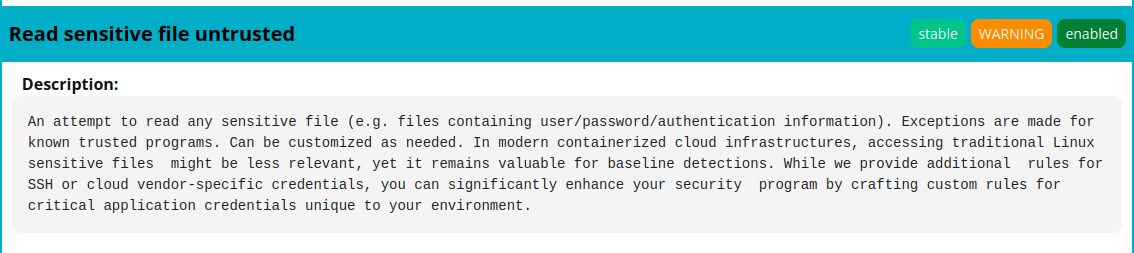
We can find this rule in the falco_rules.yaml.
vagrant@k8scilium1:~$ cat /etc/falco/falco_rules.yaml |grep "rule: Read sensitive file untrusted" -A36
- rule: Read sensitive file untrusted
  desc: >
    An attempt to read any sensitive file (e.g. files containing user/password/authentication
    information). Exceptions are made for known trusted programs. Can be customized as needed.
    In modern containerized cloud infrastructures, accessing traditional Linux sensitive files
    might be less relevant, yet it remains valuable for baseline detections. While we provide additional
    rules for SSH or cloud vendor-specific credentials, you can significantly enhance your security
    program by crafting custom rules for critical application credentials unique to your environment.
  condition: >
    open_read
    and sensitive_files
    and proc_name_exists
    and not proc.name in (user_mgmt_binaries, userexec_binaries, package_mgmt_binaries,
     cron_binaries, read_sensitive_file_binaries, shell_binaries, hids_binaries,
     vpn_binaries, mail_config_binaries, nomachine_binaries, sshkit_script_binaries,
     in.proftpd, mandb, salt-call, salt-minion, postgres_mgmt_binaries,
     google_oslogin_
     )
    and not cmp_cp_by_passwd
    and not ansible_running_python
    and not run_by_qualys
    and not run_by_chef
    and not run_by_google_accounts_daemon
    and not user_read_sensitive_file_conditions
    and not mandb_postinst
    and not perl_running_plesk
    and not perl_running_updmap
    and not veritas_driver_script
    and not perl_running_centrifydc
    and not runuser_reading_pam
    and not linux_bench_reading_etc_shadow
    and not user_known_read_sensitive_files_activities
    and not user_read_sensitive_file_containers
  output: Sensitive file opened for reading by non-trusted program | file=%fd.name gparent=%proc.aname[2] ggparent=%proc.aname[3] gggparent=%proc.aname[4] evt_type=%evt.type user=%user.name user_uid=%user.uid user_loginuid=%user.loginuid process=%proc.name proc_exepath=%proc.exepath parent=%proc.pname command=%proc.cmdline terminal=%proc.tty
  priority: WARNING
  tags: [maturity_stable, host, container, filesystem, mitre_credential_access, T1555]
2.3. Triggering rules
We just saw a rule that should detect when a sensitive file is opened. An exemple of a sensitive file could be /etc/shadow, so from a pod we’ll read this file and see what happens.
So one way to trigger this rule is to open the file from a pod.
We have the following pods.
vagrant@k8scilium1:~$ k get pod -n test -o custom-columns=Name:.metadata.name,Image:.spec.containers[
0].image
Name      Image
backend   nginx
testpod   nginx
With the exec command, we can use cat to read /etc/shadow
vagrant@k8scilium1:~$ k exec -n test testpod -- cat /etc/shadow
root:*:20409:0:99999:7:::
daemon:*:20409:0:99999:7:::
bin:*:20409:0:99999:7:::
sys:*:20409:0:99999:7:::
sync:*:20409:0:99999:7:::
games:*:20409:0:99999:7:::
man:*:20409:0:99999:7:::
lp:*:20409:0:99999:7:::
mail:*:20409:0:99999:7:::
news:*:20409:0:99999:7:::
uucp:*:20409:0:99999:7:::
proxy:*:20409:0:99999:7:::
www-data:*:20409:0:99999:7:::
backup:*:20409:0:99999:7:::
list:*:20409:0:99999:7:::
irc:*:20409:0:99999:7:::
_apt:*:20409:0:99999:7:::
nobody:*:20409:0:99999:7:::
nginx:!:20410::::::

vagrant@k8scilium1:~$ k exec -n test pods/backend -- cat /etc/shadow
root:*:20409:0:99999:7:::
daemon:*:20409:0:99999:7:::
bin:*:20409:0:99999:7:::
sys:*:20409:0:99999:7:::
sync:*:20409:0:99999:7:::
games:*:20409:0:99999:7:::
man:*:20409:0:99999:7:::
lp:*:20409:0:99999:7:::
mail:*:20409:0:99999:7:::
news:*:20409:0:99999:7:::
uucp:*:20409:0:99999:7:::
proxy:*:20409:0:99999:7:::
www-data:*:20409:0:99999:7:::
backup:*:20409:0:99999:7:::
list:*:20409:0:99999:7:::
irc:*:20409:0:99999:7:::
_apt:*:20409:0:99999:7:::
nobody:*:20409:0:99999:7:::
nginx:!:20410::::::
WE should have triggered the rule now. But how can we check this? Let’s parse the /etc/falco/falco.yaml file again.
vagrant@k8scilium1:~$ cat /etc/falco/falco.yaml |grep "# Falco outputs channels" -A7
# Falco outputs channels
#     stdout_output [Stable]
#     syslog_output [Stable]
#     file_output [Stable]
#     http_output [Stable]
#     program_output [Stable]
#     grpc_output [Stable]
# Falco exposed services
--
# Falco outputs channels #
##########################

# Falco supports various output channels, such as syslog, stdout, file, gRPC,
# webhook, and more. You can enable or disable these channels as needed to
# control where Falco alerts and log messages are directed. This flexibility
# allows seamless integration with your preferred logging and alerting systems.
# Multiple outputs can be enabled simultaneously.
We can see that we have multiple outputs available, as discussed in the concepts section. The syslog output should allow us too see Falco output inside… the syslog.
vagrant@k8scilium1:~$ cat /etc/falco/falco.yaml |grep syslog_output -A3
#     syslog_output [Stable]
#     file_output [Stable]
#     http_output [Stable]
#     program_output [Stable]
--
# [Stable] `syslog_output`
#
# -- Send alerts to syslog.
syslog_output:
  # -- Enable sending alerts to syslog.
  enabled: true
So we can check the syslog file.
vagrant@k8scilium1:~$ tail /var/log/syslog

2025-11-18T13:18:47.759877+00:00 k8scilium1 falco: 13:18:47.759150192: Warning Sensitive file opened for reading by non-trusted program | file=/etc/shadow gparent=systemd ggparent=<NA> gggparent=<NA> evt_type=openat user=root user_uid=0 user_loginuid=-1 process=cat proc_exepath=/usr/bin/cat parent=containerd-shim command=cat /etc/shadow terminal=0 container_id=0ef32e6a26c7 container_name=backend container_image_repository=docker.io/library/nginx container_image_tag=latest k8s_pod_name=backend k8s_ns_name=test

2025-11-18T13:18:49.005889+00:00 k8scilium1 falco: 13:18:49.004931832: Warning Sensitive file opened for reading by non-trusted program | file=/etc/shadow gparent=systemd ggparent=<NA> gggparent=<NA> evt_type=openat user=root user_uid=0 user_loginuid=-1 process=cat proc_exepath=/usr/bin/cat parent=containerd-shim command=cat /etc/shadow terminal=0 container_id=0ef32e6a26c7 container_name=backend container_image_repository=docker.io/library/nginx container_image_tag=latest k8s_pod_name=backend k8s_ns_name=test

2025-11-18T13:18:49.941668+00:00 k8scilium1 falco: 13:18:49.940434690: Warning Sensitive file opened for reading by non-trusted program | file=/etc/shadow gparent=systemd ggparent=<NA> gggparent=<NA> evt_type=openat user=root user_uid=0 user_loginuid=-1 process=cat proc_exepath=/usr/bin/cat parent=containerd-shim command=cat /etc/shadow terminal=0 container_id=0ef32e6a26c7 container_name=backend container_image_repository=docker.io/library/nginx container_image_tag=latest k8s_pod_name=backend k8s_ns_name=test
And we can see the rule was indeed triggered. We can also see informations on the alert sucvh as the k8s_pod_name which is backend, and the namespace which is test.
We could also use journalctl, with the -b -u falco-modern-bpf. the -b allowing us to select the current boot, and -u to specify a targeted service, in our case falco
vagrant@k8scilium1:~$ systemctl list-units | grep falco
  falco-modern-bpf.service                                                                                                                      loaded active running   Falco: Container Native Runtime Security with modern ebpf
  falcoctl-artifact-follow.service                                                                                                              loaded active running   Falcoctl Artifact Follow: automatic artifacts update service

vagrant@k8scilium1:~$ journalctl -b -u falco-modern-bpf
Nov 18 13:03:30 k8scilium1 systemd[1]: Started falco-modern-bpf.service - Falco: Container Native Runtime Security with modern ebpf.
Nov 18 13:03:30 k8scilium1 falco[699]: Falco version: 0.42.1 (x86_64)
Nov 18 13:03:30 k8scilium1 falco[699]: Falco initialized with configuration files:
Nov 18 13:03:30 k8scilium1 falco[699]:    /etc/falco/config.d/engine-kind-falcoctl.yaml | schema validation: ok
Nov 18 13:03:30 k8scilium1 falco[699]:    /etc/falco/config.d/falco.container_plugin.yaml | schema validation: ok
Nov 18 13:03:30 k8scilium1 falco[699]:    /etc/falco/falco.yaml | schema validation: ok
Nov 18 13:03:30 k8scilium1 falco[699]: System info: Linux version 6.8.0-64-generic (buildd@lcy02-amd64-083) (x86_64-linux-gnu-gcc-13 (Ubuntu 13.3.0-6ubuntu2~24.04) 13.3.0, GNU ld (GNU Binutils for Ubuntu) 2.42) #67-Ubuntu SMP PREEMPT_DYNAMIC Sun Jun 15 20:23:31 UTC 2025
Nov 18 13:03:30 k8scilium1 falco[699]: Loaded plugin 'container@0.4.1' from file /usr/share/falco/plugins/libcontainer.so
Nov 18 13:03:30 k8scilium1 falco[699]: [libs]: container: Enabled 'podman' container engine.
Nov 18 13:03:30 k8scilium1 falco[699]: [libs]: container: * enabled container runtime socket at '/run/podman/podman.sock'
Nov 18 13:03:30 k8scilium1 falco[699]: [libs]: container: Enabled 'docker' container engine.
Nov 18 13:03:30 k8scilium1 falco[699]: [libs]: container: * enabled container runtime socket at '/var/run/docker.sock'
Nov 18 13:03:30 k8scilium1 falco[699]: [libs]: container: Enabled 'cri' container engine.
Nov 18 13:03:30 k8scilium1 falco[699]: [libs]: container: * enabled container runtime socket at '/run/containerd/containerd.sock'
Nov 18 13:03:30 k8scilium1 falco[699]: [libs]: container: * enabled container runtime socket at '/run/crio/crio.sock'
Nov 18 13:03:30 k8scilium1 falco[699]: [libs]: container: * enabled container runtime socket at '/run/k3s/containerd/containerd.sock'
Nov 18 13:03:30 k8scilium1 falco[699]: [libs]: container: * enabled container runtime socket at '/run/host-containerd/containerd.sock'
Nov 18 13:03:30 k8scilium1 falco[699]: [libs]: container: Enabled 'containerd' container engine.
Nov 18 13:03:30 k8scilium1 falco[699]: [libs]: container: * enabled container runtime socket at '/run/host-containerd/containerd.sock'
Nov 18 13:03:30 k8scilium1 falco[699]: [libs]: container: Enabled 'lxc' container engine.
Nov 18 13:03:30 k8scilium1 falco[699]: [libs]: container: Enabled 'libvirt_lxc' container engine.
Nov 18 13:03:30 k8scilium1 falco[699]: [libs]: container: Enabled 'bpm' container engine.
Nov 18 13:03:30 k8scilium1 falco[699]: Loading rules from:
Nov 18 13:03:30 k8scilium1 falco[699]:    /etc/falco/falco_rules.yaml | schema validation: ok
Nov 18 13:03:30 k8scilium1 falco[699]:    /etc/falco/falco_rules.local.yaml | schema validation: ok
Nov 18 13:03:30 k8scilium1 falco[699]: The chosen syscall buffer dimension is: 8388608 bytes (8 MBs)
Nov 18 13:03:30 k8scilium1 falco[699]: Starting health webserver with threadiness 2, listening on 0.0.0.0:8765
Nov 18 13:03:30 k8scilium1 falco[699]: Loaded event sources: syscall
Nov 18 13:03:30 k8scilium1 falco[699]: Enabled event sources: syscall
Nov 18 13:03:30 k8scilium1 falco[699]: Opening 'syscall' source with modern BPF probe.
Nov 18 13:03:30 k8scilium1 falco[699]: One ring buffer every '2' CPUs.
Nov 18 13:03:30 k8scilium1 falco[699]: [libs]: Trying to open the right engine!
Nov 18 13:04:40 k8scilium1 falco[699]: 13:04:40.681159205: Warning Sensitive file opened for reading by non-trusted program | file=/etc/pam.d/common-account gparent=<NA> ggparent=<NA> gggparent=<NA> evt_type=openat user=root user_uid=0 user_loginuid=-1 process=9 proc_exepath=/usr/lib/systemd/systemd-ex>
Nov 18 13:04:40 k8scilium1 falco[699]: 13:04:40.681715475: Warning Sensitive file opened for reading by non-trusted program | file=/etc/pam.d/common-session-noninteractive gparent=<NA> ggparent=<NA> gggparent=<NA> evt_type=openat user=root user_uid=0 user_loginuid=-1 process=9 proc_exepath=/usr/lib/sys>
Nov 18 13:04:40 k8scilium1 falco[699]: 13:04:40.682795765: Warning Sensitive file opened for reading by non-trusted program | file=/etc/pam.d/other gparent=<NA> ggparent=<NA> gggparent=<NA> evt_type=openat user=root user_uid=0 user_loginuid=-1 process=9 proc_exepath=/usr/lib/systemd/systemd-executor pa>
Nov 18 13:04:40 k8scilium1 falco[699]: 13:04:40.682819496: Warning Sensitive file opened for reading by non-trusted program | file=/etc/pam.d/common-auth gparent=<NA> ggparent=<NA> gggparent=<NA> evt_type=openat user=root user_uid=0 user_loginuid=-1 process=9 proc_exepath=/usr/lib/systemd/systemd-execu>
Nov 18 13:04:40 k8scilium1 falco[699]: 13:04:40.682972731: Warning Sensitive file opened for reading by non-trusted program | file=/etc/pam.d/common-account gparent=<NA> ggparent=<NA> gggparent=<NA> evt_type=openat user=root user_uid=0 user_loginuid=-1 process=9 proc_exepath=/usr/lib/systemd/systemd-ex>
Nov 18 13:04:40 k8scilium1 falco[699]: 13:04:40.682986543: Warning Sensitive file opened for reading by non-trusted program | file=/etc/pam.d/common-password gparent=<NA> ggparent=<NA> gggparent=<NA> evt_type=openat user=root user_uid=0 user_loginuid=-1 process=9 proc_exepath=/usr/lib/systemd/systemd-e>
Nov 18 13:04:40 k8scilium1 falco[699]: 13:04:40.682998442: Warning Sensitive file opened for reading by non-trusted program | file=/etc/pam.d/common-session gparent=<NA> ggparent=<NA> gggparent=<NA> evt_type=openat user=root user_uid=0 user_loginuid=-1 process=9 proc_exepath=/usr/lib/systemd/systemd-ex>
Nov 18 13:04:40 k8scilium1 falco[699]: 13:04:40.683177671: Warning Sensitive file opened for reading by non-trusted program | file=/etc/shadow gparent=<NA> ggparent=<NA> gggparent=<NA> evt_type=openat user=root user_uid=0 user_loginuid=-1 process=9 proc_exepath=/usr/lib/systemd/systemd-executor parent=>
Nov 18 13:04:40 k8scilium1 falco[699]: 13:04:40.685939118: Warning Sensitive file opened for reading by non-trusted program | file=/etc/shadow gparent=<NA> ggparent=<NA> gggparent=<NA> evt_type=openat user=<NA> user_uid=4294967295 user_loginuid=-1 process=9 proc_exepath=/usr/lib/systemd/systemd-executo>
Nov 18 13:13:06 k8scilium1 falco[699]: 13:13:06.629866240: Warning Sensitive file opened for reading by non-trusted program | file=/etc/shadow gparent=systemd ggparent=<NA> gggparent=<NA> evt_type=openat user=root user_uid=0 user_loginuid=-1 process=cat proc_exepath=/usr/bin/cat parent=containerd-shim >
Nov 18 13:13:24 k8scilium1 falco[699]: 13:13:24.803372161: Warning Sensitive file opened for reading by non-trusted program | file=/etc/shadow gparent=systemd ggparent=<NA> gggparent=<NA> evt_type=openat user=root user_uid=0 user_loginuid=-1 process=cat proc_exepath=/usr/bin/cat parent=containerd-shim >
Nov 18 13:18:47 k8scilium1 falco[699]: 13:18:47.759150192: Warning Sensitive file opened for reading by non-trusted program | file=/etc/shadow gparent=systemd ggparent=<NA> gggparent=<NA> evt_type=openat user=root user_uid=0 user_loginuid=-1 process=cat proc_exepath=/usr/bin/cat parent=containerd-shim >
Nov 18 13:18:49 k8scilium1 falco[699]: 13:18:49.004931832: Warning Sensitive file opened for reading by non-trusted program | file=/etc/shadow gparent=systemd ggparent=<NA> gggparent=<NA> evt_type=openat user=root user_uid=0 user_loginuid=-1 process=cat proc_exepath=/usr/bin/cat parent=containerd-shim >
Nov 18 13:18:49 k8scilium1 falco[699]: 13:18:49.940434690: Warning Sensitive file opened for reading by non-trusted program | file=/etc/shadow gparent=systemd ggparent=<NA> gggparent=<NA> evt_type=openat user=root user_uid=0 user_loginuid=-1 process=cat proc_exepath=/usr/bin/cat parent=containerd-shim >
lines 1-46/46 (END)
Ok that’s fine for some basic usage. Let’s move on.
3. Custom rules
There are multiple scenarios for rule customization. It can be just a change to an existing rule, or it could be the addition of new rules that do not exist, even if the pool of community rules it quite well already.
Even so, we can have a look at those 2 scenarios.
3.1. Modifying an existing rule on a self-managed kubernetes
To modify one rule, we’ll use the falco_rules.local.yaml file. We are just overriding one rule in this case, by copy-pasting it in the local file.
We should note that the rule is only overriden on the node for which the falco_rules.local.yaml is modified, which also means that we need to interacto with all nodes for customization.
Let’s try this by looking specifically at one rule. We’ll check a rule that is triggered when a shell is opened in a container.
vagrant@k8scilium1:~$ cat /etc/falco/falco_rules.yaml |grep "rule: Terminal shell in container" -A16
- rule: Terminal shell in container
  desc: >
    A shell was used as the entrypoint/exec point into a container with an attached terminal. Parent process may have
    legitimately already exited and be null (read container_entrypoint macro). Common when using "kubectl exec" in Kubernetes.
    Correlate with k8saudit exec logs if possible to find user or serviceaccount token used (fuzzy correlation by namespace and pod name).
    Rather than considering it a standalone rule, it may be best used as generic auditing rule while examining other triggered
    rules in this container/tty.
  condition: >
    spawned_process
    and container
    and shell_procs
    and proc.tty != 0
    and container_entrypoint
    and not user_expected_terminal_shell_in_container_conditions
  output: A shell was spawned in a container with an attached terminal | evt_type=%evt.type user=%user.name user_uid=%user.uid user_loginuid=%user.loginuid process=%proc.name proc_exepath=%proc.exepath parent=%proc.pname command=%proc.cmdline terminal=%proc.tty exe_flags=%evt.arg.flags
  priority: NOTICE
  tags: [maturity_stable, container, shell, mitre_execution, T1059]
And we’ll just change the priority of the rule to get an alert rather than a notice
vagrant@k8scilium1:~$ batcat /etc/falco/falco_rules.local.yaml
───────┬─────────────────────────────────────────────────────────────────────────────────────────────────────────────────────────────────────────────────
       │ File: /etc/falco/falco_rules.local.yaml
───────┼─────────────────────────────────────────────────────────────────────────────────────────────────────────────────────────────────────────────────
   1   │ # Your custom rules!
   2   │ #
   3   │ - rule: Terminal shell in container
   4   │   desc: >
   5   │     A shell was used as the entrypoint/exec point into a container with an attached terminal. Parent process may have
   6   │     legitimately already exited and be null (read container_entrypoint macro). Common when using "kubectl exec" in Kubernetes.
   7   │     Correlate with k8saudit exec logs if possible to find user or serviceaccount token used (fuzzy correlation by namespace and pod name).
   8   │     Rather than considering it a standalone rule, it may be best used as generic auditing rule while examining other triggered
   9   │     rules in this container/tty.
  10   │   condition: >
  11   │     spawned_process
  12   │     and container
  13   │     and shell_procs
  14   │     and proc.tty != 0
  15   │     and container_entrypoint
  16   │     and not user_expected_terminal_shell_in_container_conditions
  17   │   output: A shell was spawned in a container with an attached terminal | evt_time=%evt.time.s evt_type=%evt.type user=%user.name user_uid=%user.
       │ uid user_loginuid=%user.loginuid process=%proc.name proc_exepath=%proc.exepath parent=%proc.pname command=%proc.cmdline terminal=%proc.tty exe_f
       │ lags=%evt.arg.flags
  18   │   priority: ALERT
  19   │   tags: [maturity_stable, container, shell, mitre_execution, T1059]
───────┴─────────────────────────────────────────────────────────────────────────────────────────────────────────────────────────────────────────────────
If we open a shell from one of our pod.
vagrant@k8scilium1:~$ k exec -n test testpod -it -- sh
# ls
bin  boot  dev  docker-entrypoint.d  docker-entrypoint.sh  etc  home  lib  lib64  media  mnt  opt  proc  root  run  sbin  srv  sys  tmp  usr  var
# exit
The last line of journalctl gives us the alert related to the rule.
Nov 18 15:08:16 k8scilium1 falco[699]: 15:08:16.895173674: Alert A shell was spawned in a container with an attached terminal | evt_time=15:08:16 evt_type=execve user=root user_uid=0 user_loginuid=-1 process=sh proc_exepath=/usr/bin/dash parent=containerd-shim command=sh terminal=34816 exe_flags=EXE_WR>
Ok fine, what if we want to write a rule from scratch?
3.2. Creating a new rule from scratch
This time we will try a new rule. We start with a very simple scenario, with a rule that is triggered each time a container is created. The rule looks like this.
# File: container_spawn_rule.yaml

- rule: Container Spawned
  desc: >
    Detects whenever a new container is created or started.
  condition: >
    evt.type = container
  output: >
    🚀 Container spawned!
    container=%container.name
    image=%container.image.repository:%container.image.tag
    user=%user.name
  priority: INFO
  tags: [container, monitoring, lifecycle]
Let’s try it with a simple pod.
vagrant@k8scilium1:~$ k run hellofalco --image nginx
pod/hellofalco created
vagrant@k8scilium1:~$ k get pod hellofalco
NAME         READY   STATUS    RESTARTS   AGE
hellofalco   1/1     Running   0          16s
Checking the related logs, we can see the rule was triggered.
vagrant@k8scilium1:~$ journalctl -b -u falco-modern-bpf.service
================truncated================
Nov 19 18:29:52 k8scilium1 falco[714]: 18:29:52.539665607: Informational 🚀 Container spawned! container=hellofalco image=docker.io/library/n>
That’s may be a little too wide, but that’s enough to illustrate our purpose. Ok time to wrap up.
Conclusion
In this article, we saw how to install Falco on a self-managed kubernetes and some basic usage. The rules provides a powerful way to monitor the security of the kubernetes environment. And it’s a good point, because writing rules is not that easy 😅
What is there to see about Falco?
- How to configure Falco on a cloud-managed kubernetes
- How to stream Falco output to external systems such as teams
- and last, how to add event source with plugins as discussed in the concepts.
But that will be for another post, so for now, see you ^^